When reporting a bug, please include as many of these as possible:
The previous post “The TOR browser is unable to be restarted” gave details of the problem but not the solution. Finding out that the torrc file is at fault does not tell me how to fix it.
Operating System you are using: Win 11; 25H2 64 bit; 64Gb RAM; 75mbs download
Tor Browser version: 15.0.13
Tor Browser Security Level: Standard
Step by step of how you got to the issue, so we can reproduce it (e.g. I opened the browser, typed a url, clicked on (i) icon, then my browser crashed): Opened TOR, immediately showed message. Restart not possible.
Delete the Tor folder on your desktop. Download the new Tor from Tor Project | Download
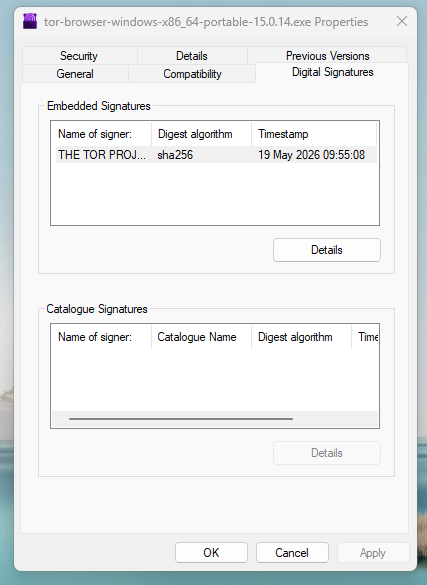
Check the signature. You probably won’t have the PGP software so right click the executable you downloaded, click properties->Digital signatures
Click the embedded signature from the THE TOR PROJECT, INC. then details. It will say “This digital signature is OK”.
Now click the countersignature from Digicert then details. It will say “This digital signature is OK”.
The download is good. Windows uses it own master certificate list (or whatever it’s called) for validation.
Now install Tor. If there is still a problem, then it is something else.
Could it also be that I install in C:\TOR rather than hidden in Users? I prefer my software to be in C:\Program Files or C:\Program Files (x86) , all in one place!
Possibly. I think to install in the ‘C:’ directory you might need elevated (‘Administrator’) privileges. I’d recommend not running Tor (or most user-space applications) with administrator privileges. Instead install it at some place within your user directories like ‘Desktop’ and so on.
Looks just like mine except mine is on the desktop. I will have to look at the PC where I installed in C:\TOR and get back.
Edited later:
Your torrc is exactly like mine on that PC where I installed on C:\Tor
It was on 15.0.14. I started it, it did its update then I restarted and it is now 15.0.15
This is far fetched but the only thing I can think of is your anti-virus which may block something. If it blocked the Firefox.exe element of Tor then the app would not even start. Now what happens if it blocked the tor.exe element of Tor??
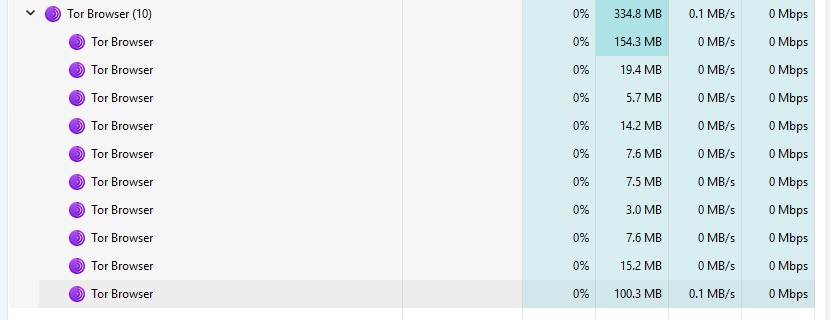
Open Task Manager. You should see Tor Browser (some number) in Processes. Now scroll down toward the letter t. Do you see a tor.exe???
Edited later:
Bingo!
I just ran an experiment on that other PC. I renamed tor.exe to something else so it would not start.
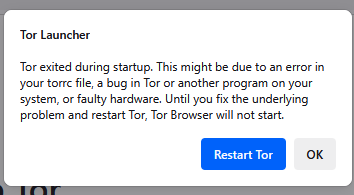
Started the Tor browser and I get the popup in your first post about Tor exited during startup.
So my conclusion to this problem is that if tor.exe is blocked by, let’s say, the antivirus (or does not execute) then this is the solution.
Open Task Manager. You should see Tor Browser (some number) in Processes. Now scroll down toward the letter t. Do you see a tor.exe???
I wrote my conclusion above.
So there’s your answer. No tor.exe, no Tor browser. As above I simulated your situation with the same results. Best place to check is your anti-virus. If not using any in particular then it is the standard Windows AV.
Settings → Privacy & security → Windows Security → Firewall & network protection then allow an app through the firewall. Surely you will see Tor.exe is blocked.
OK, so we will test this.
Without the Tor browser started execute this at a command prompt: curl --proxy socks5h://127.0.0.1:9150 http://ip-api.com/json/
and you will get this:
curl: (7) Failed to connect to ip-api.com port 80 via 127.0.0.1 after 2052 ms: Could not connect to server
Start the Tor browser and execute the command again. If it is the same result then it proves the tor proxy is not running.
test2
Open a command prompt where ever tor.exe exists
Type the command: tor
Now what happens?
Normal Firefox has nothing to do with this problem.