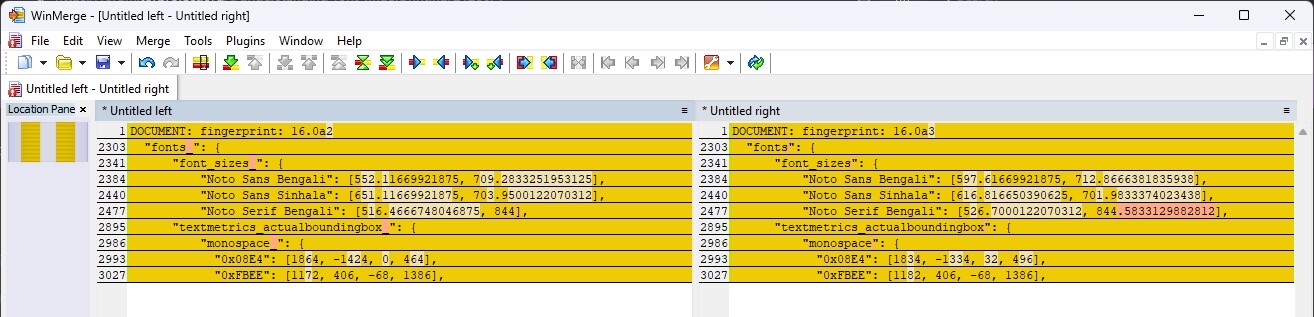
In testing the new alpha release (16.0a3) I’ve noticed that the font fingerprint metrics and fingerprint from BrowserLeaks’ font fingerprinting test have changed from 16.0a2. I know this can happen periodically due to various factors even though Tor Browser’s fonts have not changed, as @PieroV once explained to me here. My question is how to identify these factors and my renewed interest in this topic right now requires some explanation:
I maintain a software library for automating Tor Browser via Selenium WebDriver (in Ruby). I run a number of tests to ensure that the automated browser’s fingerprint is identical to one used by a regular desktop user (on the same OS). I even ensure bot detectors cannot fingerprint my automated browser as distinct from regular Tor Browser users. So far so good, but with release 16.0a3 I have for the first time seen a discrepancy between my desktop browser’s font fingerprint and the one I get from my automated browser (on the same computer).
Now I know third party browser fingerprint tests are unreliable and can be misleading, but that is beside the point in this case. I am interested in my automated browser looking exactly like a user’s desktop browser. However, for the first time I’m seeing a deterministic discrepancy between the two in this particular test, for this particular release - i.e. users of my automated browser can be identified as distinct from other Tor Browser users, which kind of ruins my library’s USP.
It is of course very likely the cause is in my own code. However:
I copy Tor Browser’s fonts into my library, so they are hard coded there
I have not changed my code between 16.0a2 and 16.0a3 and the issue does not occur in 16.0a2
it also has not occurred before in testing dozens of previous Tor Browser releases (both stable and alpha). The desktop and automated browsers have always given the same font fingerprint
I can duplicate this result with 16.0a3 on another desktop running a different ‘flavor’ of Linux
TZP gives the same font fingerprint for both desktop and my automated browser with 16.0a3
Given all these factors I thought I ought to share the issue here, just in case this is a symptom of a fingerprinting issue within the Tor Browser codebase.
In summary, I’d very much like to understand how to go about identifying the cause. To be absolutely clear, I want to know why my 16.0a3 desktop browser (and no other version) gives a different BrowserLeaks font fingerprint test result to my 16.0a3 Selenium browser - on the same machine. The latter is not container-based and not headless.
@Noino 16.0a3 and 16.0a2 are actually pretty close.
16.0a3 was an emergency release we had to release to follow Mozilla’s releases for a security bug.
I don’t see anything that would impact fonts between 16.0a2 and 16.0a3.
If it’s 100% reliable, we could try to bisect the patches we added between tor-browser-147.0a1-16.0-2-build2 (aka 16.0a2), and tor-browser-147.0a1-16.0-2-build4 (aka 16.0a3).
However, there are some async mechanisms in fonts. So, cold run tests might result in false positives. You should reload the page and re-run tests to be sure of having reliable data. Thorin knows a lot about this (much more than me), therefore TZP might have a workaround to this (e.g., he might re-run the test, but I don’t remember, I should ask him or have a look at the code).
Generally speaking, when it comes to fingeprinting in Firefox and derivatives, TZP will be the most reliable tool to detect stuff .
You should reload the page and re-run tests to be sure of having reliable data
Yes, I’ve found that I have to reload the page at BrowserLeaks to get a deterministic result - I do that in my tests and when using my desktop browser. When I do this I do get the reliable, repeatable difference I reported with 16.0a3.
As I said, this is not an issue with the observed change in the desktop browser’s fingerprint between 16.0a2 and 16.0a3, but the fact that my 16.0a3 Selenium browser now gives a different result to the one I get when using regular desktop Tor Browser.
Anyhow I will take your advice and bisect the patches. If I back them out one by one, build & test intermediate browsers I should find the cause eventually
I do not have /etc/firefox. However, you’ve prompted me to remember one thing I did before testing 16.0a3 - I removed my local installation of firefox-esr. Sadly reinstalling it and opening it (i.e. recreating the ~/.mozilla/firefox dir) makes no difference. It does not create an /etc/firefox (I don’t need sudo to install it). Also, this would not explain the fact that I get the same fingerprint results in container-based tests. I assume a local FF installation, or lack thereof, has no impact on Tor Browser itself.
Re geckodriver, Selenium uses the version in my PATH, $ which geckodriver returns /usr/local/bin/geckodriver. I installed this from their GitHub repo.
It is surely something Selenium is doing and I’ll report back if I resolve the matter. Thanks for your help.
My apt sources include https://packages.mozilla.org/aptmozilla main and I installed firefox-esr with apt install firefox-esr (scratch what I said about not needing sudo..).
$ find /etc/firefox* find: ‘/etc/firefox*’: No such file or directory and I haven’t manually deleted anything there.
My OS is Linux Mint 22.3 (noble-based).
I do see an /etc/firefox-esr on my trixie-based LMDE 7 machine.
Both are based on 147 beta). I don’t do builds, but I assume the build code hasn’t changed “source” because upstream beta is 148 and this is 147. In FF I would use moz-regression and likely find some font related change such as harfbuzz or some obscure font shapping/clipping thing (or a change in default fonts for a given script which won’t be the case here).
This should be enough for you to determine the cause of the change, if you care about that sort of thing
EDIT: font sizes changing are really weird, because the bundled fonts in TB and the text string used to test font sizes have not changed (the string used differs between platforms for perf)
TZP gives the same font fingerprint for both desktop and my automated browser with 16.0a3
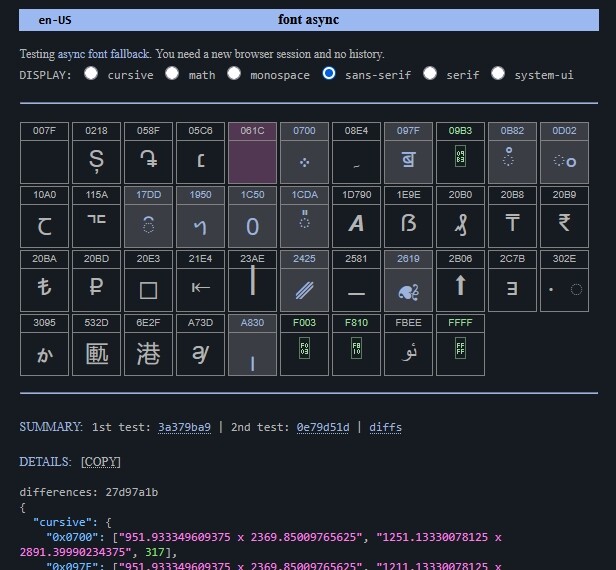
this test here → font async ← runs the code twice - immediately and then after a 2 second break - and shows you the characters that needed to await a fallback (and how long it took). Obviously load it in a cold session, because after that the fallbacks are cached in memory
for example here’s windows with TB on en-US and on average by machine took 300+ms per character fallback (fallbacks are colored grey, tofu are green)
I would look at this test to see if they differ (desktop vs automated) on the SUMMARY: that is the 1st test (they should be the same on the 2nd test). My guess is selenium is causing some instability/micro-delays somewhere and it’s enough to cause something to not fallback in time - or the reverse, selenium is holding up fonts and causing more to need fallbacks
At the very least it would show you in selenium what is being held up, maybe it’s ALL OF THEM
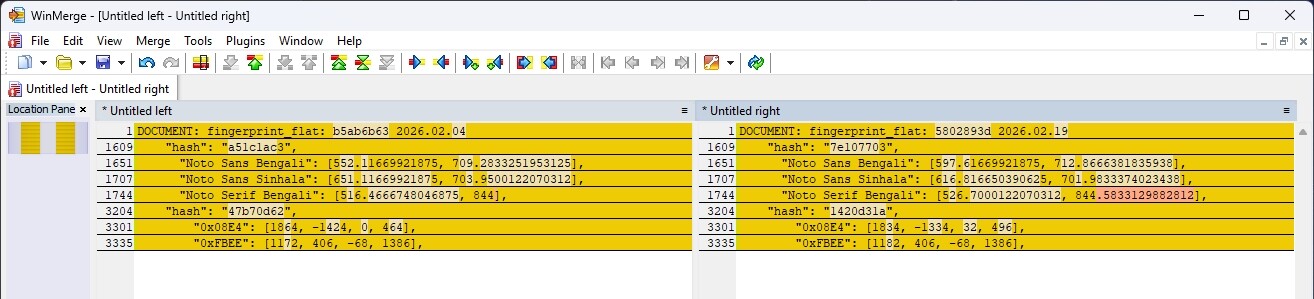
I was just in MB (mullvad browser) nightly (from 2026.02.04) and took a FP, updated (to 2026.02.19) and compared - same thing - so whatever the cause is (and I think it’s very important to know why), it’s after 2nd Feb
There are indeed some differences in the “1st test” result between desktop Tor Browser (which yields any one of half a dozen or so distinct values after 100 or so tests) and the values I see from my automated browser. The latter mostly include the former, but not always. However, as expected, the two always agree on the “2nd test value”. And this is indeed the frustration, as I conduct the BrowserLeaks fonts test in cold sessions after a 2 second interval and always get a different value between desktop & my automated browser.
Anyhow, I entitled this post “Understanding font fingerprinting” and as my understanding has increased I’m going to mark this as the solution . If an issue with the font fingerprint of Tor Browser remains I assume it will be raised as an issue on GitLab. Thanks to all for the help.
It will take @PieroV then to bisect - and I do stress this is worrying to me that it has happened - not that selenium vs desktop differs (which would be nice to know as well) but that it has changed mid 147beta. I bet those Bengali + Sinhala fonts are related to the unicode glyphs (too tired to look them up)
The thing is, it looks font related and should be easy to spot in upstream changes - I just have no idea how TP does its alpha builds regards upstream files (and upstream 147 is now stable - so I am lost on the process as to how that is reconciled with builds)
Oh, something you can use to help diagnose desktop vs selenium
I built in a forced delay if/when we really need to await async font fallback - this adds an artificial delay to the entire test if linux or mac if we are using font.vis (maybe in TB16)
you can just change that to
	if (gLoad) {
		//  force an 2 second delay on page load before we start the TZP test
		delay = 2000
		dom.protohash.innerHTML = '<span class="spaces"><b>     AWAITING ASYNC</b></span>'
		dom.documenthash.innerHTML = '<span class="spaces"><b>     FONT FALLBACK</b></span>'
	}
now both desktop and selenium will have a massive 2 second wait for the glyphs (already hardcoded in the html) to render and fallback if required
 .
.