I tried removing the bridge and still no attempt to connect and nothing in the log.
@Quartermarsh, did the installation process go smoothly? Did you notice any errors when installing the Tor Browser nightly .dmg file?
I believe there are some added steps to install Nightly builds of Tor Browser on macOS due to it having an unrecognized certificate and am wondering if things might be failing at that step.
The problem here is that Tor Browser doesn’t show the log if tor process crashes at startup or exits with error. It only shows the log if tor starts successfully. It’s a bug.
@ebanam The installation went as per usual for mac. The only problem with the nightly was a message on screen from tor browser itself via tor launcher:
Tor exited during startup. This might be due to an error in your torrc file, a bug in Tor or another program on your system, or faulty hardware. Until you fix the underlying problem and restart Tor, Tor Browser will not start.
A certificate error wouldn’t have allowed the install at all.
@anon68402605 Exactly. I might be able ferret some message out of the not so user freindly mac system log but I expect @Shelikhoo will catch the problem.
What you can do is add this line
Log notice file /path/to/log/file.log
to
./Browser/TorBrowser/Data/Tor/torrc
then restart Tor Browser and receive the whole log in /path/to/log/file.log 
Replace the log file path for your needs.
This way you should be able to find out what’s the problem.
I have reproduced this error with my own device. Here is what I did:
I downloaded and installed tor browser(tor-browser-macos-tbb-nightly.2025.11.10.dmg) from Index of /nightly-builds/tor-browser-builds/tbb-nightly.2025.11.10/nightly-macos and run it on my Mac Mini M1 device. After confirming running unsigned code, the following error appeared:

Behind the UI, the actual error tor browser encountered was:

The process seems get killed before main function call(but I am not really sure what happened).
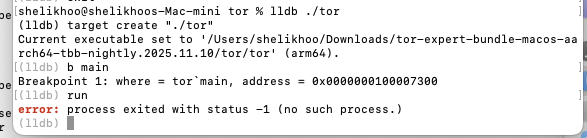
“The process seems get killed before main function call”
Which makes it hard to grab a log entry.
I get the same result on a device running 10.14.6 which makes me think that recent os security hardening like notarization checks and tcc aren’t the problem. The bridge in the nightly isn’t at fault either because removing it doesn’t help. Perhaps it’s the dylib? I have no idea.
On my M1 device I added the nightly rather than overwriting the current tbb. When I uninstalled the nightly the current stable build of tor browser behaved the same way such that I had to completely remove the browser (at least the application support folder) and reinstall in order to get it to work again.
Perhaps there would be something diagnostic in the system log but my skills with Consol aren’t good enough to figure out how to capture that. It would be very noisy I’m sure.
Howard Oakley at eclecticlight.com has a couple of log browser utilities which simplify capturing log streaming. I’ll see if I can make any progress with one of them.
Overall, it really does seem like a bug in the nightly. Maybe Dan Ballard could be persuaded to have a look.
MarkC
···
On Nov 10, 2025, at 2:59 PM, Shelikhoo via Tor Project Forum noreply@forum.torproject.org wrote:
The process seems get killed before main function call
Mark Charnell
markcharn3ll@icloud.com
604-725-2133 mobile
Here is a text file of the log from when I attempted to launch the nightly. Period was 5 seconds and predicate was ‘error’:
LogUI2025_11_11_15-25-00.txt (47.4 KB)
not getting very far on determining if error -67062 is related to this issue although it seems to mean that “the code object is not signed at all”.
Keeping in mind that this build of tor browser is perfectly functional. I can change settings etc. It just won’t connect - with or without the bridgeline.
So, I just tried the bridgeline in the latest stable Tor browser (15.0.1) and it bootstraps. Go figure.
Actually, I have asked the tor browser team yesterday, and was able to get a fix about this issue:
The root cause of the issue is that C-Tor requires codesigning to run on more recent version of MacOS operating system. You can use this script to compete the local code signing to get it to work.
Thanks for this. I’m plodding along trying to get the code signing to work. The cert creation was simple enough but I need a few pointers about running the shell script. I can see that it has to be run from the Contents/MacOS directory but I’m uncertain about the whole BROWSERPATH part. Do I have to add/substitute my own path somewhere?
On top of that I get “no identity found” when running codesign even though I have a valid identity. I’m pretty sure that that’s a problem with my $PATH which needs to be sorted out. Or maybe it’s because I don’t have BROWSERPATH sorted properly in the script. Overall I’d say I’m not very good at parsing or running shell scripts  but I’ll keep working on it.
The good news is that the nightly runs properly on 10.15.7 Catalina. I’m using it on the same machine that’s running the server so I hope that’s not a problem.