(appologies if you saw this already on the relay’s list, it was a bit misplaced there, hoping this is a more appropriate location)
I’m working on https://domum.social a Mastodon instance that does not collect email addresses and only allows authenticated access via the tor hidden service URL
Federation to and from the regular clear-net fediverse works as normal.
While there’s a number of Mastodon instances that have onion addresses and at least one I found that doesn’t block well know disposable email addresses like sharklasers.com, this puts a high burden on the user.
My technical goal with domum.social is to make privacy the default so you can’t accidentally login outside Tor and there’s no opportunity to enter an identifiable email address.
Socially a lot of documentation is needed so that a general audience can understand how to evaluate their own threat models and manage their own operational security.
I’ve been working on the site off and on since last April and running live with myself as the only user for about a month.
Before taking on real users I want to open the concept and implementation to wider scrutiny. I’m an infrastructure person not a a programmer by trade so hopefully it’s not too ugly. I tried to keep code over rides to a minimum with nothing in tree.
This repo has all the Mastodon related overrides:
There’s a bit more special sauce in the proxy config to disallow access to the authentication endpoints on the clear-net site, and to ensure rewriting of clear-net URL that mastodon generates to the onion URL when accessed through the hidden site. The mail server config is also a bit special so most users get their fake internal email discarded but Admins and Moderators (who are nonymous) can get real mail deliver to be notified or any issues.
Depending on feed back, I’m hoping to start a limited public beta in about a week.
Any and all thoughts are appreciated here, or on Mastodon @jon@domum.social
Before taking on real users I want to open the concept and implementation to
wider scrutiny. I’m an infrastructure person not a a programmer by trade so
hopefully it’s not too ugly. I tried to keep code over rides to a minimum
with nothing in tree.
Putting the moderation questions aside (I imagine you’re well prepared for that),
your project has a very interesting approach to user privacy.
I’m not well versed in Mastodon internals, so better ask their devs whether
your overrides are in a good shape.
I just wonder about the maintenance burden of keeping these overrides in sync
with Mastodon’s codebase. Maybe an approach would be upstreaming as much
as possible.
I have tested the user account creation process and it’s very smooth, congrats!
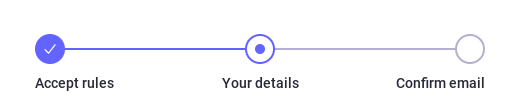
Just a small remark: the e-mail confirmation step is still listed:
A quick workaround could be just updating this string to something else.
Regarding your privacy policy, you state that no private information is
recorded, but I’m unsure if that means no IP addresses are collected. This seems
worth knowing, as many users might still connect without Tor.
Thanks for the review. I’ll look into the email confirmation language.
The clearnet side is doing rather default Nginx logging which includes IPs. I hadn’t thought of that as personal since it’s not account linked and I’ve been focused on what I could have (or what others could have if the site were compromised or under legal observation). But I don’t need that so I’ll reconfigure logging.
Keeping the revisions in tree or out is a good question. For now the changes are small and in fairly static areas of the code base. I have gone from v4.4.x to v4.5.x with several minor revisions in each with no issue so far. The current out of tree setup lets me just change the version number for the base in the Dockerfile which is easy though rebasing a light git branch isn’t hard either. Certainly if interest grows the right things would be to get these upstream with proper administrative controls to enable/disable.