Protocol for voice and chat

Hello,

Over the past few weeks I’ve been attempting to make a new protocol for voice and chat over onion services. I have working prototypes available for testing.

Terminalphone, bash varient Here ForAwhile / terminalphone · GitLab

Onionphone, native android Here ForAwhile / onionphone · GitLab

These two programs use the same protocol for communication and are cross compatible.

By design I have not included ability to transfer files and images. This is purely chat and voice to keep the bandwidth down on the network.

Looking for anyone who want to support or contribute with constructive criticism.

Hey! Cool app and idea!

Do you mean provide respectful feedback?

I have some, after checking your Android app, specifically.

Would you consider looking into adding support for setting custom bridges? (WebTunnel, obfs4, etc) Lyrebird should technically contain all the bridge options. (except conjure) It’s just that meek and Snowflake are pretty slow, so it would be not ideal for voice communication. I guess there’s an option to set the default obfs4 bridges, but those are mostly blocked in censored regions because they’re public.

Do you plan on releasing this project to f-droid, eventually? Or is it for something else?

Yes, I can add support for custom bridges, good idea.

I do want to put it on fdroid and I actually tried but I need to do some more research on how to get it there.

Also, having an option to edit the Tor SOCKS port would be cool. Because some people might already have a Tor instance running on port 9050. Instead of changing the Tor-instance port, it would probably be easier to change the one in OnionPhone. (i.e. 9053, 0) I assume that it doesn’t matter for the app to work, if the SOCKS port is there just for other on-device traffic to use the running Tor instance in OnionPhone.

Thats another great suggestion I will build that configurability in.

Ok, both improvements are implemented in 1.0.2.

Input custom bridges from QR or paste manually.

In the settings where ports are displayed, you can now tap and customize. Should prompt to restart Tor when these changes are detected.

I’ve tested with custom bridges from Tor website and seems to work great. It should detect if something is wrong with the format automatically. You can only import one bridge at a time. Optionally share a single a bridge with a QR code for others.

Ok, the pasting-bridge feature doesn’t work for me. The QR-code importing does. (even though I have 1 bridge in my clipboard) And the added bridges work great.

The changing ports works. But about changing ports, there’s another small aspect. It’s that the Tor Control Port is still stuck on port 9051. (if you use Control Port, then it’s by default on port 9051) Would it make sense to add the ability to change it’s port, too?

The calling functionality sometimes gets buggy and the app might even stop responding.

Currently, anyone (or an app) can record the screen of the phone inside OnionPhone. It doesn’t block screenshots or background view. A tool that could help is: GitHub - FlutterPlaza/no_screenshot: Flutter plugin to enable, disable or toggle screenshot support in your application. · GitHub

If that feature would be implemented, then it would fully block all app recording. The default could be either disabled, or enabled. Or it’s probably possible to not allow any screenshots at all. (without any option to enable it) But anyone could edit the app’s source code and get that functionality, so this feature would mainly make it so nothing on-device could record the user’s screen, not protection against all recording from the other side.

After looking at the app for some time, I can say that some people would prefer an option to set an OLED theme, but that doesn’t affect the app functionality, very optional.

All great feedback.

Hmm, it looks like the box to paste it in doesn’t draw until you tap it. It isn’t auto pasting, it just allows you to tap and paste (multiple bridges) at once. And the settings bar is kinda buggy, it’s collapsing once pasted, so you have to carefully pull it back up until I fix that. It should stay fully open after pasting.

So I actually have this control port logic built in on line 69 of Tor manager.kt. right now it is adding one to the custom configured socks port for the control port. I didn’t feel like we needed that granularity but are there edge cases where the users needs to set this manually?

Or would a simple note be fine so at least the user knows control port is automatically set to +1 configured?

Themes would be a nice touch I don’t think that would be hard to accommodate.

The no screenshots or recording sounds easy as well and a simple way to increase the security of the app. Your right it could be taken out but if it’s built In by default at least there is a barrier and your covered on your own end.

I can’t speak on the buggyness of the calling without knowing more, it will very quickly end the connection if it cant find the other end. I’ve had a relay set up for now almost a week and have periodically been connecting testing stability as well as another device on autolisten to try and catch any weird connection issues. If the other endpoint has any sort of connection droppage I’m it seems like restarting Tor on the other end is the only fix. Do you have anymore insight surrounding the buggyness?

Ok, understood. So is it normal when the “green recording” icon gets stuck for a while? That happens after recording using this feature: lightly double-clicking the ‘hold to speak’ button. Note: this is not Volume PTT as I understand it.

Sometimes the bar below “hold to talk” splits in half when recording. Hmm, try and see if setting both ‘devices’ into the green ‘recording’ mode using the method I just described will make one of them crash the app. In general if you ‘record’ from both sides for too long (including via the Volume PTT feature), then on one device it might show “Negotiating…”, as if it disconnected from the meeting. One device might also show the this-app-isn’t-responding error and give you a few options.

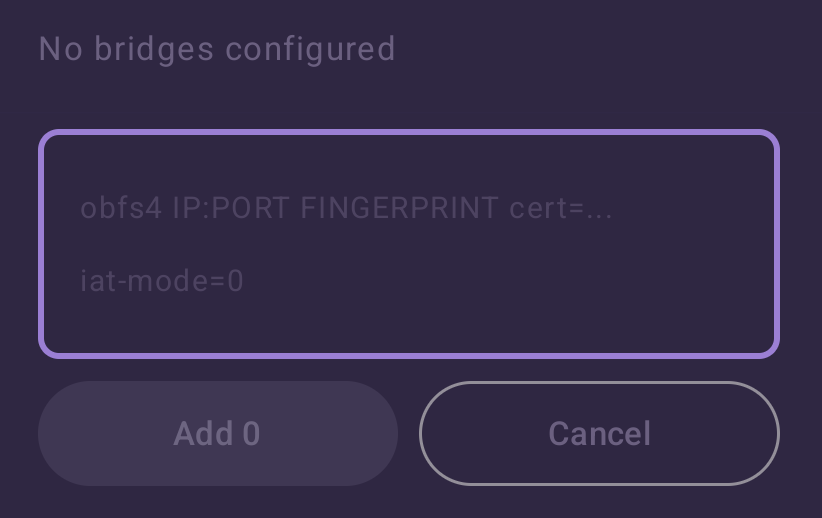
The only thing I see when trying to “paste” the bridge is this. No “Paste” bar appears even when I try to click+hold inside of the bar.

Image

Well, sometimes in cases where the SOCKS port is already used by a Tor-client the user additionally has this option [ControlPort] set, but the user would have to set it to another port in the client, what can be done with the SOCKS port after your update is you can change the port, the only difference is that ControlPort is used less often and it’s not turned on by default, which might cause less inconvenience. In any case, it would be useful to have info about the ControlPort’s port somewhere. As for whether making it customizable - that’s up to you, my recommendation is - yes, since it would be more convenient even for pretty rare cases of this occuring. The only “difference” would be more customizability, really.

A feature that is tied to the Tor connection and could be implemented, but is not necessary.

(This is not related to the previous text) Apps like https://docs.cwtch.im also use onion services, but even on Android there’s an option to connect to an already-running Tor client. That is done by setting a “custom SOCKS Port” and a “Custom Control Port”. It’s useful for 2 reasons:

1. There’s no need to run another Tor instance, which might be helpful for blending in all your traffic into “one connection”.
2. The client can always run the latest version of Tor. (i.e. by running Tor through Termux, not depending on, in this case, the OnionPhone app to be updated/bundled with the new version of Tor)

Don’t know if it’s worth it, but just brought it up as a potential feature for implementation.

And lastly, there’s no built-in UI that shows the user the current app and Tor version. Might be useful to know…
I don’t quite doubt that there might be other issues with the app that I missed, just please keep that in mind. I think that if this app gets used more, you’ll get more feedback in the form of issues in your gitlab repo, for example. I would not expect a lot of feedback on this forum alone.

Most Tor-powered apps have websites (could be useful for a docs-site) and f-droid releases.

Not rushing you there, just mentioning it.

As a note, Tor has plenty of bandwidth to use, in fact, it’s underfulfilled.

Only around 1⁄3 of Tor’s available bandwidth is used, so don’t worry about overloading the Tor network.

in fact, it’s underfulfilled.

Bet a lot of that traffic went free after iran/russia’s general internet instabilities :zany_face::water_pistol: