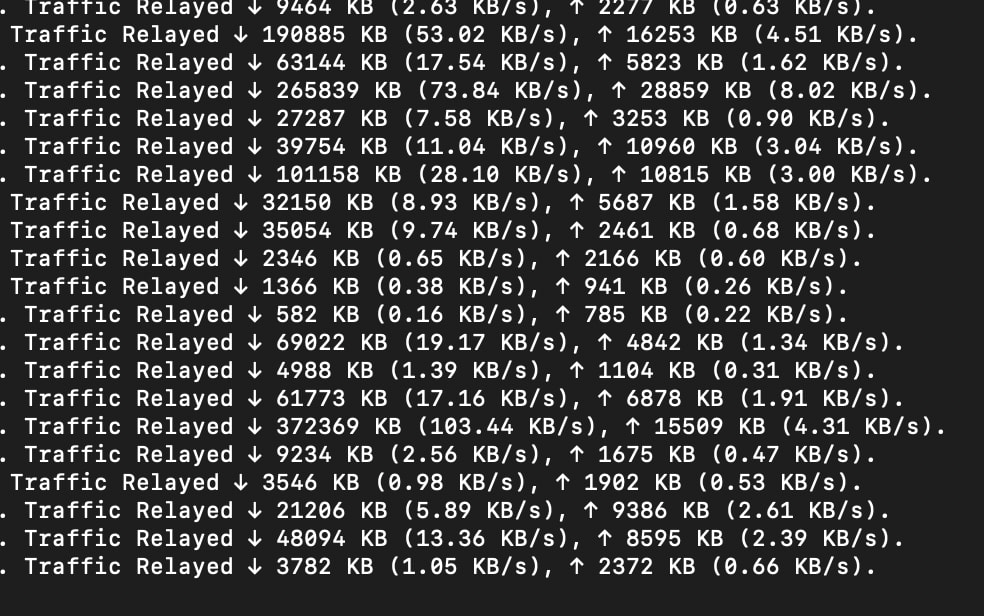
I installed a snowflake proxy on a vps a few days ago (docker on debian). It quickly picked up traffic, but looking at the docker logs it looks very slow.
Is this normal or is there anything I can do about it?
I opened the specified port range in ufw and it’s reporting as “NAT type: unrestricted”
Mine look like that also. Proxy unrestrictecd on a home IPv4 using Ubuntu 22.04.4 LTS
I add up the totals and here is the last 5 days.
2026/02/13 2894875
2026/02/14 1920520
2026/02/15 2914847
2026/02/16 2310404
2026/02/17 1837423
This shows not the peak bandwidth, but rather only the average traffic speed over the entire day. If a client downloads a file at 1000 KB / s for 10 seconds and then idles for 90 seconds, this will result in a speed of (1000KB/s * 10s) / (10s + 90s) = 100KB/s.
There is a lot of traffic which does not make it so in your logs you will see lots of these: Timed out waiting for client to open data channel
Plus a lot of traffic last less than ~30-35 seconds which really says, to me, no connection or blocked.
I also am running at less than what I specified in the -capacity 12 parameter. I rarely hit 12.
A quick and dirty way way to find this number is: sudo netstat -t4u4wanp | grep -i 'proxy' | grep -i -E -c '141.212.118.18|193.187.88.42'
This is good to know. I could see the argument from either side.
So for me, and any other proxy operator, it is ~twice the total of those 2 numbers as seen from an ISP’s measurement.