After a successful launch of Tor browser and several tabs open, I often get the following problem:
I open a new page, which is loading my homepage (“custom” startpage bookmark)
Often, this happens:
Unable to connect
The connection was refused when attempting to contact localhost.
The site could be temporarily unavailable or too busy. Try again in a few moments.
If you are unable to load any pages, check your computer’s network connection.
If your computer or network is protected by a firewall or proxy, make sure that Tor Browser is permitted to access the web.
Also, is it possible to make Tor stop looking for .onion? This often make the first launch at least 10-15 seconds slower.
Also, does it make sense to use the “new identity” when the circuit for every page/tab is separate? (Does it help privacy-wise)
Welcome to the forum @tortoro, I will try to answer your questions
What is the exact URL of your Homepage? I have seen a “Unable to connect to localhost” error occasionally when using the Startpage search engine. The solution is to hit the “New Tor Circuit for this Site” button on the hamburger menu (Ctrl + Shift +L keyboard shortcut on my computer) and do the search again.
I’m not sure I understand the problem, are you talking about disabling the “.onion available” message to the right of the URL bar? If so I’m not sure it can be disabled. In any case this feature is triggered by an HTTP response header and does not affect Tor Browser startup. I suspect the delay you are seeing may be caused by slow navigation to the Homepage you have set. Have you tried setting Homepage to “Blank Page”?
I strongly suggest you read the section on managing identities in the FAQ. Here is what it says about linkability & circuit separation:
The URL bar
Tor Browser centers your web experience around your relationship with the website in the URL bar. Even if you connect to two different sites that use the same third-party tracking service, Tor Browser will force the content to be served over two different Tor circuits, so the tracker will not know that both connections originate from your browser.
On the other hand, all connections to a single website address will be made over the same Tor circuit, meaning you can browse different pages of a single website in separate tabs or windows, without any loss of functionality
Long story short: If all your pages/tabs visit different sites you do not need a new identity. However, if you visit (for example) translate.google.com and then wish to navigate to another Google URL/subdomain without Google or anyone else being able to track you, you will need a new identity.
The connection was refused when attempting to contact localhost.
Hello tortoro. If you are using a recent Tor Browser. For example 15.0.4, localhost will likely fail.
To resolve this challenge, configure your Tor Browser appropriately. Then use this address127.0.0.1 instead of localhost.
— - — - — - — - — - — - — - — - — - — -
Below is the same as above. But with details if you’re interested in those.
Steps:
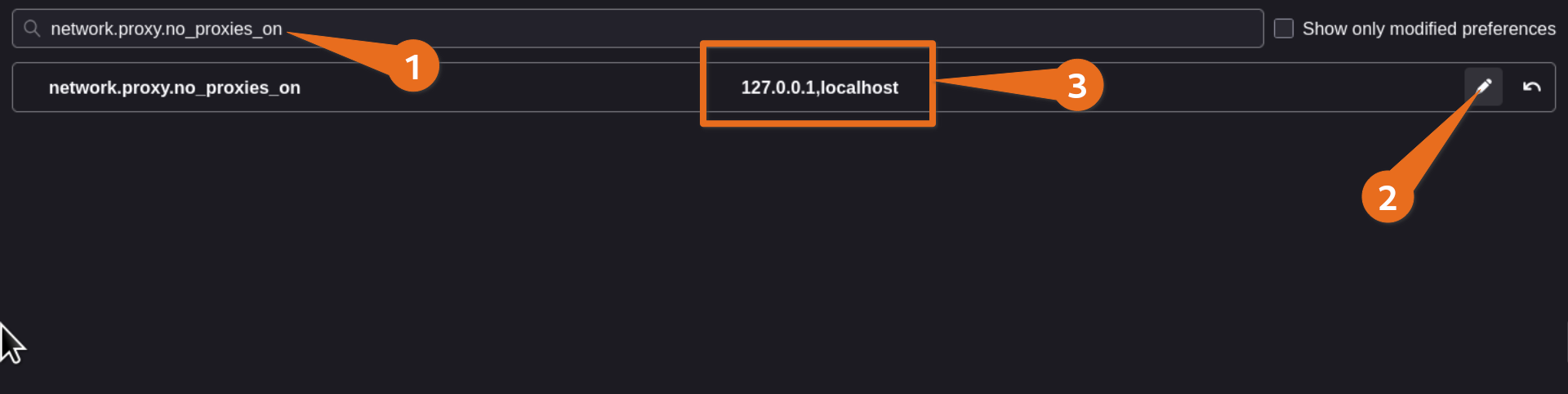
Using Tor Browser, go to about:config Be very careful with all the following steps.
Search for network.proxy.no_proxies_on
Add 127.0.0.1,localhost
Notes:
127.0.0.1is an alternative address for localhost.
This screenshot below shows the end result for this steps.
@Francewhoa FWIW I have suggested that the localhost loopback addresses Firefox excludes from any proxy are retained as the Tor Browser default - i.e. are not accessed via the Tor network. I don’t think messing with about:config ought to be necessary for users who simply wish to access locally hosted services via TB.