RendezvousPoint
Congratulations for this important release! 
I noticed that about:support doesn’t display any info, was this done intentionally? If so, what is its rationale? Doesn’t it make debugging harder in certain cases?
Congratulations for this important release!
I noticed that about:support doesn’t display any info, was this done intentionally? If so, what is its rationale? Doesn’t it make debugging harder in certain cases?

I’m using Whonix.
Another thing I noticed: the built-in translation tooltip showed up on some pages even though the translation engine is disabled. Edit: False alarm, it was a bug from my window manager.
about:support loads fine on linux - so this seems to be a Whonix issue
Firefox didn’t enable local translations until FF118 - Firefox 118.0, See All New Features, Updates and Fixes - and TB is based on ESR115 (and we didn’t enable it either)
Can you open issue at Issues · The Tor Project / Applications / Tor Browser · GitLab and provide more info, e.g. steps to reproduce: a site that triggers it, what your web-content language is, screenshot if you want, etc


Tor Browser is not yet supported on Windows ARM.

Can you please try to make a fresh install and let us know how it goes? Please follow all the steps to uninstall and then make a fresh installation.
1 reply

Congratulations on the release! No issues so far.

Hi,
it’s a sort of known bug.
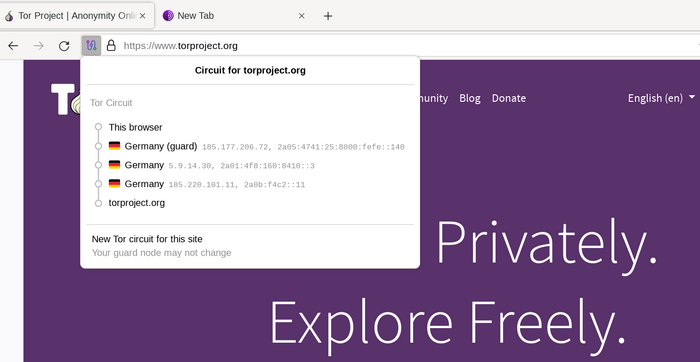
We use fingerprints to get data for the circuit display, because that’s what Tor always uses.
And if the user doesn’t provide a fingerprint in the bridge line we have some difficulties in getting the actual IP (we can query tor for node information when it’s a standard relay, for bridges it’s more difficult, we won’t know the IP as it’s secret/not even provided for some PTs, such as Snowflake).
We could lie and if there’s only one bridge line and bridges are enabled always tell that this is the current bridge (well, also “current” is another small lie, since Tor often uses two guards/bridges)… but we wouldn’t back that with actual data.
Anyway, I think we could better handle this case and just write unknown bridge.
I must admit that in general vanilla bridges aren’t tested that much, because they aren’t very effective  .
.
If I understand correctly, vanilla bridges use the Tor protocol without trying to hide it, therefore they should be quite easy to block. They work well only when the censor blocks the IP addresses of normal relays.
Hi, we did a big refactor of the Tor integration.
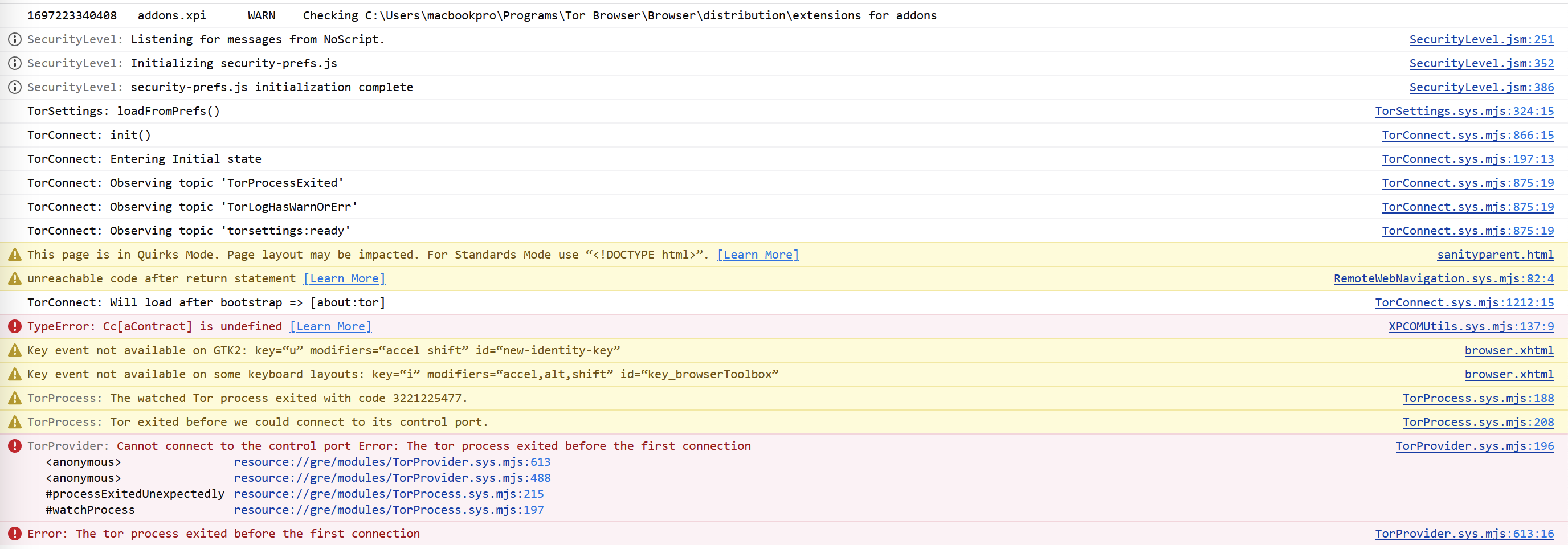
If you open the browser console (Ctrl+Shift+J on Windows/Linux) you should see some errors in red, in addition to this message.
Could you please paste them here?
Also, are you using a non so-standard configuration? E.g., system tor instead of a tor daemon managed by the browser?
Could you be more specific please?
Do you have a screenshot?

So far so good 

Thanks for the explanation. I got it 
Let me elaborate my use case:
I anyway have a bridge in my LAN and this Tor Browser instance is mainly used for accessing geoblocked content behind heavy Google captchas hence there are some modifications to it’s torrc (only two countries for exiting and a modified MaxCircuitDirtiness) to make it work at all.
Avoiding censorship of Tor is not a concern in this setup but by using my own bridge i automatically test if it still works, i avoid a useless roundtrip through the internet and i get a reliable “guard” with enough guaranteed bandwidth for video streaming.
Not having the circuit display is inconvenient for me because i can not check anymore in what country i am exiting right now and i have to use the keyboard for requesting a new circuit.
Having to switch between mouse and keyboard a few times for a good circuit gets more inconvenient the longer you were already confronted with useless captchas. 
I guess my bug report has just become a feature request:
“Please make it possible to request a new circuit with the mouse when there is no circuit window (or fix the circuit window in all cases)”
I fixed the situation for me by looking up my bridge fingerprint and the circuit display works again.
But instead of quickly typing my bridge LAN IP i now have to copy everything over from a textfile. 
Also, are you using a non so-standard configuration? E.g., system tor instead of a tor daemon managed by the browser?
No, standard config downloaded directly from official domain.
If you open the browser console (Ctrl+Shift+J on Windows/Linux) you should see some errors in red, in addition to this message.
Could you please paste them here?
This is the error if updating the tor (no matter 32 or 64 version):

Absolutely love this release. Glad to see the red screen of death is gone. Interface on Android looks wonderful too (love the Material You icon).
A request for future releases: it would be nice to have uBO installed, just like in the Mullvad Browser. There are some cases where TOR is significantly better than MB + VPN, so having a content blocker is helpful when we need to use some sites with Javascript selectively enabled.
2 replies
uBO or uBOL (lite) will be added eventually to desktop (android hasn’t been discussed) - see harden uBO against fingerprinting (#164) · Issues · The Tor Project / Applications / Mullvad Browser · GitLab (it’s under Mullvad Browser, because there we can harden it to make it fitter for purpose, but once done will be added to TB)
At this stage this is likely to be a 13.5 release
2 replies
privacy.resistFingerprinting is now locked?
How am I supposed to make each website remember its zoom level or launch tor windows maximized?
Yes, I know, anonymity and stuff, but I have to use Tor as my main browser since the government has cracked down on VPNs (not to mention you can’t trust random ones that happen to (barely) work), and I have slight disability with my hand and problem with eyesight.
Having to constantly maximize and set the zoom level is not easy for me.
3 replies
I don’t use the same level for every website. It doesn’t change the maximizing situation either.


Love the new release, especially the 1400 x 900 windows. Why not 1600 x 900 though? Oh well.
Also, upgrading from 12.5.6 I got a double tab about connecting to the Tor network (I have Connect automatically ticked on in the Preferences). Could not actually connect but clicking the New Identity button solved it, dunno if it’s a bug or something related to my setup.
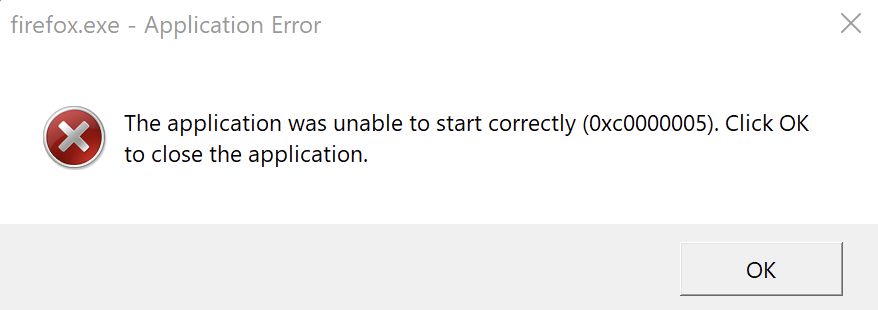
0xc0000005 is a very generic error (access violation).
In earlier messages you mentioned you’re on ARM. In case it could be a problem with translation from x86 to ARM.
At the moment we provide native ARM binaries only for macOS.
We don’t have the hardware for testing with other operating systems and the amount of changes we’d need to do to our reproducible build system is unknown (and Mozilla doesn’t even mention AArch64+mingw).
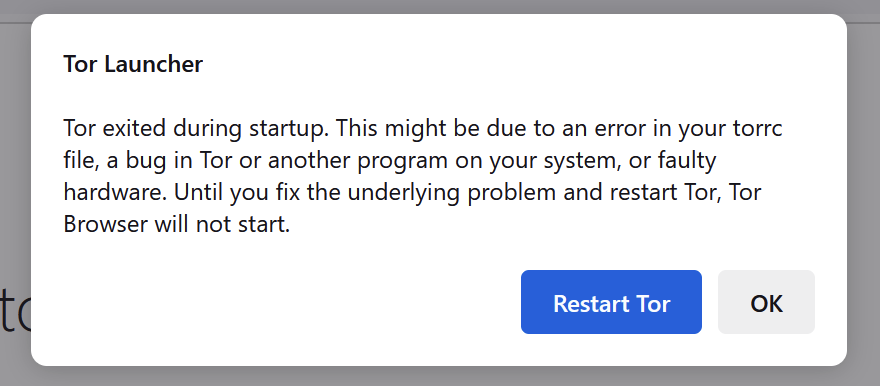
The problems you wrote in the screenshot below is that tor.exe doesn’t start.
I’d expect you could have the same error if you try to start it outside the browser.
Actually, I’d say even desktop hasn’t been discussed yet.
We briefly talked about considering it, but as far as I know, it isn’t officially a 13.5 thing for Tor Browser, yet. If we decide we’ll do it, we’ll update the related issue.
In general, we still haven’t a list for 13.5. We only have some musts/priorities, e.g., connection assist for Android, and stuff we wanted in 13.0 but that didn’t make into it.
I can’t reproduce this. Does it Could you please try with a fresh installation and in case open an issue with steps to reproduce?
One of the tabs was probably the update notes, it’s normal when you update .
That option is ignored after a connection failure is detected, to avoid making users end up in a loop where they constantly get error messages.
New identity shouldn’t be related (the only tor-related things it does is sending SIGNAL NEWNYM over the control port).
Please let us know if you manage to find a way to consistently reproduce this problem.
If I’m not wrong, there isn’t exactly a portable version of TOR per se. If you download the installer on to a USB and install it on the USB itself, then it becomes a portable download. If you download it on your PC and install it, it installs in the PC. Remember, the TOR Browser is not like conventional apps (at least in Windows as far as I know). All the required files and modules are installed in a single folder which can be deleted if you want to remove the app (as opposed to a classic uninstall process).
Since you can’t use VPNs, maybe check the suggestions for proxies mentioned here: HELP PLEASE: Anti-Censorship/Privacy Guide to Avoid State Surveillance - #8 by Ralph18 - Discussions - Techlore Discussions
It may be of some use if you need to use a normal browser like hardened Firefox.
Isn’t this like using only circuits made of two nodes? I’m not sure it’s a great idea.
So, the first request is very easy: hamburger menu → new Tor circuit for this site. It’s always available, even for internal about:pages (maybe that’s a little bug).
If keyboard is also fine, it’s Ctrl+Shift+L (on Linux, en-US; in general, we localize shortcuts, so you might have a different one).
For the request of displaying circuit display, I think we could also open an issue.
Let me find a vanilla bridge I could try.
To avoid any confusion: it was especially about the browser UI.
1 reply
Can you request a new circuit via File > New Tor Circuit for this Site, or the application menu (☰)?
This is a great point and something I’ll be advocating for going forward – unless there’s a platform-specific reason why we should deviate from providing parity-by-default.
However as @PieroV says we haven’t reached a decision about this as of now, and it isn’t officially on the roadmap yet.
Hey @eddlang, I’m really sorry to hear about the accessibility issues you’re facing because of this change. Making it more difficult to use Tor Browser in a way that meets your needs was certainly not our intention, and I really appreciate you bringing this use-case to our attention.
Thank you everyone for the constructive feedback and bug reports in this thread, please keep them coming! It’s also great to hear what you’re liking about the release too. 
Thinking ahead to future releases, you may be interested in downloading Tor Browser Alpha and becoming an alpha tester to help us catch things earlier in the development process – however please make yourself aware of the risks first:
Thanks @Ralph1806! I totally forgot we shipped adaptive icons to Android too 
This has been done:

I personally feel that the new one isn’t bad to be honest, and your picture seems to have the colors inverted? On my PC and mobile, the white areas in your picture are purple and vice versa.

New icon is fine.
However, it is slightly modified for installer:

Later I figured out that box is depicted here.
But my initial thought was that onion is censored with permanent marker.
Second thought - icon is corrupted and loaded only partially.
I’d say no.
The middle node doesn’t know that some traffic leaves to my internal network and that’s the important thing.
Metrics would give this information away but i can disable metrics reporting on my bridge via torrc.
And for my ISP it looks basically the same because in both cases my ISP will know how much incoming traffic i received over Tor that hasn’t sent outbound again regardless if it’s a Guard connection or the connection of my bridge to the next hop.
I lose the ConnectionPadding protection but that’s not much more than a cosmetic feature and much more important for onion services than for Tor Browser users.
This whole setup can be seen as a testing setup anyway where reliability and reproducibility is more important than anonymity.
That works for me
I saw the two tickets you wrote. Thanks!
Another minor thing i found:
In some previous version of Tor Browser the textbox for manually adding a bridge was already marked so you could Ctrl+V right away.
Now you first have to click in the box to be able to paste.
Just as a suggestion could it perhaps be advantageous to set the default launch page as check.torproject.org so people can verify connectivity and security settings through an official Tor Project checker?