You seem to have a couple of truncated onion addresses here. The oniux GitLab repo is here (Clearnet The Tor Project / Core / oniux · GitLab). The curl command example has what looks like the first 53 characters of an onion address too.
Also, for users who do not have cargo set up to resolve .onion addresses you may want to explain how this is done as cargo install --git http://eweiibe6tdjsdprb4px6rqrzzcsi22m4koia44kc5pcjr7nec2rlxyad.onion/tpo/core/oniux on my system results in a DNS error failed to resolve address.
Anyhow, after updating my rust toolchain (1.69.0 resulting in a dependency issue) I managed to build and install oniux. I look forward to trying out this utility, it looks very useful.
I just tried oniux wget -O - https://check.torproject.org and got
!doctype html>
<html lang="en_US">
<head>
  <meta charset="utf-8" />
  <meta name="viewport" content="width=device-width, initial-scale=1.0" />
  <title>

      Congratulations. This browser is configured to use Tor.
...
This is a great project. Thank you for putting in the work.
I am currently behind a fascist firewall. There doesn’t seem to be a way to instruct oniux to only try ports 80 and 443 right now. Some configuration options would be nice.
it looks like /, the root of your filesystem, isn’t owned by root (the super-admin user). Arti, and by extension oniux, makes sure its files can only be mangled by the current user and root. Any idea why / wouldn’t be owned by root? This seems like a strange setup, likely to cause issues with more than Arti.
This can mean any number of things. It could indicate the command you tried to run couldn’t be found in your PATH. Could you run the command again with RUST_LOG=debug, to help identify at which step this error was emitted?
have you installed hexchat? i tried installing CachyOS, and i get the same error before install hexchat, but it works fine after a quick sudo pacman -S hexchat
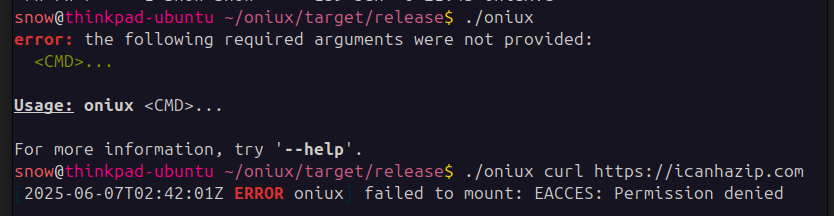
Didn’t work for me on Ubuntu 25.04, first of all the guide says “Once that is done you are ready to start using it!” but I had to look for it, it’s somewhere in the release folder, but once found I attempt to use the curl test in the guide:
oniux leverage unprivileged user namespaces to setup namespaces without the need for root access. Sadly that feature is disabled on recent Ubuntu. Supporting environment without unprivileged user namespaces is still work in progress.
This is a common pattern amongst container and container-adjacent technologies to hide/modify a file as perceived from inside without actually modifying (or even having the permission to modify) that file from the outside. In oniux’s case, the specific paths that are shadowed that way are /etc/resolv.conf and the procfs. You can see that by running something like diff <(mount | sort) <(oniux mount | sort) (assuming oniux works for you).
I didn’t try but it seems to me that we should better attempt the experiment on an unstable _ sid.
I have trouble understanding what it brings if not a configuration or a command line startup, which I don’t like: it smells like an amateur’s fantasy and may be aware of the vulnerabilities of his approach.
has this been brought to the attention of the developers of my distribution?
is it only to be integrated into tails/qubes/whonix/alpine (and others …)?
one cannot reasonably undertake a shortcut or innovate without precautions, each attempt (successful or failed) can be catastrophic in terms of the consequences.
to follow therefore, but without real details, I do not adhere.