# UI broke after updating
**URL:** https://forum.torproject.org/t/ui-broke-after-updating/535
**Category:** Tor Browser Desktop
**Created:** [November 9, 2021, 8:46pm UTC](https://forum.torproject.org/t/ui-broke-after-updating/535 "2021-11-09T20:46:10Z")
**Posts on this page:** 18
**Page:** 1
### Author:  [@kell](https://forum.torproject.org/u/kell)
#### Post date: [November 9, 2021, 8:46pm UTC](https://forum.torproject.org/t/ui-broke-after-updating/535/1 "2021-11-09T20:46:10Z")
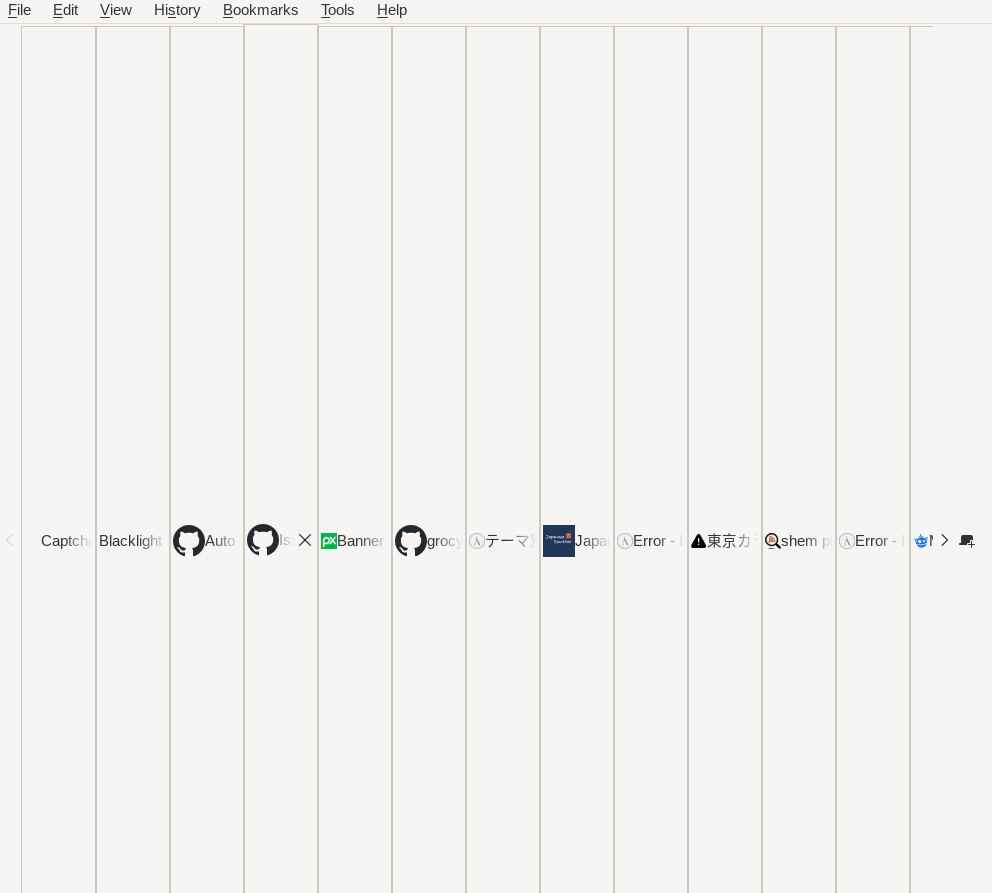
Just updated to the latest version, the UI broke, hard to explain, so here’s a screenshot.
---
### Author:  [@gus](https://forum.torproject.org/u/gus)
#### Post date: [November 9, 2021, 9:20pm UTC](https://forum.torproject.org/t/ui-broke-after-updating/535/2 "2021-11-09T21:20:40Z")
Can you check if this is the issue?
> **[Missing features on first-time launch in esr91 (#40679) · Issues · The Tor...](https://gitlab.torproject.org/tpo/applications/tor-browser/-/issues/40679)**
>
> Tor Browser 11.0a9 seems to be missing key features on initial launch after a clean install, including (but probably not limited to): The torconnect...
---
### Author:  [@kell](https://forum.torproject.org/u/kell)
#### Post date: [November 9, 2021, 10:07pm UTC](https://forum.torproject.org/t/ui-broke-after-updating/535/3 "2021-11-09T22:07:51Z")
Thank you for your help with this.
The screenshot I posted is literally the entire browser - so in a way yes, those things listed in that GitLab issue are things I’m missing. But there is also no location bar, status bar, main browser window! etc.
I have “restore previous session” set, which are the tabs that are being displayed in that screenshot. Because of this, I want to avoid reinstalling.
Let me know how else I can help with this issue.
Thanks again!
---
### Author:  [@gus](https://forum.torproject.org/u/gus)
#### Post date: [November 9, 2021, 11:10pm UTC](https://forum.torproject.org/t/ui-broke-after-updating/535/4 "2021-11-09T23:10:42Z")
Could you share what’s your Operating System and version?
---
### Author:  [@kell](https://forum.torproject.org/u/kell)
#### Post date: [November 9, 2021, 11:29pm UTC](https://forum.torproject.org/t/ui-broke-after-updating/535/5 "2021-11-09T23:29:51Z")
Debian 10
11.0 (based on Mozilla Firefox 91.3.0esr) (64-bit)
---
### Author:  [@gus](https://forum.torproject.org/u/gus)
#### Post date: [November 9, 2021, 11:47pm UTC](https://forum.torproject.org/t/ui-broke-after-updating/535/6 "2021-11-09T23:47:18Z")
I’m using Debian 10 too and it’s working fine. Could you create a new user, install Tor Browser 11 following the [official instructions](https://tb-manual.torproject.org/installation/), and check if the issue persist?
---
### Author:  [@kell](https://forum.torproject.org/u/kell)
#### Post date: [November 10, 2021, 12:59am UTC](https://forum.torproject.org/t/ui-broke-after-updating/535/7 "2021-11-10T00:59:49Z")
Thanks for your help with this.
It works (works better) w/ a new installation.
Coincidentally, i have the “Always use private browsing mode” turned off, I’m wondering if it is related to this issue:
> **[Browser chrome breaks when private browsing mode is turned off (#40690) ·...](https://gitlab.torproject.org/tpo/applications/tor-browser/-/issues/40690)**
>
> As reported in #40683 (comment...
I also have this setting turned on: “Remember browsing and download history”, to save my tabs.
---
### Author:  [@kell](https://forum.torproject.org/u/kell)
#### Post date: [November 10, 2021, 3:45pm UTC](https://forum.torproject.org/t/ui-broke-after-updating/535/8 "2021-11-10T15:45:02Z")
I noticed that I can use a keyboard shortcut to open a new private window, and the browser at least becomes usable, but it looks/acts abnormal - like icons and other things are out of place at certain times (kinda hard to explain again!).
---
### Author:  [@peddling](https://forum.torproject.org/u/peddling)
#### Post date: [November 10, 2021, 3:47pm UTC](https://forum.torproject.org/t/ui-broke-after-updating/535/9 "2021-11-10T15:47:26Z")
On macOS I encountered a similar browser chrome issue, also after disabling “Always use private browsing mode”. Luckily I got to keep all the chrome elements but it’s difficult to use.
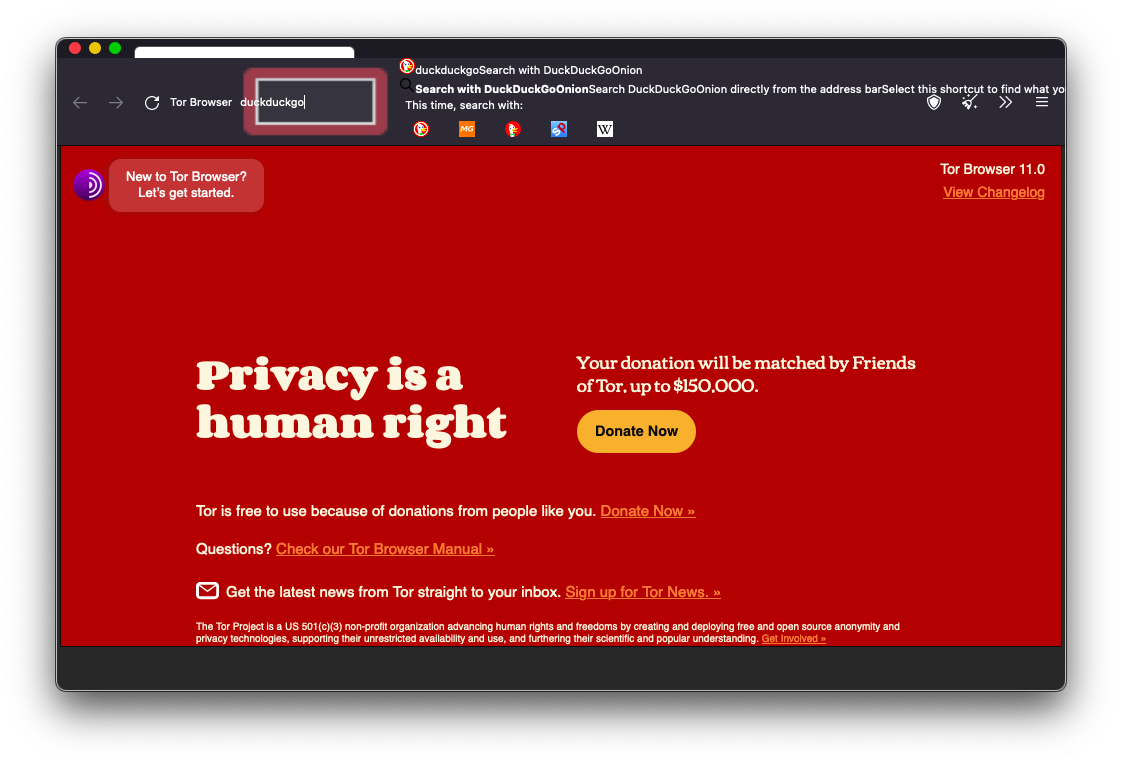
The address bar, tabs, and toolbar buttons become displaced. The toolbar appears to be larger in height, affecting the viewport height. The toolbar also expands and shrinks depending on the number of address bar suggestions.
The issue persists after deleting Tor Browser, re-installing, and disabling the “private browsing mode” option again.
* * *
Looks like many more people have encountered the issue.
> **[Misc UI bugs in 11.0a10 (#40684) · Issues · The Tor Project / Applications /...](https://gitlab.torproject.org/tpo/applications/tor-browser/-/issues/40684)**
>
> @duncan and I have found a couple of UI issues (either missing patches from the original rebase, or broken...
> **[Absolutely broken UI, after update (#40702) · Issues · The Tor Project /...](https://gitlab.torproject.org/tpo/applications/tor-browser/-/issues/40702)**
>
> Hello. The new UI / X (on Debian 10) is completely unusable after the update, thats crazy.
Quite relieved that it isn’t just me.
Much love to the dev team.
---
### Author:  [@Gaba](https://forum.torproject.org/u/Gaba)
#### Post date: [November 10, 2021, 4:44pm UTC](https://forum.torproject.org/t/ui-broke-after-updating/535/10 "2021-11-10T16:44:03Z")
Does the UI get fix when you turn on "Always use private browsing mode” ?
---
### Author:  [@SWintheSKY](https://forum.torproject.org/u/SWintheSKY)
#### Post date: [November 10, 2021, 5:03pm UTC](https://forum.torproject.org/t/ui-broke-after-updating/535/11 "2021-11-10T17:03:36Z")
I have the same issue on Windows.
I didn’t try to do a fresh install yet but that would fix things? or there is an official word about it?
thanks
---
### Author:  [@COB](https://forum.torproject.org/u/COB)
#### Post date: [November 10, 2021, 5:43pm UTC](https://forum.torproject.org/t/ui-broke-after-updating/535/12 "2021-11-10T17:43:28Z")
Joining with the Kubuntu 18.04 x64 and would like to note that the problem firstly appeared in the Alpha channel. The latest version that works well for me is 11.0a9, so the roots of the bug may be traced from the version **11.0a10**.
---
### Author:  [@HackerNCoder](https://forum.torproject.org/u/HackerNCoder)
#### Post date: [November 10, 2021, 5:43pm UTC](https://forum.torproject.org/t/ui-broke-after-updating/535/13 "2021-11-10T17:43:31Z")
Disabling “Always use private browsing mode” seems to be what is causing this issue, a fix has been made and will be available in the next Alpha and Stable, until then you must have it enabled to use TB 11.
This is the relevant issue: [Browser chrome breaks when private browsing mode is turned off (#40690) · Issues · The Tor Project / Applications / Tor Browser · GitLab](https://gitlab.torproject.org/tpo/applications/tor-browser/-/issues/40690)
---
### Author:  [@SWintheSKY](https://forum.torproject.org/u/SWintheSKY)
#### Post date: [November 10, 2021, 8:32pm UTC](https://forum.torproject.org/t/ui-broke-after-updating/535/14 "2021-11-10T20:32:00Z")
Thanks but someone said that there is even an issue regarding NoScript that wont prevent the disabling of the JS. I don’t remember where I read this but this issue is far more worrying
---
### Author:  [@HackerNCoder](https://forum.torproject.org/u/HackerNCoder)
#### Post date: [November 10, 2021, 8:39pm UTC](https://forum.torproject.org/t/ui-broke-after-updating/535/15 "2021-11-10T20:39:59Z")
I’ve said it multiple places. As far as I know it the bug only affects Windows. For this reason the windows download on [Tor Project | Download](http://torproject.org/download) has been reverted to 10.5.10.
---
### Author:  [@Neos](https://forum.torproject.org/u/Neos)
#### Post date: [November 11, 2021, 11:17pm UTC](https://forum.torproject.org/t/ui-broke-after-updating/535/16 "2021-11-11T23:17:50Z")
Hello I also encountered the issue with Ubuntu 20.04.3 LTS
> Solved by ticking “Always use private browsing mode”
Screenshots :
[https://ibb.co/RT0bgd1](https://ibb.co/RT0bgd1)
[https://ibb.co/GvJYM0B](https://ibb.co/GvJYM0B)
It is not very convenient for me, and hope it will be fixed, but at least I know there is a workaround 🙂
---
### Author:  [@Neos](https://forum.torproject.org/u/Neos)
#### Post date: [November 15, 2021, 6:06pm UTC](https://forum.torproject.org/t/ui-broke-after-updating/535/17 "2021-11-15T18:06:48Z")
Fixed for me in 11.0.1 (at least for the most obvious, I didn’t checked everything carefully yet).
---
### Author:  [@kell](https://forum.torproject.org/u/kell)
#### Post date: [November 15, 2021, 6:42pm UTC](https://forum.torproject.org/t/ui-broke-after-updating/535/18 "2021-11-15T18:42:07Z")
Thanks for the update!
I just updated here as well, and everything looks good! I also haven’t checked everything thoroughly yet either.
Thanks everyone who helped with this! 🎉