# Tor service over web browser
**URL:** https://forum.torproject.org/t/tor-service-over-web-browser/16294
**Category:** Support
**Tags:** tor-browser
**Created:** [December 11, 2024, 8:47pm UTC](https://forum.torproject.org/t/tor-service-over-web-browser/16294 "2024-12-11T20:47:24Z")
**Posts on this page:** 19
**Page:** 1
### Author:  [@mimimimi](https://forum.torproject.org/u/mimimimi)
#### Post date: [December 11, 2024, 8:47pm UTC](https://forum.torproject.org/t/tor-service-over-web-browser/16294/1 "2024-12-11T20:47:24Z")
Hello
I am using tor-expert-bundle-windows-i686-14.0.2 with the currently running tor win32 service which I want to use behind firefox and also hope to set bitcoin node by hidden-service from the same tor bundle but that is a different issue.
I am listening to ports 9050 and 9051 and have tried changing the internet options in control panel to SOCKS: 127.0.0.1 and Port:9050 but did not get any connection.
I tried the same settings in the firefox’s network configuration settings

**here is my torcc file:**
ControlPort 9051
CookieAuthentication 1
ExitNodes {de}
---
### Author:  [@Vort](https://forum.torproject.org/u/Vort)
#### Post date: [December 12, 2024, 12:55am UTC](https://forum.torproject.org/t/tor-service-over-web-browser/16294/2 "2024-12-12T00:55:27Z")
Your configuration looks fine.
1. You can try executing `telnet 127.0.0.1 9050` command and typing `GE` . Will there be any response?
2. You can start loopback traffic capture with Wireshark and track what Firefox tries to do with `9050` port and what Tor replies are.
---
### Author:  [@BobbyB](https://forum.torproject.org/u/BobbyB)
#### Post date: [December 12, 2024, 9:11am UTC](https://forum.torproject.org/t/tor-service-over-web-browser/16294/3 "2024-12-12T09:11:17Z")
I presume you are trying to use Firefox through Tor browser. That is the Firefox control panel I see.
I use 127.0.0.1:9150 but make no change to torrc except to maybe the ExitNodes
---
### Author:  [@mimimimi](https://forum.torproject.org/u/mimimimi)
#### Post date: [December 12, 2024, 4:21pm UTC](https://forum.torproject.org/t/tor-service-over-web-browser/16294/4 "2024-12-12T16:21:35Z")
Are you sure I shouldn’t remove the exit nodes if I still want my traffic to go to around one location
---
### Author:  [@mimimimi](https://forum.torproject.org/u/mimimimi)
#### Post date: [December 12, 2024, 6:03pm UTC](https://forum.torproject.org/t/tor-service-over-web-browser/16294/5 "2024-12-12T18:03:51Z")
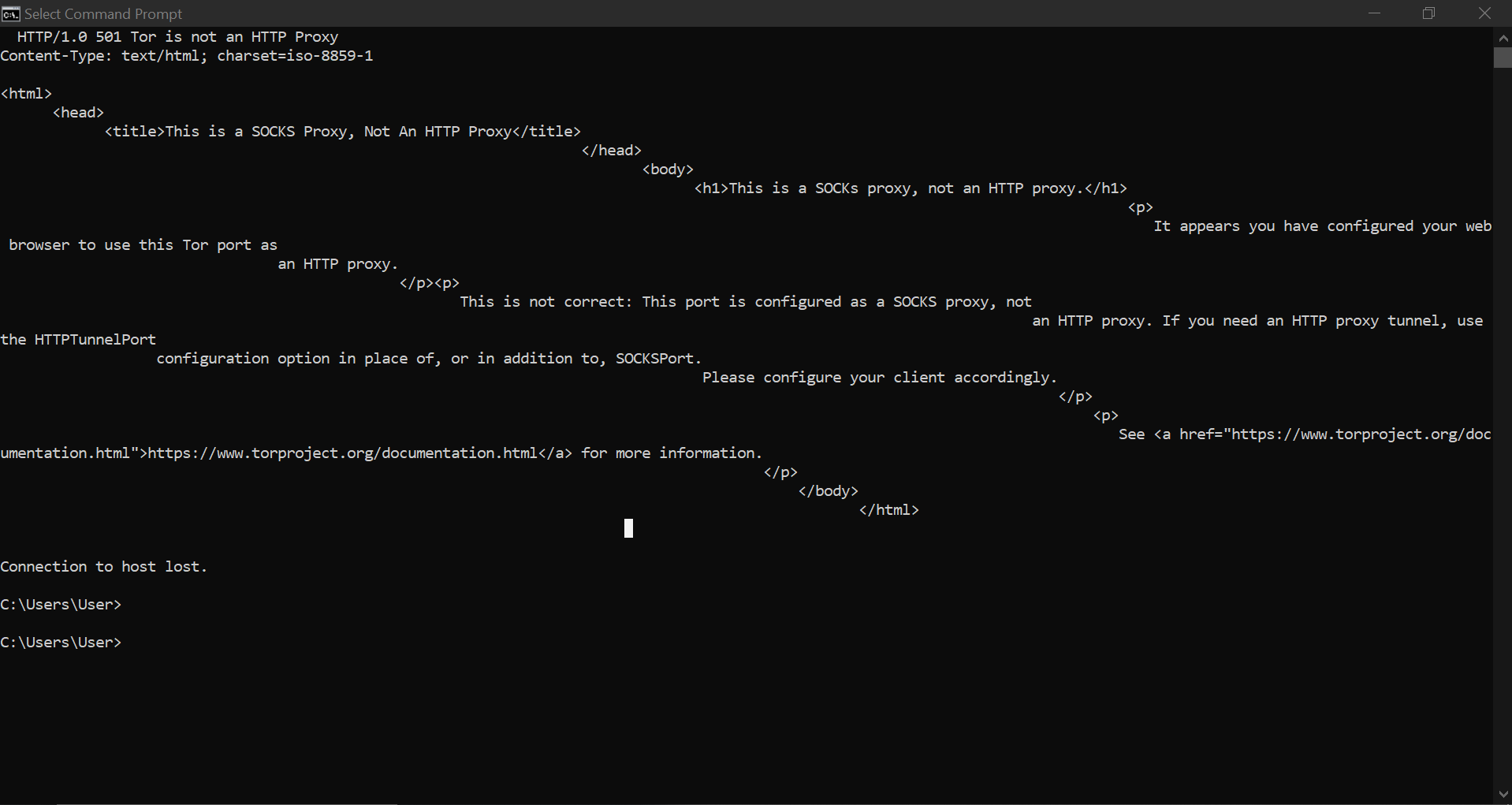
After selecting telnet in control panel and seeing this I decided to override firefox’s proxy settings after doing this I got no response response from `telnet 127.0.0.1 9050`
---
### Author:  [@Vort](https://forum.torproject.org/u/Vort)
#### Post date: [December 12, 2024, 6:55pm UTC](https://forum.torproject.org/t/tor-service-over-web-browser/16294/6 "2024-12-12T18:55:09Z")
This result means that Tor SOCKS proxy works correctly.
Now it is needed to understand why Firefox fails to use it.
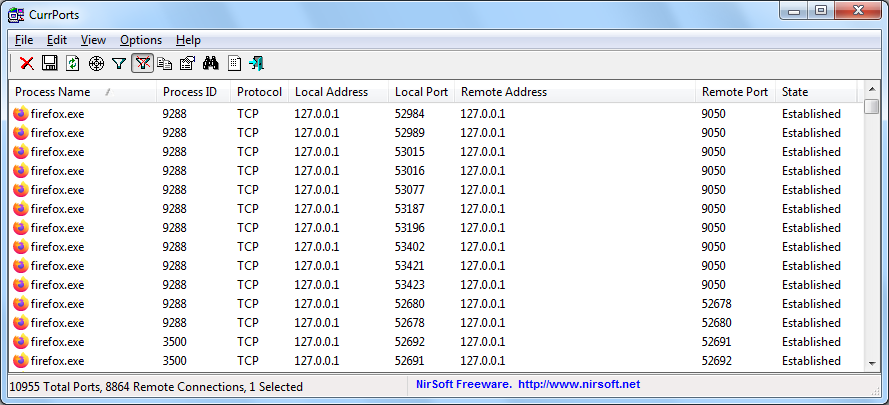
Wireshark can show what exactly is going on, but less complex program, CurrPorts, can also be used, to see if Firefox was able to establish connections at all:
---
### Author:  [@BobbyB](https://forum.torproject.org/u/BobbyB)
#### Post date: [December 13, 2024, 2:44am UTC](https://forum.torproject.org/t/tor-service-over-web-browser/16294/7 "2024-12-13T02:44:44Z")
I am posting this via my regular Firefox browser via sock5 proxy on 127.0.0.1 port 9150 and my IP is 185.220.101.17 because I used an exit node of DE.
The Tor browser is also running.
Windows 11 pro
check the ports with netstat or tcpview or currports
```auto
Proto Local Address Foreign Address State
TCP 127.0.0.1:9150 msi:53297 ESTABLISHED
TCP 127.0.0.1:9150 msi:53417 ESTABLISHED
TCP 127.0.0.1:9151 msi:52852 ESTABLISHED
```
---
### Author:  [@atari](https://forum.torproject.org/u/atari)
#### Post date: [December 13, 2024, 12:54pm UTC](https://forum.torproject.org/t/tor-service-over-web-browser/16294/8 "2024-12-13T12:54:07Z")
Is you tor.exe connected with the network? Does it show something like this? The Socks listener is open quite early, but this does not consequently mean tor is ready already connected to the network. (just tested in a setup hopefully close to yours i 32-bit)
```auto
Dec 13 05:03:35.602 [notice] Opening Socks listener on 127.0.0.1:9050
Dec 13 05:03:35.602 [notice] Opened Socks listener connection (ready) on 127.0.0.1:9050
Dec 13 05:03:35.000 [notice] Bootstrapped 0% (starting): Starting
Dec 13 05:03:46.000 [notice] Starting with guard context "default"
Dec 13 05:03:48.000 [notice] Bootstrapped 5% (conn): Connecting to a relay
Dec 13 05:03:48.000 [notice] Bootstrapped 10% (conn_done): Connected to a relay
Dec 13 05:03:48.000 [notice] Bootstrapped 14% (handshake): Handshaking with a relay
Dec 13 05:03:48.000 [notice] Bootstrapped 15% (handshake_done): Handshake with a relay done
Dec 13 05:03:48.000 [notice] Bootstrapped 75% (enough_dirinfo): Loaded enough directory info to build circuits
Dec 13 05:03:48.000 [notice] Bootstrapped 90% (ap_handshake_done): Handshake finished with a relay to build circuits
Dec 13 05:03:48.000 [notice] Bootstrapped 95% (circuit_create): Establishing a Tor circuit
Dec 13 05:03:48.000 [notice] Bootstrapped 100% (done): Done
```
```auto
Dec 13 05:09:27.886 [notice] Tor 0.4.8.13 (git-e153e72c01315f86) running on Windows Server 2012 [or later] with Libevent 2.1.12-stable, OpenSSL 3.0.15, Zlib 1.3.1, Liblzma N/A, Libzstd N/A and Unknown N/A as libc.
```
```auto
\7z.exe l tor.exe|more
7-Zip 24.09 (x64) : Copyright (c) 1999-2024 Igor Pavlov : 2024-11-29
Scanning the drive for archives:
1 file, 8562176 bytes (8362 KiB)
Listing archive: tor.exe
--
Path = tor.exe
Type = PE
Physical Size = 8562176
CPU = x86
Characteristics = Executable 32-bit
```
Maybe you did some tweaks on your torrc which do not work? Or an antivirus or firewall interfering?
---
### Author:  [@mimimimi](https://forum.torproject.org/u/mimimimi)
#### Post date: [December 14, 2024, 7:22pm UTC](https://forum.torproject.org/t/tor-service-over-web-browser/16294/9 "2024-12-14T19:22:54Z")
How do I see this from tor.exe
---
### Author:  [@mimimimi](https://forum.torproject.org/u/mimimimi)
#### Post date: [December 14, 2024, 7:22pm UTC](https://forum.torproject.org/t/tor-service-over-web-browser/16294/10 "2024-12-14T19:22:59Z")
Yes thank you, currports is showing firefox processes with 127.0.0.1 adresses, how can i see if the exit node is working?
---
### Author:  [@Felix](https://forum.torproject.org/u/Felix)
#### Post date: [December 15, 2024, 7:10pm UTC](https://forum.torproject.org/t/tor-service-over-web-browser/16294/11 "2024-12-15T19:10:31Z")
If I remember right, socks5 for vanilla Firefox on Windows is broken. A http proxy can help. Like Privoxy for example.
---
### Author:  [@Vort](https://forum.torproject.org/u/Vort)
#### Post date: [December 15, 2024, 7:10pm UTC](https://forum.torproject.org/t/tor-service-over-web-browser/16294/12 "2024-12-15T19:10:55Z")
> [@mimimimi](#):
>
> how can i see if the exit node is working?
You can try to press F12, go to network tab, open `https://check.torproject.org/` and watch what info Firefox will show there.
But better method is to use “curl” program. Run this command: `curl --socks5-hostname 127.0.0.1:9050 https://check.torproject.org/ -v` and if result will be like this, then Tor proxy works for sure and problem is on Firefox side:

---
### Author:  [@atari](https://forum.torproject.org/u/atari)
#### Post date: [December 15, 2024, 7:10pm UTC](https://forum.torproject.org/t/tor-service-over-web-browser/16294/13 "2024-12-15T19:10:59Z")
How do you start your tor.exe?
---
### Author:  [@mimimimi](https://forum.torproject.org/u/mimimimi)
#### Post date: [December 16, 2024, 12:00am UTC](https://forum.torproject.org/t/tor-service-over-web-browser/16294/14 "2024-12-16T00:00:22Z")
There didn’t seem to be anything in network but the site displayed " Sorry. You are not using Tor."
here is what cmd came back as
```auto
*C:\WINDOWS\system32>curl --socks5-hostname 127.0.0.1:9050 https://check.torproject.org/ -v
* Trying 127.0.0.1:9050...
* Connected to 127.0.0.1 (127.0.0.1) port 9050
* SOCKS5 connect to check.torproject.org:443 (remotely resolved)
* cannot complete SOCKS5 connection to check.torproject.org. (6)
* closing connection #0
curl: (97) cannot complete SOCKS5 connection to check.torproject.org. (6)
```
---
### Author:  [@mimimimi](https://forum.torproject.org/u/mimimimi)
#### Post date: [December 16, 2024, 12:00am UTC](https://forum.torproject.org/t/tor-service-over-web-browser/16294/15 "2024-12-16T00:00:25Z")
I’ve never had to open it before and when I click on it from file explorer it closes.
---
### Author:  [@atari](https://forum.torproject.org/u/atari)
#### Post date: [December 16, 2024, 6:44am UTC](https://forum.torproject.org/t/tor-service-over-web-browser/16294/16 "2024-12-16T06:44:20Z")
> [@mimimimi](#):
>
> using tor-expert-bundle-windows-i686-14.0.2 with the currently running tor win32 service
Your “service” seems not to be running properly. Please try not to setup a service before you managed to get it running as a non service. So please stop and deactivate your service until you figured out what is wrong…
Afterwards just start tor.exe from a command line and look at the output which should look like [Tor service over web browser - #8 by atari](https://forum.torproject.org/t/tor-service-over-web-browser/16294/8)
---
### Author:  [@Vort](https://forum.torproject.org/u/Vort)
#### Post date: [December 16, 2024, 8:19am UTC](https://forum.torproject.org/t/tor-service-over-web-browser/16294/17 "2024-12-16T08:19:13Z")
> [@mimimimi](#):
>
> here is what cmd came back as
As @atari said, there is most likely problem with firewall (or with something like that).
Try adding rule to firewall, which specifically allows outgoing _(and incoming if you have relay)_ TCP connections for `tor.exe` service.
Also you can add line like `Log notice file d:\Tor\notices.log` to `torrc` and see what complains Tor will write to that file.
---
### Author:  [@BobbyB](https://forum.torproject.org/u/BobbyB)
#### Post date: [December 16, 2024, 3:35pm UTC](https://forum.torproject.org/t/tor-service-over-web-browser/16294/18 "2024-12-16T15:35:39Z")
> [@Felix](#):
>
> If I remember right, socks5 for vanilla Firefox on Windows is broken. A http proxy can help. Like Privoxy for example.
I just used it in my post (no problem):
> [@Tor service over web browser](https://forum.torproject.org/t/tor-service-over-web-browser/16294/7):
>
> I am posting this via my regular Firefox browser via sock5 proxy on 127.0.0.1 port 9150 and my IP is 185.220.101.17 because I used an exit node of DE. The Tor browser is also running. Windows 11 pro check the ports with netstat or tcpview or currports Proto Local Address Foreign Address State TCP 127.0.0.1:9150 msi:53297 ESTABLISHED TCP 127.0.0.1:9150 msi:53417 ESTABLISHED TCP 127.0.0.1:9151 msi:52852 ESTABLISHED
---
### Author:  [@BobbyB](https://forum.torproject.org/u/BobbyB)
#### Post date: [December 16, 2024, 4:22pm UTC](https://forum.torproject.org/t/tor-service-over-web-browser/16294/19 "2024-12-16T16:22:55Z")
**This is the command syntax:**
tor -f [args]
See man page for options, or https: // www.torprojectorg/ for documentation.
**Here is my test using Window 11 with a default Tor browser install:**
I open a command prompt or terminal session or powershell (and type cmd) in the folder where tor.exe exists:
C:\Users\YourUserNameHere\Desktop\Tor Browser\Browser\TorBrowser\Tor
I give the command:
tor -f “C:\Users\YourUserNameHere\Desktop\Tor Browser\Browser\TorBrowser\Data\Tor\torrc”
This will respond to Port 9050
curl --proxy socks5h://127.0.0.1:9050 [http://ip-api.com/json/](http://ip-api.com/json/)
> {“status”:“success”,“country”:“Germany”,“countryCode”:“DE”,“region”:“HE”,“regionName”:“Hesse”,“city”:“Frankfurt am Main”,“zip”:“60313”,“lat”:50.1187,“lon”:8.6842,“timezone”:“Europe/Berlin”,“isp”:“Florian Kolb”,“org”:“Datalix”,“as”:“AS58087 Florian Kolb”,“query”:“45.11.229.132”}
I prefer just starting the Tor browser which will then respond to Port 9150
curl --proxy socks5h://127.0.0.1:9150 [http://ip-api.com/json/](http://ip-api.com/json/)
> {“status”:“success”,“country”:“The Netherlands”,“countryCode”:“NL”,“region”:“NH”,“regionName”:“North Holland”,“city”:“Amsterdam”,“zip”:“1012”,“lat”:52.3676,“lon”:4.90414,“timezone”:“Europe/Amsterdam”,“isp”:“Surf B.V.”,“org”:“Nothing to hide”,“as”:“AS1101 SURF B.V.”,“query”:“192.42.116.216”}
**Edited later:**
This could be automated using a batch file.