# Tor Browser exits during startup
**URL:** https://forum.torproject.org/t/tor-browser-exits-during-startup/21610
**Category:** Tor Browser Desktop
**Tags:** tor-browser
**Created:** [May 18, 2026, 9:27am UTC](https://forum.torproject.org/t/tor-browser-exits-during-startup/21610 "2026-05-18T09:27:11Z")
**Posts on this page:** 20
**Page:** 1
### Author:  [@BSM26](https://forum.torproject.org/u/BSM26)
#### Post date: [May 18, 2026, 9:27am UTC](https://forum.torproject.org/t/tor-browser-exits-during-startup/21610/1 "2026-05-18T09:27:11Z")
When reporting a bug, please include as many of these as possible:
The previous post “The TOR browser is unable to be restarted” gave details of the problem but not the solution. Finding out that the torrc file is at fault does not tell me how to fix it.
- Operating System you are using: Win 11; 25H2 64 bit; 64Gb RAM; 75mbs download
- Tor Browser version: 15.0.13
- Tor Browser Security Level: Standard
- Step by step of how you got to the issue, so we can reproduce it (e.g. I opened the browser, typed a url, clicked on (i) icon, then my browser crashed): Opened TOR, immediately showed message. Restart not possible.
- About screen says “failed to check for updates”
- (optional) A screenshot of the problem
- The Tor log: and where is the log? History shows nothing since nothing was possible.
---
### Author:  [@BobbyB](https://forum.torproject.org/u/BobbyB)
#### Post date: [May 19, 2026, 2:17pm UTC](https://forum.torproject.org/t/tor-browser-exits-during-startup/21610/2 "2026-05-19T14:17:06Z")
Version 15.0.14 is out. Here is what I suggest.
Delete the Tor folder on your desktop. Download the new Tor from [Tor Project | Download](https://www.torproject.org/download/)
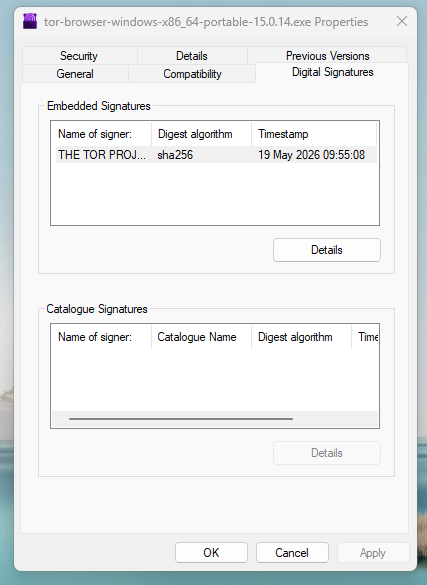
Check the signature. You probably won’t have the PGP software so right click the executable you downloaded, click properties-\>Digital signatures
Click the embedded signature from the THE TOR PROJECT, INC. then details. It will say “This digital signature is OK”.
Now click the countersignature from Digicert then details. It will say “This digital signature is OK”.
The download is good. Windows uses it own master certificate list (or whatever it’s called) for validation.
Now install Tor. If there is still a problem, then it is something else.
---
### Author:  [@BSM26](https://forum.torproject.org/u/BSM26)
#### Post date: [May 19, 2026, 3:01pm UTC](https://forum.torproject.org/t/tor-browser-exits-during-startup/21610/3 "2026-05-19T15:01:19Z")
Could it also be that I install in C:\TOR rather than hidden in Users? I prefer my software to be in C:\Program Files or C:\Program Files (x86) , all in one place!
---
### Author:  [@BSM26](https://forum.torproject.org/u/BSM26)
#### Post date: [May 19, 2026, 3:07pm UTC](https://forum.torproject.org/t/tor-browser-exits-during-startup/21610/4 "2026-05-19T15:07:44Z")
---
### Author:  [@BSM26](https://forum.torproject.org/u/BSM26)
#### Post date: [May 19, 2026, 3:07pm UTC](https://forum.torproject.org/t/tor-browser-exits-during-startup/21610/5 "2026-05-19T15:07:47Z")

---
### Author:  [@ebanam](https://forum.torproject.org/u/ebanam)
#### Post date: [May 19, 2026, 3:11pm UTC](https://forum.torproject.org/t/tor-browser-exits-during-startup/21610/6 "2026-05-19T15:11:49Z")
> [@BSM26](#):
>
> Could it also be that I install in C:\TOR rather than hidden in Users? I prefer my software to be in C:\Program Files or C:\Program Files (x86) , all in one place!
Possibly. I think to install in the ‘C:’ directory you might need elevated (‘Administrator’) privileges. I’d recommend **not** running Tor (or most user-space applications) with administrator privileges. Instead install it at some place within your user directories like ‘Desktop’ and so on.
---
### Author:  [@BobbyB](https://forum.torproject.org/u/BobbyB)
#### Post date: [May 19, 2026, 5:20pm UTC](https://forum.torproject.org/t/tor-browser-exits-during-startup/21610/7 "2026-05-19T17:20:43Z")
You can install in C:\TOR
I am on another Win11 machine now where I installed the browser in C:\Tor\Tor Browser
I specified c:\tor and it created the sub directory Tor Browser
The link is adjusted when it makes the icon on the desktop to start Tor. I checked the torrc file and it is adjusted also.
To make it run as administrator you need to tell it. So you run in user space.
I also don’t recommend runing anything as admin unless necessary as in sudo on Linux
---
### Author:  [@BSM26](https://forum.torproject.org/u/BSM26)
#### Post date: [June 2, 2026, 4:22pm UTC](https://forum.torproject.org/t/tor-browser-exits-during-startup/21610/8 "2026-06-02T16:22:42Z")
I have just deleted TOR and re-installed. I’m getting exactly the same problem. Would it help to upload the various torrc files?
---
### Author:  [@BobbyB](https://forum.torproject.org/u/BobbyB)
#### Post date: [June 2, 2026, 11:04pm UTC](https://forum.torproject.org/t/tor-browser-exits-during-startup/21610/9 "2026-06-02T23:04:59Z")
I’m game to look at them but make sure you redact personal information if any.
---
### Author:  [@BSM26](https://forum.torproject.org/u/BSM26)
#### Post date: [June 2, 2026, 11:57pm UTC](https://forum.torproject.org/t/tor-browser-exits-during-startup/21610/10 "2026-06-02T23:57:42Z")
_ **torrc** _
#### #This file was generated by Tor; if you edit it, comments will not be preserved
#### #The old torrc file was renamed to torrc.orig.1, and Tor will ignore it
ClientOnionAuthDir C:\TOR\Tor Browser\Browser\TorBrowser\Data\Tor\onion-auth
DataDirectory C:\TOR\Tor Browser\Browser\TorBrowser\Data\Tor
DisableNetwork 1
GeoIPFile C:\TOR\Tor Browser\Browser\TorBrowser\Data\Tor\geoip
GeoIPv6File C:\TOR\Tor Browser\Browser\TorBrowser\Data\Tor\geoip6
_ **torrc.orig.1** _
_empty file_
_ **torrc-defaults** _
#### **torrc-defaults for Tor Browser**
#DO NOT EDIT THIS FILE
#This file is distributed with Tor Browser and SHOULD NOT be modified (it
#may be overwritten during the #next Tor Browser update). To customize your
#tor configuration, shut down Tor Browser and edit the torrc file.
#If non-zero, try to write to disk less frequently than we would otherwise.
AvoidDiskWrites 1
### #Where to send logging messages. Format is minSeverity[-maxSeverity]
### #(stderr|stdout|syslog|file FILENAME).
Log notice stdout
CookieAuthentication 1
DormantCanceledByStartup 1
ClientTransportPlugin meek\_lite,obfs2,obfs3,obfs4,scramblesuit,webtunnel exec TorBrowser\Tor\PluggableTransports\lyrebird.exe
ClientTransportPlugin snowflake exec TorBrowser\Tor\PluggableTransports\lyrebird.exe
ClientTransportPlugin conjure exec TorBrowser\Tor\PluggableTransports\conjure-client.exe -registerURL [https://registration.refraction.network/api](https://registration.refraction.network/api)
---
### Author:  [@BobbyB](https://forum.torproject.org/u/BobbyB)
#### Post date: [June 3, 2026, 1:35pm UTC](https://forum.torproject.org/t/tor-browser-exits-during-startup/21610/11 "2026-06-03T13:35:04Z")
Looks just like mine except mine is on the desktop. I will have to look at the PC where I installed in C:\TOR and get back.
**Edited later:**
Your torrc is exactly like mine on that PC where I installed on C:\Tor
It was on 15.0.14. I started it, it did its update then I restarted and it is now 15.0.15
---
### Author:  [@BobbyB](https://forum.torproject.org/u/BobbyB)
#### Post date: [June 3, 2026, 3:14pm UTC](https://forum.torproject.org/t/tor-browser-exits-during-startup/21610/12 "2026-06-03T15:14:39Z")
This is far fetched but the only thing I can think of is your anti-virus which may block something. If it blocked the Firefox.exe element of Tor then the app would not even start. Now what happens if it blocked the tor.exe element of Tor??
Open Task Manager. You should see Tor Browser (some number) in Processes. Now scroll down toward the letter t. Do you see a tor.exe???
**Edited later:**
Bingo!
I just ran an experiment on that other PC. I renamed tor.exe to something else so it would not start.
Started the Tor browser and I get the popup in your first post about Tor exited during startup.
So my conclusion to this problem is that if tor.exe is blocked by, let’s say, the antivirus (or does not execute) then this is the solution.
---
### Author:  [@BSM26](https://forum.torproject.org/u/BSM26)
#### Post date: [June 3, 2026, 4:24pm UTC](https://forum.torproject.org/t/tor-browser-exits-during-startup/21610/13 "2026-06-03T16:24:08Z")
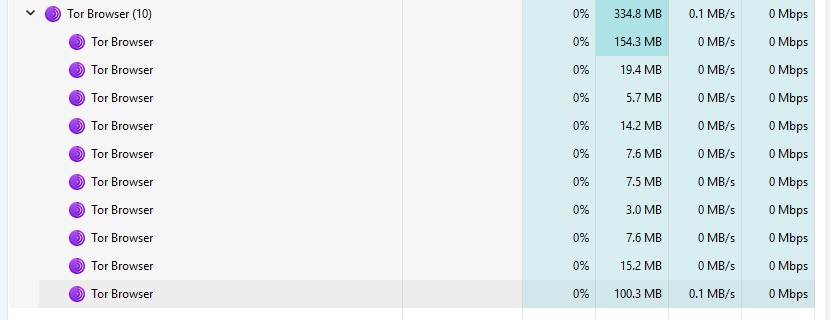
As soon as Tor starts this is Task Manager!
---
### Author:  [@BSM26](https://forum.torproject.org/u/BSM26)
#### Post date: [June 18, 2026, 11:28am UTC](https://forum.torproject.org/t/tor-browser-exits-during-startup/21610/14 "2026-06-18T11:28:27Z")
15.0.16 is now available. I deleted TOR completely and installed the new version.
Same problem.
---
### Author:  [@BobbyB](https://forum.torproject.org/u/BobbyB)
#### Post date: [June 18, 2026, 2:56pm UTC](https://forum.torproject.org/t/tor-browser-exits-during-startup/21610/15 "2026-06-18T14:56:33Z")
You never answered the question above:
Open Task Manager. You should see Tor Browser (some number) in Processes. Now scroll down toward the letter t. **Do you see a tor.exe???**
I wrote my conclusion above.
---
### Author:  [@BSM26](https://forum.torproject.org/u/BSM26)
#### Post date: [June 21, 2026, 12:50pm UTC](https://forum.torproject.org/t/tor-browser-exits-during-startup/21610/16 "2026-06-21T12:50:24Z")
Sorry for not responding.
Tor Browser (10) appears under Apps.
tor.exe does not appear in Background processes.
---
### Author:  [@BSM26](https://forum.torproject.org/u/BSM26)
#### Post date: [June 21, 2026, 7:58pm UTC](https://forum.torproject.org/t/tor-browser-exits-during-startup/21610/17 "2026-06-21T19:58:26Z")
My 2 AV apps and Windows Defender have no issues with TOR or Firefox
---
### Author:  [@BobbyB](https://forum.torproject.org/u/BobbyB)
#### Post date: [June 21, 2026, 7:58pm UTC](https://forum.torproject.org/t/tor-browser-exits-during-startup/21610/18 "2026-06-21T19:58:42Z")
So there’s your answer. No tor.exe, no Tor browser. As above I simulated your situation with the same results. Best place to check is your anti-virus. If not using any in particular then it is the standard Windows AV.
Settings → Privacy & security → Windows Security → Firewall & network protection then allow an app through the firewall. Surely you will see Tor.exe is blocked.
---
### Author:  [@BSM26](https://forum.torproject.org/u/BSM26)
#### Post date: [June 21, 2026, 8:48pm UTC](https://forum.torproject.org/t/tor-browser-exits-during-startup/21610/19 "2026-06-21T20:48:52Z")
Windows Firewall, ZoneAlarm and MalwareBytes do not mention TOR in any app restrictions. I also have an up-to-date version of Firefox working well.
---
### Author:  [@BobbyB](https://forum.torproject.org/u/BobbyB)
#### Post date: [June 22, 2026, 12:43am UTC](https://forum.torproject.org/t/tor-browser-exits-during-startup/21610/20 "2026-06-22T00:43:45Z")
OK, so we will test this.
Without the Tor browser started execute this at a command prompt:
`curl --proxy socks5h://127.0.0.1:9150 http://ip-api.com/json/`
and you will get this:
curl: (7) Failed to connect to [ip-api.com](http://ip-api.com) port 80 via 127.0.0.1 after 2052 ms: Could not connect to server
Start the Tor browser and execute the command again. If it is the same result then it proves the tor proxy is not running.
**test2**
Open a command prompt where ever tor.exe exists
Type the command: `tor`
Now what happens?
Normal Firefox has nothing to do with this problem.
[Next page](https://forum.torproject.org/t/tor-browser-exits-during-startup/21610.md?page=2)