# New Alpha Release: Tor Browser 12.0a4 (Android, Windows, macOS, Linux)
**URL:** https://forum.torproject.org/t/new-alpha-release-tor-browser-12-0a4-android-windows-macos-linux/5366
**Category:** Tor Browser Alpha Feedback
**Tags:** tor-browser
**Created:** [October 31, 2022, 8:34pm UTC](https://forum.torproject.org/t/new-alpha-release-tor-browser-12-0a4-android-windows-macos-linux/5366 "2022-10-31T20:34:47Z")
**Posts on this page:** 15
**Page:** 1
### Author:  [@system](https://forum.torproject.org/u/system)
#### Post date: [October 31, 2022, 8:34pm UTC](https://forum.torproject.org/t/new-alpha-release-tor-browser-12-0a4-android-windows-macos-linux/5366/1 "2022-10-31T20:34:47Z")
by [richard](https://blog.torproject.org/author/richard) | October 31, 2022
Tor Browser 12.0a4 is now available from the [Tor Browser download page](https://www.torproject.org/download/alpha/) and also from our [distribution directory](https://www.torproject.org/dist/torbrowser/12.0a4/).
Tor Browser 12.0a4 updates Firefox on Android, Windows, macOS, and Linux to 102.4.0esr.
This version includes important [security updates](https://www.mozilla.org/en-US/security/advisories/mfsa2022-45/) to Firefox and GeckoView. There were no Android-specific security updates to backport from the Firefox 106 release.
## What's new?
Tor Browser 12.0a4 includes a number of changes that require testing and feedback:
### Multi-locale bundles (Desktop)
This is the first multi-locale release of Tor Browser Alpha for desktop. All supported languages are now included in a single bundle, and can be changed without requiring additional downloads via the Language menu in General settings.
**What to test:** Tor Browser Alpha should default to your system language on first launch if it matches [a language we support](https://support.torproject.org/tbb/tbb-37/). Alpha testers are also encouraged to test changing language within about:preferences#general, and to report any new bugs with localization in general.
### tor-launcher migration (Desktop)
Parts of the code that power tor-launcher – which starts tor within Tor Browser – have been refactored. Although this work doesn't include any changes to the user experience, those who run non-standard Tor Browser setups are encouraged to test 12.0a4 on their systems.
**What to test:** Alpha testers who run non-standard Tor Browser setups (including, but not limited to, those who use system tor in conjunction with Tor Browser) should test starting and connecting to Tor, and report any unexpected error messages they encounter. All of the previously supported environment variables should still behave the same way as in the stable series.
### Onion Auth fixes (Desktop)
12.0a4 includes two fixes to Onion Service client authorization:
1. A fix to the auth window itself, which was broken in Alpha due to a regression caused by the esr102 transition: [tor-browser#41344](https://gitlab.torproject.org/tpo/applications/tor-browser/-/issues/41344)
2. Another fix to a longstanding issue with Onion Auth failing on subdomains, which has also been backported to 11.5.5: [tor-browser#40465](https://gitlab.torproject.org/tpo/applications/tor-browser/-/issues/40465)
**What to test:** Accessing client authorized Onion Services on both top-level and subdomains.
### Always prioritize .onion sites (Android)
Android users can now enable automatic Onion-Location redirects by switching "Prioritize .onion sites" within Privacy and Security settings.
**What to test:** Enable "Prioritize .onion sites" within settings, visit a website that supports Onion-Location, and verify that you were redirected to the website's .onion address.
### Unified Español locale (Desktop and Android)
Previous versions of Tor Browser Alpha were available in both "es" and "es-AR" (Español Argentina) locales. In Tor Browser 12.0a4 these have been unified into a single Spanish locale instead.
**What to test:** Alpha testers who use the "es-AR" locale should be automatically switched to "es-ES" after updating.
The full changelog since [Tor Browser 12.0a3](https://gitlab.torproject.org/tpo/applications/tor-browser-build/-/raw/main/projects/browser/Bundle-Data/Docs/ChangeLog.txt) can be viewed on the [accompanying blog post.](https://blog.torproject.org/new-alpha-release-tor-browser-120a4/)
* * *
This is a companion discussion topic for the original entry at [https://blog.torproject.org/new-alpha-release-tor-browser-120a4/](https://blog.torproject.org/new-alpha-release-tor-browser-120a4/)
---
### Author:  [@tobrop](https://forum.torproject.org/u/tobrop)
#### Post date: [November 1, 2022, 3:11pm UTC](https://forum.torproject.org/t/new-alpha-release-tor-browser-12-0a4-android-windows-macos-linux/5366/2 "2022-11-01T15:11:12Z")
Tor Browser 12.0a4 64bit on a German Windows 10 64bit
After installing TB with the preset language (German) by the installer the browser opens in the correct language (German). Menu, settings, About dialog and manual are in German.
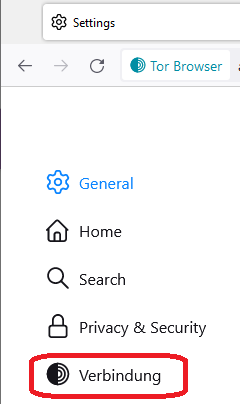
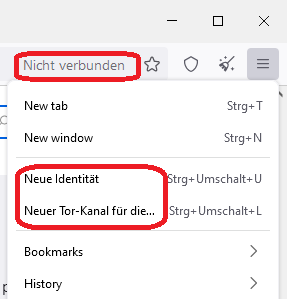
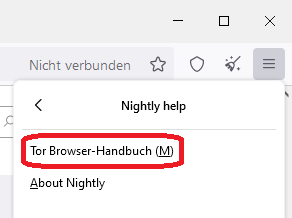
But, after switching to _English (en-US)_ via _about:preferences#general_ there are some untranslated texts, see screenshots for examples. The About dialog and manual are in English.
---
### Author:  [@donuts](https://forum.torproject.org/u/donuts)
#### Post date: [November 1, 2022, 4:49pm UTC](https://forum.torproject.org/t/new-alpha-release-tor-browser-12-0a4-android-windows-macos-linux/5366/3 "2022-11-01T16:49:08Z")
Hi @tobrop! It sounds like you’re experiencing this issue, which I’ve just opened a ticket for:
> **[Prompt users to restart after changing language (#41417) · Issues · The Tor...](https://gitlab.torproject.org/tpo/applications/tor-browser/-/issues/41417)**
>
> It sounds like Tor Browser needs to restart before certain Tor-specific strings will get reloaded. We should prompt the user to do so whenever they change language, otherwise...
Could you try restarting Tor Browser Alpha with your desired language selected in `about:preferences#general` to see if that fixes the untranslated strings please?
---
### Author:  [@tobrop](https://forum.torproject.org/u/tobrop)
#### Post date: [November 1, 2022, 5:19pm UTC](https://forum.torproject.org/t/new-alpha-release-tor-browser-12-0a4-android-windows-macos-linux/5366/4 "2022-11-01T17:19:37Z")
Yes, after restarting the browser the strings mentioned above are translated.
---
### Author:  [@tobrop](https://forum.torproject.org/u/tobrop)
#### Post date: [November 1, 2022, 5:22pm UTC](https://forum.torproject.org/t/new-alpha-release-tor-browser-12-0a4-android-windows-macos-linux/5366/5 "2022-11-01T17:22:09Z")
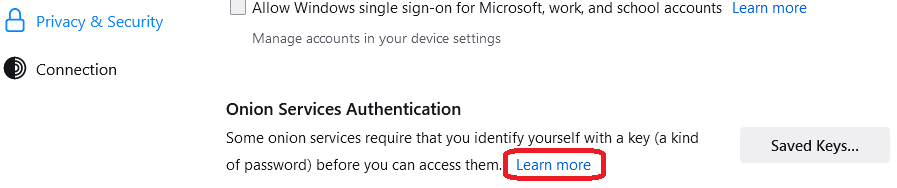
In the following screenshot, the “Learn more” link opens `https://support.torproject.org/en-US/onionservices/client-auth/`.
What about to open **about:manual#onion-services** instead? There’s a chapter `ONION SERVICE AUTHENTICATION`
---
### Author:  [@donuts](https://forum.torproject.org/u/donuts)
#### Post date: [November 1, 2022, 6:18pm UTC](https://forum.torproject.org/t/new-alpha-release-tor-browser-12-0a4-android-windows-macos-linux/5366/6 "2022-11-01T18:18:15Z")
> Yes, after restarting the browser the strings mentioned above are translated.
Great, thanks for confirming! We’ll improve that UX in a future release.
---
### Author:  [@TorUser234232](https://forum.torproject.org/u/TorUser234232)
#### Post date: [November 11, 2022, 10:21am UTC](https://forum.torproject.org/t/new-alpha-release-tor-browser-12-0a4-android-windows-macos-linux/5366/7 "2022-11-11T10:21:10Z")
Using 102.2.21-Beta (12.0a4) on android. Tried always prioritize .onion sites. Tried [blog.torproject.org](http://blog.torproject.org) and the new [reddit.com](http://reddit.com). Went to both sites. Neither redirected me to onion sites. Tor browser on alpha desktop forwards as expected.
I also have an issue with the tor-launcher migration.
I tried running normal Tor browser 11.5.7 (based on Mozilla Firefox 91.13.0esr) (64-bit) and have it open like normal. Launching Tor Alpha browser 12.0a4 (based on Mozilla Firefox 102.4.0esr) (64-bit) at the same time results in this popup. I guess non-standard setup would be running both normal Tor browser and alpha at same time. I have never been able to run both browsers at the same time. No change from previous alpha versions.
> Tor Launcher
>
> Tor exited during startup. This might be due to an error in your torrc file, a bug in Tor or another program on your system, or faulty hardware. Until you fix the underlying problem and restart Tor, Tor browser will not start.
---
### Author:  [@donuts](https://forum.torproject.org/u/donuts)
#### Post date: [November 11, 2022, 3:55pm UTC](https://forum.torproject.org/t/new-alpha-release-tor-browser-12-0a4-android-windows-macos-linux/5366/8 "2022-11-11T15:55:51Z")
Hi @TorUser234232, thanks for testing!
> [@TorUser234232](#):
>
> Using 102.2.21-Beta (12.0a4) on android. Tried always prioritize .onion sites. Tried [blog.torproject.org](http://blog.torproject.org) and the new [reddit.com](http://reddit.com). Went to both sites. Neither redirected me to onion sites. Tor browser on alpha desktop forwards as expected.
Strange, I just tested both URLs and was successfully redirected each time. Paging @PieroV to see what we can do to narrow down the bug.
> [@TorUser234232](#):
>
> I also have an issue with the tor-launcher migration.
> I tried running normal Tor browser 11.5.7 (based on Mozilla Firefox 91.13.0esr) (64-bit) and have it open like normal. Launching Tor Alpha browser 12.0a4 (based on Mozilla Firefox 102.4.0esr) (64-bit) at the same time results in this popup. I guess non-standard setup would be running both normal Tor browser and alpha at same time. I have never been able to run both browsers at the same time. No change from previous alpha versions.
Right, it’s not possible to run two Tor Browsers like that straight out of the box. By non-standard setups, we mean things like using system tor in conjunction with Tor Browser 🙂
---
### Author:  [@PieroV](https://forum.torproject.org/u/PieroV)
#### Post date: [November 11, 2022, 4:39pm UTC](https://forum.torproject.org/t/new-alpha-release-tor-browser-12-0a4-android-windows-macos-linux/5366/9 "2022-11-11T16:39:11Z")
> [@donuts](#):
>
> > [@TorUser234232](#):
> >
> > sites. Tor browser on alpha desktop forwards as expected.
>
> Strange, I just tested both URLs and was successfully redirected each time. Paging @PieroV to see what we can do to narrow down the bug.
Hello!
Onion-location has a huge defect: the event wired to onion location might takes a very long time to be triggered.
It depends on the size of a page, and on the circuit you are using in turn: if you got a slow circuit and the page is quite big, it might take more than a minute before starting redirecting you.
We have an issue for that on GitLab, but we never had the time to look at it properly (I’ve tried, but I fear you need to go down the rabbit hole of Firefox HTTP code).
> [@donuts](#):
>
> > [@TorUser234232](#):
> >
> > I also have an issue with the tor-launcher migration.
> > I tried running normal Tor browser 11.5.7 (based on Mozilla Firefox 91.13.0esr) (64-bit) and have it open like normal. Launching Tor Alpha browser 12.0a4 (based on Mozilla Firefox 102.4.0esr) (64-bit) at the same time results in this popup. I guess non-standard setup would be running both normal Tor browser and alpha at same time. I have never been able to run both browsers at the same time. No change from previous alpha versions.
>
> Right, it’s not possible to run two Tor Browsers like that straight out of the box. By non-standard setups, we mean things like using system tor in conjunction with Tor Browser 🙂
Basically, what Duncan said.
You could theoretically use two Tor Browsers by specifying a few environment variables.
You have two possibilities:
1. You use the same `tor` (as little-t-tor): one browser launches it, and controls it; the other one just connects to it (and it will not show you connection settings in `about:preferences`).
You will need to specify the same password for the control port to both browser (normally it’s randomly generated), and you will need to tell the second browser only to connect to `tor`.
2. You specify a custom couple of socks and control port addresses for one of the two browsers (e.g., SOCKS to 9502 and control to 9503).
One proposal was to randomize the port number used for the control port, but I didn’t like it very much (we’d need a way to avoid conflicts with other services on your system).
For the socks port, it’s possible to ask Tor to open one randomly and then tell you which one it’s using on the control port, but we haven’t implemented on the browser side, yet.
We plan to resume the work on this part of Tor Browser for 12.5 and we might implement this.
`TOR_CONTROL_PASSWD` is the variable used for the password, but you could use also a cookie file with `TOR_CONTROL_COOKIE_AUTH_FILE` (it will need the correct permissions, 600 on Linux IIRC, not sure for the other OS). You will need to set also `TOR_SKIP_LAUNCH`.
`TOR_CONTROL_PORT` and `TOR_SOCKS_PORT` are the variables to use for 2. If you are on a Unix system (Linux or macOS), you could also use Unix sockets. In case the variables are `TOR_CONTROL_IPC_PATH` and `TOR_SOCKS_IPC_PATH`.
These environment variables can be replaced with preferences in `about:config` (I don’t remember which ones, though).
These configurations haven’t tested very much 😅 so please let me know if you happened to test and found errors.
---
### Author:  [@TorUser234232](https://forum.torproject.org/u/TorUser234232)
#### Post date: [November 11, 2022, 7:21pm UTC](https://forum.torproject.org/t/new-alpha-release-tor-browser-12-0a4-android-windows-macos-linux/5366/10 "2022-11-11T19:21:10Z")
Thank you very much for the replies.
I tried the onion-location feature a few times. I was able to get it to redirect one time but other times it doesn’t seem to be working. Another time I went on the [torproject.org](http://torproject.org) website and even after about 10 minutes it hasn’t redirected. I also remember when I first installed this version of alpha it did seem to work for me so it seems to be hit or miss.
As far as the two versions running side by side I don’t mind having to run them separately. I just wanted to mention it since I wasn’t sure what was meant by “non-standard setups”
Thanks.
---
### Author:  [@PieroV](https://forum.torproject.org/u/PieroV)
#### Post date: [November 14, 2022, 8:44am UTC](https://forum.torproject.org/t/new-alpha-release-tor-browser-12-0a4-android-windows-macos-linux/5366/11 "2022-11-14T08:44:37Z")
Hi, sorry for missing this message before.
In my builds I get redirected to the correct manual page.
Could you please try again?
I’ve tried both in English and in German, on Linux, and English on Windows 10.
Have you tried with a fresh installation or updated an older alpha?
In the latter case it might be a problem of cache of UI files (which is a problem anyway…).
---
### Author:  [@tobrop](https://forum.torproject.org/u/tobrop)
#### Post date: [November 14, 2022, 10:16am UTC](https://forum.torproject.org/t/new-alpha-release-tor-browser-12-0a4-android-windows-macos-linux/5366/12 "2022-11-14T10:16:40Z")
It was a fresh installation of TB 12.0a4 64bit on a German Windows 10 64bit.
Just tried it again with a new installation of TB 12.0a4. Same behavior, the link opens `https://support.torproject.org/en-US/onionservices/client-auth/` respectively
`https://support.torproject.org/de-DE/onionservices/client-auth/`
---
### Author:  [@PieroV](https://forum.torproject.org/u/PieroV)
#### Post date: [November 14, 2022, 10:31am UTC](https://forum.torproject.org/t/new-alpha-release-tor-browser-12-0a4-android-windows-macos-linux/5366/13 "2022-11-14T10:31:39Z")
Sorry, my bad!
I’ve tested onion location instead of onion authentication! I’ve noticed only now that the screenshot was for the authentication.
And yes, I can indeed confirm the problem!
In our workflow we open GitLab issues, both to track the problems and to add them to the changelogs.
Do you have an account for our GitLab? In case would you like to open the issue yourself?
Otherwise I can do, as you prefer 🙂 .
Thank you!
---
### Author:  [@tobrop](https://forum.torproject.org/u/tobrop)
#### Post date: [November 14, 2022, 11:56am UTC](https://forum.torproject.org/t/new-alpha-release-tor-browser-12-0a4-android-windows-macos-linux/5366/14 "2022-11-14T11:56:35Z")
I’m sorry, I don’t have an account there.
---
### Author:  [@PieroV](https://forum.torproject.org/u/PieroV)
#### Post date: [November 14, 2022, 11:57am UTC](https://forum.torproject.org/t/new-alpha-release-tor-browser-12-0a4-android-windows-macos-linux/5366/15 "2022-11-14T11:57:01Z")
Okay, no problem at all, and thanks again for being an alpha tester 😄 .