# How to start Tor Browser on Linux
**URL:** https://forum.torproject.org/t/how-to-start-tor-browser-on-linux/11202
**Category:** Tor Browser Desktop
**Tags:** tor-browser
**Created:** [January 19, 2024, 6:04pm UTC](https://forum.torproject.org/t/how-to-start-tor-browser-on-linux/11202 "2024-01-19T18:04:41Z")
**Posts on this page:** 13
**Page:** 1
### Author:  [@anon48802337](https://forum.torproject.org/u/anon48802337)
#### Post date: [January 19, 2024, 6:04pm UTC](https://forum.torproject.org/t/how-to-start-tor-browser-on-linux/11202/1 "2024-01-19T18:04:41Z")
I refer to [INSTALLATION | Tor Project | Tor Browser Manual](https://tb-manual.torproject.org/installation/). According to the paragraph For GNU/Linux/ Graphical method, in file manager I right-clicked start-tor-browser.desktop and chose Properties and checked Executable as program. When I double-click it, it opens as text file. How do I start Tor Browser?
---
### Author:  [@Cryptux](https://forum.torproject.org/u/Cryptux)
#### Post date: [January 19, 2024, 7:58pm UTC](https://forum.torproject.org/t/how-to-start-tor-browser-on-linux/11202/2 "2024-01-19T19:58:20Z")
Hi,
Which distro do you use? Is your “start-tor-browser.desktop” is reconized as an executable file?
---
### Author:  [@anon48802337](https://forum.torproject.org/u/anon48802337)
#### Post date: [January 20, 2024, 11:54am UTC](https://forum.torproject.org/t/how-to-start-tor-browser-on-linux/11202/3 "2024-01-20T11:54:41Z")
Hello,
> [@Cryptux](#):
>
> Which distro do you use?
It’s Fedora.
> [@Cryptux](#):
>
> Is your “start-tor-browser.desktop” is reconized as an executable file?
> [@anon48802337](#):
>
> in file manager I right-clicked start-tor-browser.desktop and chose Properties and checked Executable as program. When I double-click it, it opens as text file.
I don’t get what you mean by ‘reconized’? It seems, it’s not.
---
### Author:  [@Cryptux](https://forum.torproject.org/u/Cryptux)
#### Post date: [January 20, 2024, 10:27pm UTC](https://forum.torproject.org/t/how-to-start-tor-browser-on-linux/11202/4 "2024-01-20T22:27:29Z")
For me if the script is opened with the notepad, it means the OS doesn’t interpret it like a executable file. If you do a right-click on it, do you have the possibility to execute it?
---
### Author:  [@thorin](https://forum.torproject.org/u/thorin)
#### Post date: [January 20, 2024, 10:35pm UTC](https://forum.torproject.org/t/how-to-start-tor-browser-on-linux/11202/5 "2024-01-20T22:35:31Z")
IANALinuxExpert … but I do test multiple releases in linux VMs (test builds, alpha, stable, nightly … ) and the problem here is GNOME made changes in Nautilus
we need to update that tor doc, and/or find a better way for users to launch the app - meanwhile you can run it via the terminal, or what I do which is a bit messy, is I locate the exe and right click and run that as program (it opens a terminal in the background)
---
### Author:  [@thorin](https://forum.torproject.org/u/thorin)
#### Post date: [January 21, 2024, 1:50am UTC](https://forum.torproject.org/t/how-to-start-tor-browser-on-linux/11202/6 "2024-01-21T01:50:25Z")
I opened [update docs and/or do something about launching app on GNOME/Nautilus (#42379) · Issues · The Tor Project / Applications / Tor Browser · GitLab](https://gitlab.torproject.org/tpo/applications/tor-browser/-/issues/42379)
---
### Author:  [@anon48802337](https://forum.torproject.org/u/anon48802337)
#### Post date: [January 22, 2024, 10:05am UTC](https://forum.torproject.org/t/how-to-start-tor-browser-on-linux/11202/7 "2024-01-22T10:05:48Z")
When I right-click, there’s a Execute as Application option. When I pick that, a window pops up for half a sec. or so and disappears. Can’t see or read what’s in that window. Nothing more occurs. Tor Browser isn’t launched.
---
### Author:  [@thorin](https://forum.torproject.org/u/thorin)
#### Post date: [January 22, 2024, 11:02am UTC](https://forum.torproject.org/t/how-to-start-tor-browser-on-linux/11202/8 "2024-01-22T11:02:13Z")
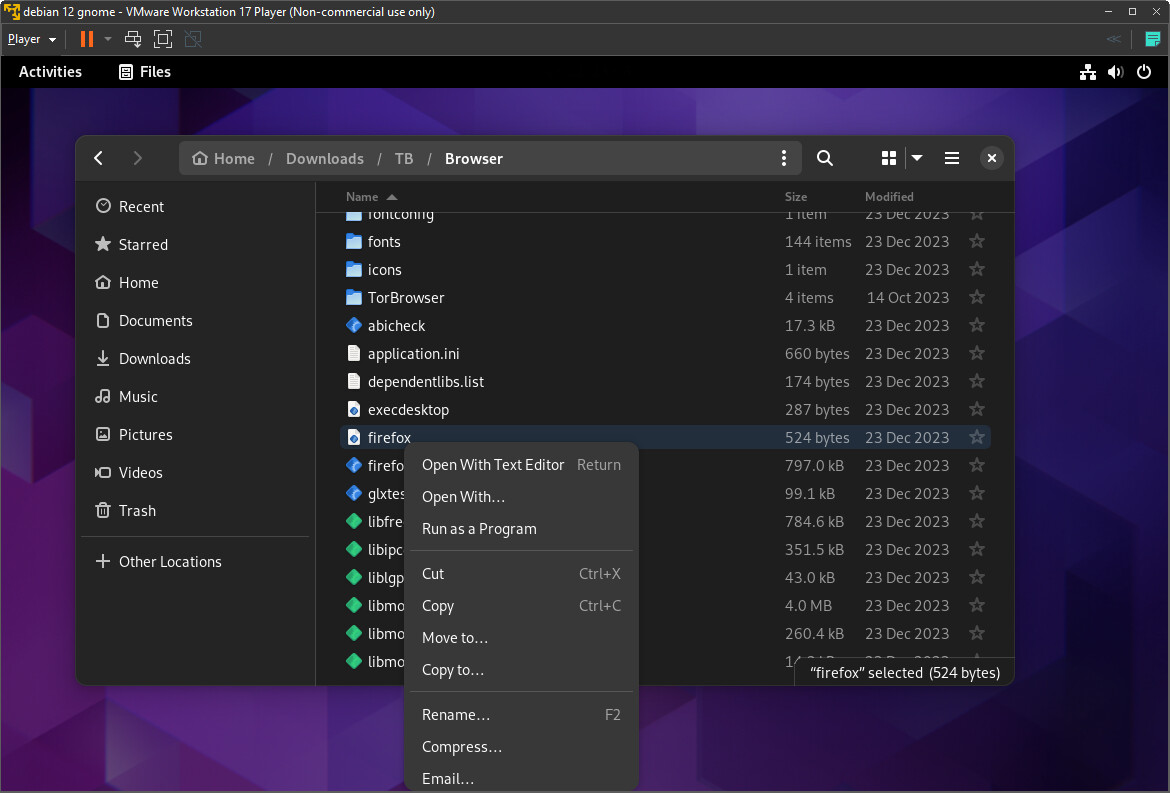
~~here’s what “works” for me in debian - find the executable in the `Browser` directory and right click that - mine says `Run as a Program`~~
apparently this a bad idea, but it’s the only thing that works for ME on my VM (and I’m just testing, not using)
---
### Author:  [@anon48802337](https://forum.torproject.org/u/anon48802337)
#### Post date: [January 22, 2024, 5:26pm UTC](https://forum.torproject.org/t/how-to-start-tor-browser-on-linux/11202/9 "2024-01-22T17:26:13Z")
@thorin
> [@thorin](#):
>
> I opened [update docs and/or do something about launching app on GNOME/Nautilus (#42379) · Issues · The Tor Project / Applications / Tor Browser · GitLab](https://gitlab.torproject.org/tpo/applications/tor-browser/-/issues/42379)
Can someone post here if docs are updated and/or launching from GNOME file manager works again?
---
### Author:  [@PieroV](https://forum.torproject.org/u/PieroV)
#### Post date: [January 25, 2024, 10:33am UTC](https://forum.torproject.org/t/how-to-start-tor-browser-on-linux/11202/10 "2024-01-25T10:33:53Z")
Please use the `start-tor-browser` executable rather than `firefox`.
`firefox` is lacking the preparation of the environment as we do it in `start-tor-browser`.
Maybe we should just unify the two scripts (the reason for having two is that it was needed for the updater in systems that ships an older libstdc++6 than the one we link against).
If `start-tor-browser` doesn’t work for you, could you please try to open a terminal in the `.../Browser` directory (you can open a terminal with right click, or open a normal terminal and then do `cd "/home/..../Browser"`).
Once you are there, please use this command: `./start-tor-browser -v`.
It will enable the verbose output, allowing us to understand if there’s something wrong with the script.
---
### Author:  [@thorin](https://forum.torproject.org/u/thorin)
#### Post date: [January 25, 2024, 10:44am UTC](https://forum.torproject.org/t/how-to-start-tor-browser-on-linux/11202/11 "2024-01-25T10:44:34Z")
closed my issue as a duplicate - the original issue is [start-tor-browser.desktop hack will soon stop working (#21939) · Issues · The Tor Project / Applications / tor-browser-build · GitLab](https://gitlab.torproject.org/tpo/applications/tor-browser-build/-/issues/21939)
---
### Author:  [@anon48802337](https://forum.torproject.org/u/anon48802337)
#### Post date: [January 26, 2024, 11:39am UTC](https://forum.torproject.org/t/how-to-start-tor-browser-on-linux/11202/12 "2024-01-26T11:39:40Z")
> [@PieroV](#):
>
> Please use the `start-tor-browser` executable rather than `firefox`.
When you write `start-tor-browser` executable (without .desktop), do you mean the `start-tor-browser` shell script in the directory `Browser`, the subdirectory of `tor-browser` where `start-tor-browser.desktop` is?
What do you mean with `firefox`? Do you mean I should rather use Tor Browser than `firefox`?
---
### Author:  [@PieroV](https://forum.torproject.org/u/PieroV)
#### Post date: [January 26, 2024, 1:56pm UTC](https://forum.torproject.org/t/how-to-start-tor-browser-on-linux/11202/13 "2024-01-26T13:56:54Z")
> [@anon48802337](#):
>
> When you write `start-tor-browser` executable (without .desktop), do you mean the `start-tor-browser` shell script in the directory `Browser`, the subdirectory of `tor-browser` where `start-tor-browser.desktop` is?
Yes.
I normally don’t use the `.desktop` (I usually launch from the terminal…), but the `.desktop` is also supposed to work, if your system supports it.
> [@anon48802337](#):
>
> What do you mean with `firefox`? Do you mean I should rather use Tor Browser than `firefox`?
Tor Browser is a Firefox fork.
You can customize the name of the binary, but we didn’t know it, and eventually also the main binary of Tor Browser is called `firefox` (`firefox.real`, actually). For Mullvad Browser, we knew this, and called the binary `mullvadbrowser`.
In particular, there are the following files in the `Browser` directory:
- `start-tor-browser`: a shell script that does some environment customziation (rewrites `$HOME`, set a custom fontconfig configuration, etc…). **This is one of the two script to use to start Tor Browser**.
- `start-tor-browser.desktop`: calls `start-tor-browser`, but it has a custom icon (if your file manager supports it - notably Nautilus doesn’t to avoid attacks from untrusted `.desktop` files). **This is also a way to start Tor Browser** , if your system supports it.
- `firefox.real`: this is the real compiled binary. **You shouldn’t launch it directly** , because it will be missing some protections that the custom environment set by the other two files would prepare. You might be fingerprintable from other Tor Browser users if you use it directly.
- The only case in which you need to use this is if you want to launch Tor Browser inside a debugger. In that case, please remember to customize your debugging environment to look like the environment we create. However, when you build Tor Browser/Firefox for debugging, you won’t need to launch it inside a debugger, because Firefox integrates some utilities to tell you the PID to attach to it if it crashes.
- `firefox`: this is a wrapper for `firefox.real`. It checks if your system has a recent enough `libstdc++6.so`, and if it doesn’t, it adds the directory that contains the `libstdc++6.so` we ship to `LD_LIBRARY_PATH`. It was created for updating purposes, I don’t know if it’s still needed/it still works. **You shouldn’t launch directly this** , like `firefox.real` it lacks the custom environment.
These files are not related at all to the `firefox` command that usually is the official Firefox, packaged by your distribution and you can usually find in a directory such as `/usr/bin`.
I was talking about the `firefox` script with execution permission we ship.