# How to launch a Tor proxy server?
**URL:** https://forum.torproject.org/t/how-to-launch-a-tor-proxy-server/7981
**Category:** Core Tor
**Tags:** tor-browser
**Created:** [June 13, 2023, 11:38am UTC](https://forum.torproject.org/t/how-to-launch-a-tor-proxy-server/7981 "2023-06-13T11:38:23Z")
**Posts on this page:** 20
**Page:** 1
### Author:  [@hack3rcon](https://forum.torproject.org/u/hack3rcon)
#### Post date: [June 13, 2023, 11:38am UTC](https://forum.torproject.org/t/how-to-launch-a-tor-proxy-server/7981/1 "2023-06-13T11:38:24Z")
Hello,
I want to setup Tor as a proxy server and a remote computer connect to my system and use Tor. I opened “/etc/tor/torrc” file and added the following lines to it:
```auto
SocksListenAddress (Server's internal IP address)
SocksPolicy accept *
SocksPort 0.0.0.0:9050
```
Then, restarted the Tor service:
```auto
● tor.service - Anonymizing overlay network for TCP (multi-instance-master)
Loaded: loaded (/lib/systemd/system/tor.service; enabled; vendor preset: enabled)
Active: active (exited) since Wed 2022-12-14 09:47:38 +0330; 5min ago
Process: 9759 ExecStart=/bin/true (code=exited, status=0/SUCCESS)
Main PID: 9759 (code=exited, status=0/SUCCESS)
Dec 14 09:47:38 User systemd[1]: Starting Anonymizing overlay network for TCP (multi-instance-master)...
Dec 14 09:47:38 User systemd[1]: Started Anonymizing overlay network for TCP (multi-instance-master).
```
After it, I opened port 9050 with the following command:
```auto
$ sudo iptables -A INPUT -p tcp --dport 9050 -j ACCEPT
```
My system iptables rules are:
```auto
Chain INPUT (policy DROP)
target prot opt source destination
ACCEPT all -- 127.0.0.0/8 127.0.0.0/8
ACCEPT all -- anywhere anywhere state RELATED,ESTABLISHED
REJECT all -- anywhere anywhere reject-with icmp-port-unreachable
ACCEPT all -- anywhere anywhere state RELATED,ESTABLISHED
ACCEPT all -- anywhere anywhere
SYN_FLOOD tcp -- anywhere anywhere tcp flags:FIN,SYN,RST,ACK/SYN
ACCEPT tcp -- anywhere anywhere tcp dpt:9050
Chain FORWARD (policy DROP)
target prot opt source destination
REJECT all -- anywhere anywhere reject-with icmp-port-unreachable
Chain OUTPUT (policy ACCEPT)
target prot opt source destination
ACCEPT tcp -- anywhere anywhere
ACCEPT udp -- anywhere anywhere
ACCEPT icmp -- anywhere anywhere
REJECT all -- anywhere anywhere reject-with icmp-port-unreachable
ACCEPT all -- anywhere anywhere
Chain SYN_FLOOD (1 references)
target prot opt source destination
RETURN all -- anywhere anywhere limit: avg 5/sec burst 10
DROP all -- anywhere anywhere
```
On the client, I set a SOCKS5 proxy in the Internet browser, but I got the following error:
```auto
The proxy server is refusing connections
```
Why? How to solve it?
Thank you.
---
### Author:  [@Vort](https://forum.torproject.org/u/Vort)
#### Post date: [June 13, 2023, 2:45pm UTC](https://forum.torproject.org/t/how-to-launch-a-tor-proxy-server/7981/2 "2023-06-13T14:45:44Z")
I expect that your server may not have public IP address available.
Other possibility is that something between client and server is blocking access.
What you may try is configuring simpler service (like web server) in the same way. If it will work, then problem is Tor-specific, if not, then access is just blocked somehow.
Also, I think that `SocksListenAddress` and `SocksPolicy` lines are not needed. `SocksPort 0.0.0.0:9050` should be enough.
---
### Author:  [@hack3rcon](https://forum.torproject.org/u/hack3rcon)
#### Post date: [June 14, 2023, 9:43am UTC](https://forum.torproject.org/t/how-to-launch-a-tor-proxy-server/7981/3 "2023-06-14T09:43:15Z")
Hello,
Thank you so much for your reply.
Which one is the main Tor configuration file?
```auto
$ ls /etc/tor/
torrc torsocks.conf
```
Thank you.
---
### Author:  [@Vort](https://forum.torproject.org/u/Vort)
#### Post date: [June 14, 2023, 10:38am UTC](https://forum.torproject.org/t/how-to-launch-a-tor-proxy-server/7981/4 "2023-06-14T10:38:22Z")
`torsocks` is proxy client, not server.
So correct config for server is `torrc`.
However, I’m not sure what is correct location for it.
Linux directory structure always confuses me.
But it is important to check if file, which you change, is actually used by Tor.
So try to confirm that modifications of this file are actually doing something.
Another method of debugging this problem is by using `netstat`.
I believe it can show if port is bound to `127.0.0.1` or `0.0.0.0`.
---
### Author:  [@hack3rcon](https://forum.torproject.org/u/hack3rcon)
#### Post date: [June 14, 2023, 12:04pm UTC](https://forum.torproject.org/t/how-to-launch-a-tor-proxy-server/7981/5 "2023-06-14T12:04:47Z")
Thank you again.
The Tor is running:
```auto
$ netstat -nat
Active Internet connections (servers and established)
Proto Recv-Q Send-Q Local Address Foreign Address State
tcp 0 0 127.0.0.1:5433 0.0.0.0:* LISTEN
tcp 0 0 127.0.0.1:5434 0.0.0.0:* LISTEN
tcp 0 0 0.0.0.0:9050 0.0.0.0:* LISTEN
tcp 0 0 127.0.0.1:5435 0.0.0.0:* LISTEN
tcp 0 0 0.0.0.0:2049 0.0.0.0:* LISTEN
...
```
But, the client can’t connect to it:
```auto
C:\>ncat IP -v 9050
Ncat: Version 7.93 ( https://nmap.org/ncat )
libnsock ssl_init_helper(): OpenSSL legacy provider failed to load.
Ncat: No connection could be made because the target machine actively refused it. .
```
---
### Author:  [@Vort](https://forum.torproject.org/u/Vort)
#### Post date: [June 14, 2023, 3:53pm UTC](https://forum.torproject.org/t/how-to-launch-a-tor-proxy-server/7981/6 "2023-06-14T15:53:23Z")
Ok, `netstat` shows that port is correctly opened at server side.
To rule out possibility that something is wrong with client PC, you can check if port is accessible with this service: [https://ping.eu/port-chk/](https://ping.eu/port-chk/).
---
### Author:  [@hack3rcon](https://forum.torproject.org/u/hack3rcon)
#### Post date: [June 15, 2023, 10:38pm UTC](https://forum.torproject.org/t/how-to-launch-a-tor-proxy-server/7981/7 "2023-06-15T22:38:01Z")
Hello,
Thank you again for your help.
My PC is on an internal network and I can’t use that service to check my system port. What is the next option?
---
### Author:  [@Vort](https://forum.torproject.org/u/Vort)
#### Post date: [June 16, 2023, 6:47am UTC](https://forum.torproject.org/t/how-to-launch-a-tor-proxy-server/7981/8 "2023-06-16T06:47:36Z")
Do you mean that both server and client are in internal network?
If they are in different networks, then that’s the reason why you can’t connect them.
_(Just in case: port-chk service can be accessed from any PC, which have Internet access. However, it can check ports only for services with public IPs)_
---
### Author:  [@hack3rcon](https://forum.torproject.org/u/hack3rcon)
#### Post date: [June 16, 2023, 8:23pm UTC](https://forum.torproject.org/t/how-to-launch-a-tor-proxy-server/7981/9 "2023-06-16T20:23:16Z")
Yes, they are.
What is the problem?
---
### Author:  [@Vort](https://forum.torproject.org/u/Vort)
#### Post date: [June 17, 2023, 6:36am UTC](https://forum.torproject.org/t/how-to-launch-a-tor-proxy-server/7981/10 "2023-06-17T06:36:57Z")
> [@hack3rcon](#):
>
> What is the problem?
As you see, port cannot be checked with external services.
In such case, you may install Wireshark (or dumpcap) and capture network packets with `port 9050` filter.
It is easier to start looking at packets from client PC, then same procedure can be repeated at server.
What needs to be checked: if client sends correct requests and if server receives it.
Here is an example:
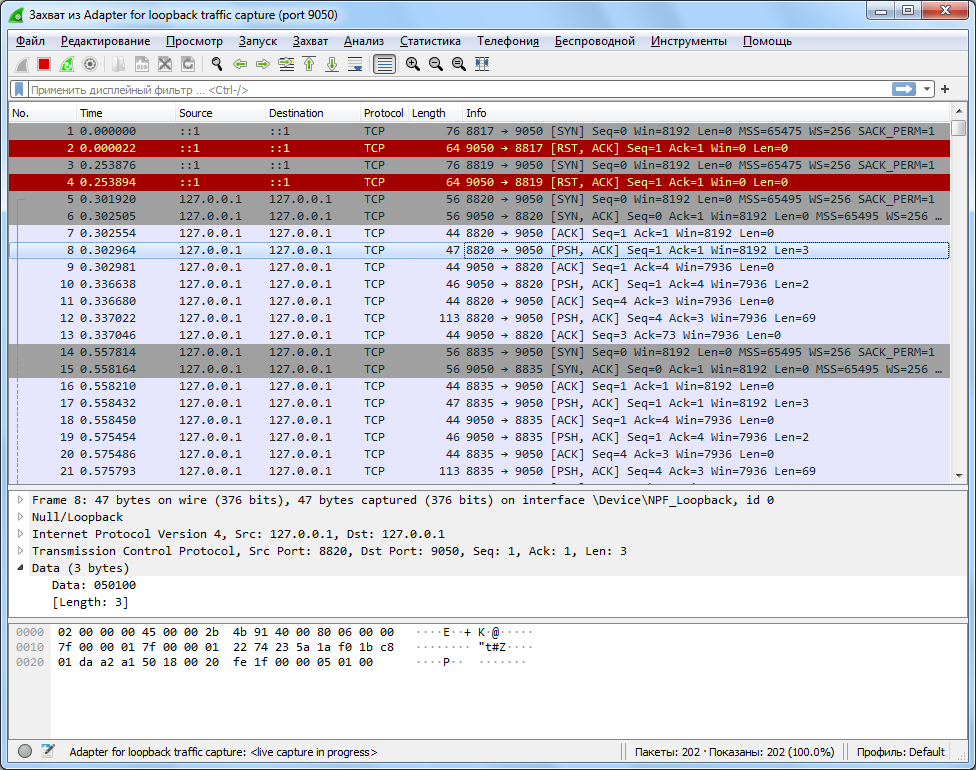
Packets 1 + 2 are example of failure (SYN, RST+ACK) [Tor is listening on IPv4 address, not IPv6].
Packets 5 + 6 + 7 + 8 + … are example of success (SYN, SYN+ACK, ACK, PSH+ACK).
---
### Author:  [@hack3rcon](https://forum.torproject.org/u/hack3rcon)
#### Post date: [June 17, 2023, 4:17pm UTC](https://forum.torproject.org/t/how-to-launch-a-tor-proxy-server/7981/11 "2023-06-17T16:17:51Z")
Hello,
Thank you so much for your help.
I installed a Windows VM via VirtualBox and used NAT as its network settings, then I used the default gateway IP address instead of its IP address and as you see it connected:
```auto
C:\> ncat 10.0.2.2 -v 9050
Ncat: Version 7.93 ( https://nmap.org/ncat )
libnsock ssl_init_helper(): OpenSSL legacy provider failed to load.
Ncat: Connected to 10.0.2.2:9050.
```
Can you tell me why I must use the default gateway instead of the IP address?
In the Windows VM, I used Firefox with SOCKS v5, and set SOCKS Host to “10.0.2.2” and Port to “9050”, but I couldn’t browse any website. When I selected “Proxy DNS when using SOCKS v5” option, then it’s working.
My question is that why I must use the default gateway instead of the IP address?
On a real client (not VM) in my local network, I tested port 9050 and I got the following result:
```auto
C:\> nc 172.21.50.61 -v 9050
172.21.50.61: inverse host lookup failed: h_errno 11004: NO_DATA
(UNKNOWN) [172.21.50.61] 9050 (?): TIMEDOUT
```
Why? Are my iptables rules wrong? If yes, then why Windows VM can connect?
---
### Author:  [@Vort](https://forum.torproject.org/u/Vort)
#### Post date: [June 17, 2023, 6:01pm UTC](https://forum.torproject.org/t/how-to-launch-a-tor-proxy-server/7981/12 "2023-06-17T18:01:05Z")
> [@hack3rcon](#):
>
> Can you tell me why I must use the default gateway instead of the IP address?
In my VM, 10.0.2.2 is not gateway, but DNS server.
It happens because 10.0.2.2 corresponds to your host (Linux), not guest (Windows).
So from the host’s point of view, connection was established from 127.0.0.1 to 127.0.0.1.
> [@hack3rcon](#):
>
> When I selected “Proxy DNS when using SOCKS v5” option, then it’s working
Maybe system DNS works incorrectly inside VM.
Also if you tested hidden services, then system DNS can’t know about them at all.
> [@hack3rcon](#):
>
> Why? Are my iptables rules wrong?
Probably.
I’m not much familiar with iptables, so I was not able to check if your configuration is correct. I saw `REJECT all` in your quote before `ACCEPT tcp`, but I can’t say yet if it is fine or not.
Maybe it is possible to disable firewall in Linux? Or maybe you can install Linux inside VM and check what are default and definitely correct entries for iptables?
---
### Author:  [@hack3rcon](https://forum.torproject.org/u/hack3rcon)
#### Post date: [June 18, 2023, 7:53am UTC](https://forum.torproject.org/t/how-to-launch-a-tor-proxy-server/7981/13 "2023-06-18T07:53:20Z")
Hello,
Thank you again for your reply.
Why configure a Tor server is hard? I want to configure a Tor router that clients connect to it and use Tor.
How about the following lines?
```auto
SocksPort 192.168.1.100:9050
SocksPolicy accept 192.168.1.0/24
RunAsDaemon 1
DataDirectory /var/lib/tor
ControlPort 9051
CookieAuthentication 1
```
---
### Author:  [@Vort](https://forum.torproject.org/u/Vort)
#### Post date: [June 18, 2023, 9:31am UTC](https://forum.torproject.org/t/how-to-launch-a-tor-proxy-server/7981/14 "2023-06-18T09:31:12Z")
> [@hack3rcon](#):
>
> Why configure a Tor server is hard?
Because configuring Linux is hard.
I tried simple `SocksPort 0.0.0.0:9050` on my Windows PC and it started worked just fine after allowing access in the appeared window.
---
### Author:  [@hack3rcon](https://forum.torproject.org/u/hack3rcon)
#### Post date: [June 18, 2023, 2:14pm UTC](https://forum.torproject.org/t/how-to-launch-a-tor-proxy-server/7981/15 "2023-06-18T14:14:42Z")
Hello,
Thank you for your reply.
Can other clients connect to your Windows box and use the Tor service?
I changed the Tor configuration as follow:
```auto
SocksPort 172.21.50.61:9050
SocksPolicy accept 172.21.50.0/25
RunAsDaemon 1
DataDirectory /var/lib/tor
CookieAuthentication 1
```
I restarted the Tor service and it is running:
```auto
$ netstat -nat
Active Internet connections (servers and established)
Proto Recv-Q Send-Q Local Address Foreign Address State
...
tcp 0 0 172.21.50.61:9050 0.0.0.0:* LISTEN
...
```
I changed the network settings to the Bridged Adapter and my Windows VM got a new IP address in the range of my Linux host and has Internet access too:
```auto
C:\>ipconfig /all
Windows IP Configuration
Host Name . . . . . . . . . . . . : Windows-VM
Primary Dns Suffix . . . . . . . : MyNetwork.xyz
Node Type . . . . . . . . . . . . : Hybrid
IP Routing Enabled. . . . . . . . : No
WINS Proxy Enabled. . . . . . . . : No
DNS Suffix Search List. . . . . . : MyNetwork.xyz
Ethernet adapter Ethernet:
Connection-specific DNS Suffix . : MyNetwork.xyz
Description . . . . . . . . . . . : Intel(R) PRO/1000 MT Desktop Adapter
Physical Address. . . . . . . . . : 08-00-27-B9-2C-B5
DHCP Enabled. . . . . . . . . . . : Yes
Autoconfiguration Enabled . . . . : Yes
Link-local IPv6 Address . . . . . : fe80::4d7e:3a8:5c36:b153%6(Preferred)
IPv4 Address. . . . . . . . . . . : 172.21.50.67(Preferred)
Subnet Mask . . . . . . . . . . . : 255.255.255.128
Lease Obtained. . . . . . . . . . : Sunday, June 18, 2023 2:05:11 PM
Lease Expires . . . . . . . . . . : Monday, June 19, 2023 2:04:59 PM
Default Gateway . . . . . . . . . : 0.0.0.0
172.21.50.62
DHCP Server . . . . . . . . . . . : 172.20.1.48
DHCPv6 IAID . . . . . . . . . . . : 101187623
DHCPv6 Client DUID. . . . . . . . : 00-01-00-01-28-BD-7F-C6-08-00-27-B9-2C-B5
DNS Servers . . . . . . . . . . . : 172.20.1.2
172.20.1.7
Primary WINS Server . . . . . . . : 172.20.1.5
Secondary WINS Server . . . . . . : 172.20.1.7
NetBIOS over Tcpip. . . . . . . . : Enabled
C:\>
C:\> ping 8.8.8.8
Pinging 8.8.8.8 with 32 bytes of data:
Reply from 8.8.8.8: bytes=32 time=47ms TTL=108
Reply from 8.8.8.8: bytes=32 time=40ms TTL=108
Reply from 8.8.8.8: bytes=32 time=40ms TTL=108
Reply from 8.8.8.8: bytes=32 time=41ms TTL=108
Ping statistics for 8.8.8.8:
Packets: Sent = 4, Received = 4, Lost = 0 (0% loss),
Approximate round trip times in milli-seconds:
Minimum = 40ms, Maximum = 47ms, Average = 42ms
```
I can’t ping my Linux host and I guess this is because of the iptables rules:
```auto
C:\> ping 172.21.50.61
Pinging 172.21.50.61 with 32 bytes of data:
Reply from 172.21.50.61: Destination port unreachable.
Reply from 172.21.50.61: Destination port unreachable.
Reply from 172.21.50.61: Destination port unreachable.
Reply from 172.21.50.61: Destination port unreachable.
Ping statistics for 172.21.50.61:
Packets: Sent = 4, Received = 4, Lost = 0 (0% loss),
```
Can it cause a problem?
I did a Netcat, and the result is:
```auto
C:\> ncat 172.21.50.61 -v 9050
Ncat: Version 7.93 ( https://nmap.org/ncat )
libnsock ssl_init_helper(): OpenSSL legacy provider failed to load.
Ncat: TIMEOUT.
```
When I ran the Netcat in my Windows VM, I did a tcpdump on Linux host and results are:
```auto
$ sudo tcpdump -A -i eth1 -vv 'port 9050'
tcpdump: listening on eth1, link-type EN10MB (Ethernet), snapshot length 262144 bytes
14:23:15.103995 IP (tos 0x0, ttl 128, id 1199, offset 0, flags [DF], proto TCP (6), length 52)
172.21.50.67.8918 > 10.0.2.2.9050: Flags [S], cksum 0xba83 (correct), seq 518810149, win 64240, options [mss 1460,nop,wscale 8,nop,nop,sackOK], length 0
E..4..@.......2C
...".#Z..j%........................
14:23:15.379653 IP (tos 0x0, ttl 128, id 1200, offset 0, flags [DF], proto TCP (6), length 52)
172.21.50.67.8919 > 10.0.2.2.9050: Flags [S], cksum 0xbbfc (correct), seq 2453271901, win 64240, options [mss 1460,nop,wscale 8,nop,nop,sackOK], length 0
E..4..@.......2C
...".#Z.9.]........................
14:23:16.135299 IP (tos 0x0, ttl 128, id 1201, offset 0, flags [DF], proto TCP (6), length 52)
172.21.50.67.8918 > 10.0.2.2.9050: Flags [S], cksum 0xba83 (correct), seq 518810149, win 64240, options [mss 1460,nop,wscale 8,nop,nop,sackOK], length 0
E..4..@.......2C
...".#Z..j%........................
14:23:16.385244 IP (tos 0x0, ttl 128, id 29474, offset 0, flags [DF], proto TCP (6), length 52)
172.21.50.67.8920 > 172.21.50.61.9050: Flags [S], cksum 0xa31d (correct), seq 32295992, win 64240, options [mss 1460,nop,wscale 8,nop,nop,sackOK], length 0
E..4s"@.......2C..2=".#Z...8........................
14:23:16.391966 IP (tos 0x0, ttl 128, id 1202, offset 0, flags [DF], proto TCP (6), length 52)
172.21.50.67.8919 > 10.0.2.2.9050: Flags [S], cksum 0xbbfc (correct), seq 2453271901, win 64240, options [mss 1460,nop,wscale 8,nop,nop,sackOK], length 0
E..4..@.......2C
...".#Z.9.]........................
14:23:17.397237 IP (tos 0x0, ttl 128, id 29475, offset 0, flags [DF], proto TCP (6), length 52)
172.21.50.67.8920 > 172.21.50.61.9050: Flags [S], cksum 0xa31d (correct), seq 32295992, win 64240, options [mss 1460,nop,wscale 8,nop,nop,sackOK], length 0
E..4s#@.......2C..2=".#Z...8........................
14:23:18.135421 IP (tos 0x0, ttl 128, id 1203, offset 0, flags [DF], proto TCP (6), length 52)
172.21.50.67.8918 > 10.0.2.2.9050: Flags [S], cksum 0xba83 (correct), seq 518810149, win 64240, options [mss 1460,nop,wscale 8,nop,nop,sackOK], length 0
E..4..@.......2C
...".#Z..j%........................
14:23:18.405281 IP (tos 0x0, ttl 128, id 1204, offset 0, flags [DF], proto TCP (6), length 52)
172.21.50.67.8919 > 10.0.2.2.9050: Flags [S], cksum 0xbbfc (correct), seq 2453271901, win 64240, options [mss 1460,nop,wscale 8,nop,nop,sackOK], length 0
E..4..@.......2C
...".#Z.9.]........................
14:23:19.412358 IP (tos 0x0, ttl 128, id 29476, offset 0, flags [DF], proto TCP (6), length 52)
172.21.50.67.8920 > 172.21.50.61.9050: Flags [S], cksum 0xa31d (correct), seq 32295992, win 64240, options [mss 1460,nop,wscale 8,nop,nop,sackOK], length 0
E..4s$@.......2C..2=".#Z...8........................
14:23:20.112987 IP (tos 0x0, ttl 128, id 1205, offset 0, flags [DF], proto TCP (6), length 52)
172.21.50.67.8921 > 10.0.2.2.9050: Flags [S], cksum 0x2c4d (correct), seq 2722591997, win 64240, options [mss 1460,nop,wscale 8,nop,nop,sackOK], length 0
E..4..@.......2C
...".#Z.Gt.........,M..............
14:23:20.364403 IP (tos 0x0, ttl 128, id 1206, offset 0, flags [DF], proto TCP (6), length 52)
172.21.50.67.8922 > 10.0.2.2.9050: Flags [S], cksum 0xea5c (correct), seq 1965417486, win 64240, options [mss 1460,nop,wscale 8,nop,nop,sackOK], length 0
E..4..@.......2C
...".#Zu%...........\..............
14:23:21.117852 IP (tos 0x0, ttl 128, id 1207, offset 0, flags [DF], proto TCP (6), length 52)
172.21.50.67.8921 > 10.0.2.2.9050: Flags [S], cksum 0x2c4d (correct), seq 2722591997, win 64240, options [mss 1460,nop,wscale 8,nop,nop,sackOK], length 0
E..4..@.......2C
...".#Z.Gt.........,M..............
14:23:21.378889 IP (tos 0x0, ttl 128, id 1208, offset 0, flags [DF], proto TCP (6), length 52)
172.21.50.67.8922 > 10.0.2.2.9050: Flags [S], cksum 0xea5c (correct), seq 1965417486, win 64240, options [mss 1460,nop,wscale 8,nop,nop,sackOK], length 0
E..4..@.......2C
...".#Zu%...........\..............
14:23:23.118687 IP (tos 0x0, ttl 128, id 1209, offset 0, flags [DF], proto TCP (6), length 52)
172.21.50.67.8921 > 10.0.2.2.9050: Flags [S], cksum 0x2c4d (correct), seq 2722591997, win 64240, options [mss 1460,nop,wscale 8,nop,nop,sackOK], length 0
E..4..@.......2C
...".#Z.Gt.........,M..............
14:23:23.389242 IP (tos 0x0, ttl 128, id 1210, offset 0, flags [DF], proto TCP (6), length 52)
172.21.50.67.8922 > 10.0.2.2.9050: Flags [S], cksum 0xea5c (correct), seq 1965417486, win 64240, options [mss 1460,nop,wscale 8,nop,nop,sackOK], length 0
E..4..@.......2C
...".#Zu%...........\..............
14:23:23.435442 IP (tos 0x0, ttl 128, id 29477, offset 0, flags [DF], proto TCP (6), length 52)
172.21.50.67.8920 > 172.21.50.61.9050: Flags [S], cksum 0xa31d (correct), seq 32295992, win 64240, options [mss 1460,nop,wscale 8,nop,nop,sackOK], length 0
E..4s%@.......2C..2=".#Z...8........................
14:23:25.120212 IP (tos 0x0, ttl 128, id 1211, offset 0, flags [DF], proto TCP (6), length 52)
172.21.50.67.8923 > 10.0.2.2.9050: Flags [S], cksum 0x3ff3 (correct), seq 2250931570, win 64240, options [mss 1460,nop,wscale 8,nop,nop,sackOK], length 0
E..4..@.......2C
...".#Z.*}r........?...............
14:23:25.384437 IP (tos 0x0, ttl 128, id 1212, offset 0, flags [DF], proto TCP (6), length 52)
172.21.50.67.8924 > 10.0.2.2.9050: Flags [S], cksum 0x9e87 (correct), seq 2474774917, win 64240, options [mss 1460,nop,wscale 8,nop,nop,sackOK], length 0
E..4..@.......2C
...".#Z............................
14:23:26.122266 IP (tos 0x0, ttl 128, id 1213, offset 0, flags [DF], proto TCP (6), length 52)
172.21.50.67.8923 > 10.0.2.2.9050: Flags [S], cksum 0x3ff3 (correct), seq 2250931570, win 64240, options [mss 1460,nop,wscale 8,nop,nop,sackOK], length 0
E..4..@.......2C
...".#Z.*}r........?...............
14:23:26.388450 IP (tos 0x0, ttl 128, id 1214, offset 0, flags [DF], proto TCP (6), length 52)
172.21.50.67.8924 > 10.0.2.2.9050: Flags [S], cksum 0x9e87 (correct), seq 2474774917, win 64240, options [mss 1460,nop,wscale 8,nop,nop,sackOK], length 0
E..4..@.......2C
...".#Z............................
14:23:28.131228 IP (tos 0x0, ttl 128, id 1215, offset 0, flags [DF], proto TCP (6), length 52)
172.21.50.67.8923 > 10.0.2.2.9050: Flags [S], cksum 0x3ff3 (correct), seq 2250931570, win 64240, options [mss 1460,nop,wscale 8,nop,nop,sackOK], length 0
E..4..@.......2C
...".#Z.*}r........?...............
14:23:28.404984 IP (tos 0x0, ttl 128, id 1216, offset 0, flags [DF], proto TCP (6), length 52)
172.21.50.67.8924 > 10.0.2.2.9050: Flags [S], cksum 0x9e87 (correct), seq 2474774917, win 64240, options [mss 1460,nop,wscale 8,nop,nop,sackOK], length 0
E..4..@.......2C
...".#Z............................
14:23:30.129342 IP (tos 0x0, ttl 128, id 1217, offset 0, flags [DF], proto TCP (6), length 52)
172.21.50.67.8925 > 10.0.2.2.9050: Flags [S], cksum 0xe14b (correct), seq 2069358314, win 64240, options [mss 1460,nop,wscale 8,nop,nop,sackOK], length 0
E..4..@.......2C
...".#Z{W...........K..............
14:23:30.380835 IP (tos 0x0, ttl 128, id 1218, offset 0, flags [DF], proto TCP (6), length 52)
172.21.50.67.8926 > 10.0.2.2.9050: Flags [S], cksum 0x968e (correct), seq 578587266, win 64240, options [mss 1460,nop,wscale 8,nop,nop,sackOK], length 0
E..4..@.......2C
...".#Z"|..........................
14:23:31.138038 IP (tos 0x0, ttl 128, id 1219, offset 0, flags [DF], proto TCP (6), length 52)
172.21.50.67.8925 > 10.0.2.2.9050: Flags [S], cksum 0xe14b (correct), seq 2069358314, win 64240, options [mss 1460,nop,wscale 8,nop,nop,sackOK], length 0
E..4..@.......2C
...".#Z{W...........K..............
14:23:31.384848 IP (tos 0x0, ttl 128, id 1220, offset 0, flags [DF], proto TCP (6), length 52)
172.21.50.67.8926 > 10.0.2.2.9050: Flags [S], cksum 0x968e (correct), seq 578587266, win 64240, options [mss 1460,nop,wscale 8,nop,nop,sackOK], length 0
E..4..@.......2C
...".#Z"|..........................
14:23:31.446289 IP (tos 0x0, ttl 128, id 29478, offset 0, flags [DF], proto TCP (6), length 52)
172.21.50.67.8920 > 172.21.50.61.9050: Flags [S], cksum 0xa31d (correct), seq 32295992, win 64240, options [mss 1460,nop,wscale 8,nop,nop,sackOK], length 0
E..4s&@.......2C..2=".#Z...8........................
14:23:33.152324 IP (tos 0x0, ttl 128, id 1221, offset 0, flags [DF], proto TCP (6), length 52)
172.21.50.67.8925 > 10.0.2.2.9050: Flags [S], cksum 0xe14b (correct), seq 2069358314, win 64240, options [mss 1460,nop,wscale 8,nop,nop,sackOK], length 0
E..4..@.......2C
...".#Z{W...........K..............
14:23:33.399840 IP (tos 0x0, ttl 128, id 1222, offset 0, flags [DF], proto TCP (6), length 52)
172.21.50.67.8926 > 10.0.2.2.9050: Flags [S], cksum 0x968e (correct), seq 578587266, win 64240, options [mss 1460,nop,wscale 8,nop,nop,sackOK], length 0
E..4..@.......2C
...".#Z"|..........................
14:23:35.148876 IP (tos 0x0, ttl 128, id 1223, offset 0, flags [DF], proto TCP (6), length 52)
172.21.50.67.8927 > 10.0.2.2.9050: Flags [S], cksum 0x882d (correct), seq 46184606, win 64240, options [mss 1460,nop,wscale 8,nop,nop,sackOK], length 0
E..4..@.......2C
...".#Z.............-..............
14:23:35.408129 IP (tos 0x0, ttl 128, id 1224, offset 0, flags [DF], proto TCP (6), length 52)
172.21.50.67.8928 > 10.0.2.2.9050: Flags [S], cksum 0x789d (correct), seq 889624039, win 64240, options [mss 1460,nop,wscale 8,nop,nop,sackOK], length 0
E..4..@.......2C
...".#Z5...........x...............
14:23:36.151947 IP (tos 0x0, ttl 128, id 1225, offset 0, flags [DF], proto TCP (6), length 52)
172.21.50.67.8927 > 10.0.2.2.9050: Flags [S], cksum 0x882d (correct), seq 46184606, win 64240, options [mss 1460,nop,wscale 8,nop,nop,sackOK], length 0
E..4..@.......2C
...".#Z.............-..............
14:23:36.421955 IP (tos 0x0, ttl 128, id 1226, offset 0, flags [DF], proto TCP (6), length 52)
172.21.50.67.8928 > 10.0.2.2.9050: Flags [S], cksum 0x789d (correct), seq 889624039, win 64240, options [mss 1460,nop,wscale 8,nop,nop,sackOK], length 0
E..4..@.......2C
...".#Z5...........x...............
14:23:38.159000 IP (tos 0x0, ttl 128, id 1227, offset 0, flags [DF], proto TCP (6), length 52)
172.21.50.67.8927 > 10.0.2.2.9050: Flags [S], cksum 0x882d (correct), seq 46184606, win 64240, options [mss 1460,nop,wscale 8,nop,nop,sackOK], length 0
E..4..@.......2C
...".#Z.............-..............
14:23:38.426458 IP (tos 0x0, ttl 128, id 1228, offset 0, flags [DF], proto TCP (6), length 52)
172.21.50.67.8928 > 10.0.2.2.9050: Flags [S], cksum 0x789d (correct), seq 889624039, win 64240, options [mss 1460,nop,wscale 8,nop,nop,sackOK], length 0
E..4..@.......2C
...".#Z5...........x...............
14:23:40.157310 IP (tos 0x0, ttl 128, id 1229, offset 0, flags [DF], proto TCP (6), length 52)
172.21.50.67.8929 > 10.0.2.2.9050: Flags [S], cksum 0x6040 (correct), seq 803910495, win 64240, options [mss 1460,nop,wscale 8,nop,nop,sackOK], length 0
E..4..@.......2C
...".#Z/.._........`@..............
14:23:40.417635 IP (tos 0x0, ttl 128, id 1230, offset 0, flags [DF], proto TCP (6), length 52)
172.21.50.67.8930 > 10.0.2.2.9050: Flags [S], cksum 0x7dea (correct), seq 2499817630, win 64240, options [mss 1460,nop,wscale 8,nop,nop,sackOK], length 0
E..4..@.......2C
...".#Z..0.........}...............
14:23:41.157725 IP (tos 0x0, ttl 128, id 1231, offset 0, flags [DF], proto TCP (6), length 52)
172.21.50.67.8929 > 10.0.2.2.9050: Flags [S], cksum 0x6040 (correct), seq 803910495, win 64240, options [mss 1460,nop,wscale 8,nop,nop,sackOK], length 0
E..4..@.......2C
...".#Z/.._........`@..............
14:23:41.426603 IP (tos 0x0, ttl 128, id 1232, offset 0, flags [DF], proto TCP (6), length 52)
172.21.50.67.8930 > 10.0.2.2.9050: Flags [S], cksum 0x7dea (correct), seq 2499817630, win 64240, options [mss 1460,nop,wscale 8,nop,nop,sackOK], length 0
E..4..@.......2C
...".#Z..0.........}...............
14:23:43.166201 IP (tos 0x0, ttl 128, id 1233, offset 0, flags [DF], proto TCP (6), length 52)
172.21.50.67.8929 > 10.0.2.2.9050: Flags [S], cksum 0x6040 (correct), seq 803910495, win 64240, options [mss 1460,nop,wscale 8,nop,nop,sackOK], length 0
E..4..@.......2C
...".#Z/.._........`@..............
14:23:43.435814 IP (tos 0x0, ttl 128, id 1234, offset 0, flags [DF], proto TCP (6), length 52)
172.21.50.67.8930 > 10.0.2.2.9050: Flags [S], cksum 0x7dea (correct), seq 2499817630, win 64240, options [mss 1460,nop,wscale 8,nop,nop,sackOK], length 0
E..4..@.......2C
...".#Z..0.........}...............
```
I changed the SOCKS Host to 172.21.50.61 and Port to 9050 and refreshed the Firefox page. I got the following error:
```auto
The connection has timed out
```
And the tcpdump outputs are:
```auto
$ sudo tcpdump -A -i eth1 -vv 'port 9050'
tcpdump: listening on eth1, link-type EN10MB (Ethernet), snapshot length 262144 bytes
14:33:15.403793 IP (tos 0x0, ttl 128, id 29530, offset 0, flags [DF], proto TCP (6), length 52)
172.21.50.67.9014 > 172.21.50.61.9050: Flags [S], cksum 0x4d3f (correct), seq 564920825, win 64240, options [mss 1460,nop,wscale 8,nop,nop,sackOK], length 0
E..4sZ@.......2C..2=#6#Z!...........M?..............
14:33:16.160151 IP (tos 0x0, ttl 128, id 29531, offset 0, flags [DF], proto TCP (6), length 52)
172.21.50.67.9013 > 172.21.50.61.9050: Flags [S], cksum 0x17aa (correct), seq 1289161828, win 64240, options [mss 1460,nop,wscale 8,nop,nop,sackOK], length 0
E..4s[@.......2C..2=#5#ZL..d........................
14:33:16.410809 IP (tos 0x0, ttl 128, id 29532, offset 0, flags [DF], proto TCP (6), length 52)
172.21.50.67.9014 > 172.21.50.61.9050: Flags [S], cksum 0x4d3f (correct), seq 564920825, win 64240, options [mss 1460,nop,wscale 8,nop,nop,sackOK], length 0
E..4s\@.......2C..2=#6#Z!...........M?..............
14:33:18.162753 IP (tos 0x0, ttl 128, id 29533, offset 0, flags [DF], proto TCP (6), length 52)
172.21.50.67.9013 > 172.21.50.61.9050: Flags [S], cksum 0x17aa (correct), seq 1289161828, win 64240, options [mss 1460,nop,wscale 8,nop,nop,sackOK], length 0
E..4s]@.......2C..2=#5#ZL..d........................
14:33:18.412887 IP (tos 0x0, ttl 128, id 29534, offset 0, flags [DF], proto TCP (6), length 52)
172.21.50.67.9014 > 172.21.50.61.9050: Flags [S], cksum 0x4d3f (correct), seq 564920825, win 64240, options [mss 1460,nop,wscale 8,nop,nop,sackOK], length 0
E..4s^@.......2C..2=#6#Z!...........M?..............
14:33:18.936171 IP (tos 0x0, ttl 128, id 29535, offset 0, flags [DF], proto TCP (6), length 52)
172.21.50.67.9015 > 172.21.50.61.9050: Flags [S], cksum 0x6ced (correct), seq 1408675839, win 64240, options [mss 1460,nop,wscale 8,nop,nop,sackOK], length 0
E..4s_@.......2C..2=#7#ZS...........l...............
14:33:19.191267 IP (tos 0x0, ttl 128, id 29536, offset 0, flags [DF], proto TCP (6), length 52)
172.21.50.67.9016 > 172.21.50.61.9050: Flags [S], cksum 0x887f (correct), seq 1397986575, win 64240, options [mss 1460,nop,wscale 8,nop,nop,sackOK], length 0
E..4s`@.......2C..2=#8#ZSS..........................
14:33:19.952869 IP (tos 0x0, ttl 128, id 29537, offset 0, flags [DF], proto TCP (6), length 52)
172.21.50.67.9015 > 172.21.50.61.9050: Flags [S], cksum 0x6ced (correct), seq 1408675839, win 64240, options [mss 1460,nop,wscale 8,nop,nop,sackOK], length 0
E..4sa@.......2C..2=#7#ZS...........l...............
14:33:20.161193 IP (tos 0x0, ttl 128, id 29538, offset 0, flags [DF], proto TCP (6), length 52)
172.21.50.67.9017 > 172.21.50.61.9050: Flags [S], cksum 0xef28 (correct), seq 1332818503, win 64240, options [mss 1460,nop,wscale 8,nop,nop,sackOK], length 0
E..4sb@.......2C..2=#9#ZOq2G.........(..............
14:33:20.191379 IP (tos 0x0, ttl 128, id 29539, offset 0, flags [DF], proto TCP (6), length 52)
172.21.50.67.9016 > 172.21.50.61.9050: Flags [S], cksum 0x887f (correct), seq 1397986575, win 64240, options [mss 1460,nop,wscale 8,nop,nop,sackOK], length 0
E..4sc@.......2C..2=#8#ZSS..........................
14:33:20.411371 IP (tos 0x0, ttl 128, id 29540, offset 0, flags [DF], proto TCP (6), length 52)
172.21.50.67.9018 > 172.21.50.61.9050: Flags [S], cksum 0x9946 (correct), seq 3450079733, win 64240, options [mss 1460,nop,wscale 8,nop,nop,sackOK], length 0
E..4sd@.......2C..2=#:#Z.. ..........F..............
14:33:21.166867 IP (tos 0x0, ttl 128, id 29541, offset 0, flags [DF], proto TCP (6), length 52)
172.21.50.67.9017 > 172.21.50.61.9050: Flags [S], cksum 0xef28 (correct), seq 1332818503, win 64240, options [mss 1460,nop,wscale 8,nop,nop,sackOK], length 0
E..4se@.......2C..2=#9#ZOq2G.........(..............
14:33:21.415640 IP (tos 0x0, ttl 128, id 29542, offset 0, flags [DF], proto TCP (6), length 52)
172.21.50.67.9018 > 172.21.50.61.9050: Flags [S], cksum 0x9946 (correct), seq 3450079733, win 64240, options [mss 1460,nop,wscale 8,nop,nop,sackOK], length 0
E..4sf@.......2C..2=#:#Z.. ..........F..............
14:33:21.964037 IP (tos 0x0, ttl 128, id 29543, offset 0, flags [DF], proto TCP (6), length 52)
172.21.50.67.9015 > 172.21.50.61.9050: Flags [S], cksum 0x6ced (correct), seq 1408675839, win 64240, options [mss 1460,nop,wscale 8,nop,nop,sackOK], length 0
E..4sg@.......2C..2=#7#ZS...........l...............
14:33:22.201508 IP (tos 0x0, ttl 128, id 29544, offset 0, flags [DF], proto TCP (6), length 52)
172.21.50.67.9016 > 172.21.50.61.9050: Flags [S], cksum 0x887f (correct), seq 1397986575, win 64240, options [mss 1460,nop,wscale 8,nop,nop,sackOK], length 0
E..4sh@.......2C..2=#8#ZSS..........................
14:33:23.169312 IP (tos 0x0, ttl 128, id 29545, offset 0, flags [DF], proto TCP (6), length 52)
172.21.50.67.9017 > 172.21.50.61.9050: Flags [S], cksum 0xef28 (correct), seq 1332818503, win 64240, options [mss 1460,nop,wscale 8,nop,nop,sackOK], length 0
E..4si@.......2C..2=#9#ZOq2G.........(..............
14:33:23.426325 IP (tos 0x0, ttl 128, id 29546, offset 0, flags [DF], proto TCP (6), length 52)
172.21.50.67.9018 > 172.21.50.61.9050: Flags [S], cksum 0x9946 (correct), seq 3450079733, win 64240, options [mss 1460,nop,wscale 8,nop,nop,sackOK], length 0
E..4sj@.......2C..2=#:#Z.. ..........F..............
14:33:25.165555 IP (tos 0x0, ttl 128, id 29547, offset 0, flags [DF], proto TCP (6), length 52)
172.21.50.67.9019 > 172.21.50.61.9050: Flags [S], cksum 0x16d9 (correct), seq 1676080671, win 64240, options [mss 1460,nop,wscale 8,nop,nop,sackOK], length 0
E..4sk@.......2C..2=#;#Zc...........................
14:33:25.417307 IP (tos 0x0, ttl 128, id 29548, offset 0, flags [DF], proto TCP (6), length 52)
172.21.50.67.9020 > 172.21.50.61.9050: Flags [S], cksum 0xb90f (correct), seq 1291283159, win 64240, options [mss 1460,nop,wscale 8,nop,nop,sackOK], length 0
E..4sl@.......2C..2=#<#ZL.j.........................
14:33:25.966968 IP (tos 0x0, ttl 128, id 29549, offset 0, flags [DF], proto TCP (6), length 52)
172.21.50.67.9015 > 172.21.50.61.9050: Flags [S], cksum 0x6ced (correct), seq 1408675839, win 64240, options [mss 1460,nop,wscale 8,nop,nop,sackOK], length 0
E..4sm@.......2C..2=#7#ZS...........l...............
14:33:26.169002 IP (tos 0x0, ttl 128, id 29550, offset 0, flags [DF], proto TCP (6), length 52)
172.21.50.67.9019 > 172.21.50.61.9050: Flags [S], cksum 0x16d9 (correct), seq 1676080671, win 64240, options [mss 1460,nop,wscale 8,nop,nop,sackOK], length 0
E..4sn@.......2C..2=#;#Zc...........................
14:33:26.207218 IP (tos 0x0, ttl 128, id 29551, offset 0, flags [DF], proto TCP (6), length 52)
172.21.50.67.9016 > 172.21.50.61.9050: Flags [S], cksum 0x887f (correct), seq 1397986575, win 64240, options [mss 1460,nop,wscale 8,nop,nop,sackOK], length 0
E..4so@.......2C..2=#8#ZSS..........................
14:33:26.424800 IP (tos 0x0, ttl 128, id 29552, offset 0, flags [DF], proto TCP (6), length 52)
172.21.50.67.9020 > 172.21.50.61.9050: Flags [S], cksum 0xb90f (correct), seq 1291283159, win 64240, options [mss 1460,nop,wscale 8,nop,nop,sackOK], length 0
E..4sp@.......2C..2=#<#ZL.j.........................
14:33:28.180271 IP (tos 0x0, ttl 128, id 29553, offset 0, flags [DF], proto TCP (6), length 52)
172.21.50.67.9019 > 172.21.50.61.9050: Flags [S], cksum 0x16d9 (correct), seq 1676080671, win 64240, options [mss 1460,nop,wscale 8,nop,nop,sackOK], length 0
E..4sq@.......2C..2=#;#Zc...........................
14:33:28.441061 IP (tos 0x0, ttl 128, id 29554, offset 0, flags [DF], proto TCP (6), length 52)
172.21.50.67.9020 > 172.21.50.61.9050: Flags [S], cksum 0xb90f (correct), seq 1291283159, win 64240, options [mss 1460,nop,wscale 8,nop,nop,sackOK], length 0
E..4sr@.......2C..2=#<#ZL.j.........................
14:33:30.173365 IP (tos 0x0, ttl 128, id 29555, offset 0, flags [DF], proto TCP (6), length 52)
172.21.50.67.9021 > 172.21.50.61.9050: Flags [S], cksum 0x0a2b (correct), seq 263214850, win 64240, options [mss 1460,nop,wscale 8,nop,nop,sackOK], length 0
E..4ss@.......2C..2=#=#Z..W.........
+..............
14:33:30.439967 IP (tos 0x0, ttl 128, id 29556, offset 0, flags [DF], proto TCP (6), length 52)
172.21.50.67.9022 > 172.21.50.61.9050: Flags [S], cksum 0x2c5b (correct), seq 601301162, win 64240, options [mss 1460,nop,wscale 8,nop,nop,sackOK], length 0
E..4st@.......2C..2=#>#Z#. .........,[..............
14:33:31.183654 IP (tos 0x0, ttl 128, id 29557, offset 0, flags [DF], proto TCP (6), length 52)
172.21.50.67.9021 > 172.21.50.61.9050: Flags [S], cksum 0x0a2b (correct), seq 263214850, win 64240, options [mss 1460,nop,wscale 8,nop,nop,sackOK], length 0
E..4su@.......2C..2=#=#Z..W.........
+..............
14:33:31.455527 IP (tos 0x0, ttl 128, id 29558, offset 0, flags [DF], proto TCP (6), length 52)
172.21.50.67.9022 > 172.21.50.61.9050: Flags [S], cksum 0x2c5b (correct), seq 601301162, win 64240, options [mss 1460,nop,wscale 8,nop,nop,sackOK], length 0
E..4sv@.......2C..2=#>#Z#. .........,[..............
14:33:33.198111 IP (tos 0x0, ttl 128, id 29559, offset 0, flags [DF], proto TCP (6), length 52)
172.21.50.67.9021 > 172.21.50.61.9050: Flags [S], cksum 0x0a2b (correct), seq 263214850, win 64240, options [mss 1460,nop,wscale 8,nop,nop,sackOK], length 0
E..4sw@.......2C..2=#=#Z..W.........
+..............
14:33:33.467816 IP (tos 0x0, ttl 128, id 29560, offset 0, flags [DF], proto TCP (6), length 52)
172.21.50.67.9022 > 172.21.50.61.9050: Flags [S], cksum 0x2c5b (correct), seq 601301162, win 64240, options [mss 1460,nop,wscale 8,nop,nop,sackOK], length 0
E..4sx@.......2C..2=#>#Z#. .........,[..............
14:33:33.968824 IP (tos 0x0, ttl 128, id 29561, offset 0, flags [DF], proto TCP (6), length 52)
172.21.50.67.9015 > 172.21.50.61.9050: Flags [S], cksum 0x6ced (correct), seq 1408675839, win 64240, options [mss 1460,nop,wscale 8,nop,nop,sackOK], length 0
E..4sy@.......2C..2=#7#ZS...........l...............
14:33:34.220240 IP (tos 0x0, ttl 128, id 29562, offset 0, flags [DF], proto TCP (6), length 52)
172.21.50.67.9016 > 172.21.50.61.9050: Flags [S], cksum 0x887f (correct), seq 1397986575, win 64240, options [mss 1460,nop,wscale 8,nop,nop,sackOK], length 0
E..4sz@.......2C..2=#8#ZSS..........................
14:33:35.184093 IP (tos 0x0, ttl 128, id 29563, offset 0, flags [DF], proto TCP (6), length 52)
172.21.50.67.9023 > 172.21.50.61.9050: Flags [S], cksum 0x9210 (correct), seq 3948802924, win 64240, options [mss 1460,nop,wscale 8,nop,nop,sackOK], length 0
E..4s{@.......2C..2=#?#Z.].l........................
14:33:35.447679 IP (tos 0x0, ttl 128, id 29564, offset 0, flags [DF], proto TCP (6), length 52)
172.21.50.67.9024 > 172.21.50.61.9050: Flags [S], cksum 0x1698 (correct), seq 2884349526, win 64240, options [mss 1460,nop,wscale 8,nop,nop,sackOK], length 0
E..4s|@.......2C..2=#@#Z...V........................
14:33:36.188311 IP (tos 0x0, ttl 128, id 29565, offset 0, flags [DF], proto TCP (6), length 52)
172.21.50.67.9023 > 172.21.50.61.9050: Flags [S], cksum 0x9210 (correct), seq 3948802924, win 64240, options [mss 1460,nop,wscale 8,nop,nop,sackOK], length 0
E..4s}@.......2C..2=#?#Z.].l........................
14:33:36.456047 IP (tos 0x0, ttl 128, id 29566, offset 0, flags [DF], proto TCP (6), length 52)
172.21.50.67.9024 > 172.21.50.61.9050: Flags [S], cksum 0x1698 (correct), seq 2884349526, win 64240, options [mss 1460,nop,wscale 8,nop,nop,sackOK], length 0
E..4s~@.......2C..2=#@#Z...V........................
14:33:38.195835 IP (tos 0x0, ttl 128, id 29567, offset 0, flags [DF], proto TCP (6), length 52)
172.21.50.67.9023 > 172.21.50.61.9050: Flags [S], cksum 0x9210 (correct), seq 3948802924, win 64240, options [mss 1460,nop,wscale 8,nop,nop,sackOK], length 0
E..4s.@.......2C..2=#?#Z.].l........................
14:33:38.473690 IP (tos 0x0, ttl 128, id 29568, offset 0, flags [DF], proto TCP (6), length 52)
172.21.50.67.9024 > 172.21.50.61.9050: Flags [S], cksum 0x1698 (correct), seq 2884349526, win 64240, options [mss 1460,nop,wscale 8,nop,nop,sackOK], length 0
E..4s.@.......2C..2=#@#Z...V........................
14:33:40.192564 IP (tos 0x0, ttl 128, id 29569, offset 0, flags [DF], proto TCP (6), length 52)
172.21.50.67.9025 > 172.21.50.61.9050: Flags [S], cksum 0x9ab2 (correct), seq 1802988207, win 64240, options [mss 1460,nop,wscale 8,nop,nop,sackOK], length 0
E..4s.@.......2C..2=#A#Zkwj.........................
14:33:40.458446 IP (tos 0x0, ttl 128, id 29570, offset 0, flags [DF], proto TCP (6), length 52)
172.21.50.67.9026 > 172.21.50.61.9050: Flags [S], cksum 0x3d81 (correct), seq 2120529138, win 64240, options [mss 1460,nop,wscale 8,nop,nop,sackOK], length 0
E..4s.@.......2C..2=#B#Z~d..........=...............
14:33:41.210715 IP (tos 0x0, ttl 128, id 29571, offset 0, flags [DF], proto TCP (6), length 52)
172.21.50.67.9025 > 172.21.50.61.9050: Flags [S], cksum 0x9ab2 (correct), seq 1802988207, win 64240, options [mss 1460,nop,wscale 8,nop,nop,sackOK], length 0
E..4s.@.......2C..2=#A#Zkwj.........................
14:33:41.466125 IP (tos 0x0, ttl 128, id 29572, offset 0, flags [DF], proto TCP (6), length 52)
172.21.50.67.9026 > 172.21.50.61.9050: Flags [S], cksum 0x3d81 (correct), seq 2120529138, win 64240, options [mss 1460,nop,wscale 8,nop,nop,sackOK], length 0
E..4s.@.......2C..2=#B#Z~d..........=...............
14:33:43.228385 IP (tos 0x0, ttl 128, id 29573, offset 0, flags [DF], proto TCP (6), length 52)
172.21.50.67.9025 > 172.21.50.61.9050: Flags [S], cksum 0x9ab2 (correct), seq 1802988207, win 64240, options [mss 1460,nop,wscale 8,nop,nop,sackOK], length 0
E..4s.@.......2C..2=#A#Zkwj.........................
14:33:43.481248 IP (tos 0x0, ttl 128, id 29574, offset 0, flags [DF], proto TCP (6), length 52)
172.21.50.67.9026 > 172.21.50.61.9050: Flags [S], cksum 0x3d81 (correct), seq 2120529138, win 64240, options [mss 1460,nop,wscale 8,nop,nop,sackOK], length 0
E..4s.@.......2C..2=#B#Z~d..........=...............
```
What is your opinion?
---
### Author:  [@Vort](https://forum.torproject.org/u/Vort)
#### Post date: [June 18, 2023, 9:38pm UTC](https://forum.torproject.org/t/how-to-launch-a-tor-proxy-server/7981/16 "2023-06-18T21:38:54Z")
> [@hack3rcon](#):
>
> Can other clients connect to your Windows box and use the Tor service?
I checked that `port-chk` service can connect to it - it was enough for me.
> [@hack3rcon](#):
>
> I can’t ping my Linux host and I guess this is because of the iptables rules:
Can you make pings other way - from host to guest?
> [@hack3rcon](#):
>
> `Reply from 172.21.50.61: Destination port unreachable`
Of course it’s a sign of problem.
You don’t need VM for such test by the way.
> [@hack3rcon](#):
>
> When I ran the Netcat in my Windows VM, I did a tcpdump on Linux host and results are:
It is hard to understand what is happening here because of bridged settings.
But looks like server sees requests, but do nothing with them (or maybe returning ICMP errors in response).
> [@hack3rcon](#):
>
> What is your opinion?
Like I said earlier: try disabling iptables and look if it will help.
I googled what else can help and found that 1. it is possible to export all rules (`iptables-save`), useful in case if you want to remove or add rules one by one and want to have backup. 2. it is possible to enable logging for iptables. but because of description of this mechanism I suspect that instead of answers it will produce only even more questions.
Also you may not think about Tor yet - try to make pings work correctly first of all.
---
### Author:  [@hack3rcon](https://forum.torproject.org/u/hack3rcon)
#### Post date: [June 19, 2023, 11:31am UTC](https://forum.torproject.org/t/how-to-launch-a-tor-proxy-server/7981/17 "2023-06-19T11:31:26Z")
Hello,
The problem is partially solved.
This was because of the third iptables rule:
```auto
REJECT all -- anywhere anywhere reject-with icmp-port-unreachable
```
I removed it:
```auto
$ sudo iptables -D INPUT 3
$ sudo iptables-save
```
Then, I could ping my Linux host and Netcat worked too:
```auto
C:\> ping 172.21.50.61
Pinging 172.21.50.61 with 32 bytes of data:
Reply from 172.21.50.61: bytes=32 time<1ms TTL=127
Reply from 172.21.50.61: bytes=32 time<1ms TTL=127
Reply from 172.21.50.61: bytes=32 time<1ms TTL=127
Reply from 172.21.50.61: bytes=32 time<1ms TTL=127
Ping statistics for 172.21.50.61:
Packets: Sent = 4, Received = 4, Lost = 0 (0% loss),
Approximate round trip times in milli-seconds:
Minimum = 0ms, Maximum = 0ms, Average = 0ms
C:\>
C:\> ncat 172.21.50.61 -v 9050
Ncat: Version 7.93 ( https://nmap.org/ncat )
libnsock ssl_init_helper(): OpenSSL legacy provider failed to load.
Ncat: Connected to 172.21.50.61:9050.
```
I changed the Tor configuration as below:
```auto
SocksPort 172.21.50.61:9050
SocksPolicy accept 172.21.50.0/25
RunAsDaemon 1
DataDirectory /var/lib/tor
```
Then, restarted the Tor service and it worked.
Why with the following configuration, the Tor didn’t work:
```auto
SocksPolicy accept *
SocksPort 0.0.0.0:9050
DataDirectory /var/lib/tor
```
When I use SocksPort 0.0.0.0:9050, then Tor accepts all connections. Am I wrong?
---
### Author:  [@Vort](https://forum.torproject.org/u/Vort)
#### Post date: [June 19, 2023, 6:03pm UTC](https://forum.torproject.org/t/how-to-launch-a-tor-proxy-server/7981/18 "2023-06-19T18:03:28Z")
> [@hack3rcon](#):
>
> When I use SocksPort 0.0.0.0:9050, then Tor accepts all connections. Am I wrong?
Listening at `0.0.0.0` should be equal to listening at all available IPv4 addresses at once (`127.0.0.1`, `172.21.50.61`, maybe something else). So you are right.
> [@hack3rcon](#):
>
> Why with the following configuration, the Tor didn’t work:
I don’t know.
Probably either because of some mistake with testing (and it actually works), or some other Linux protection mechanism prevents it from working (have no idea which one exactly).
In config, which works correctly, you set `RunAsDaemon 1`, but in non-working config this line is missing, maybe that’s the reason?
---
### Author:  [@hack3rcon](https://forum.torproject.org/u/hack3rcon)
#### Post date: [June 20, 2023, 10:57am UTC](https://forum.torproject.org/t/how-to-launch-a-tor-proxy-server/7981/19 "2023-06-20T10:57:11Z")
Hello,
Thank you again for your reply.
How can I limit the connections to the Tor? For example, if anyone knows my server IP, then he\she can connect to it and use Tor.
---
### Author:  [@Vort](https://forum.torproject.org/u/Vort)
#### Post date: [June 20, 2023, 12:57pm UTC](https://forum.torproject.org/t/how-to-launch-a-tor-proxy-server/7981/20 "2023-06-20T12:57:06Z")
> [@hack3rcon](#):
>
> How can I limit the connections to the Tor? For example, if anyone knows my server IP, then he\she can connect to it and use Tor.
First of all, for `172.21.50.61` it does not matter - it is not accessible from outside of your local network.
If you want to add further limitations for your local network or want to use public IP, then you can use `SocksPolicy` as you showed before or allow access only from specific IPs with firewall.
[Next page](https://forum.torproject.org/t/how-to-launch-a-tor-proxy-server/7981.md?page=2)