# Border Around Websites
**URL:** https://forum.torproject.org/t/border-around-websites/1812
**Category:** Tor Browser Desktop
**Tags:** fingerprinting, tor-browser
**Created:** [January 18, 2022, 6:18pm UTC](https://forum.torproject.org/t/border-around-websites/1812 "2022-01-18T18:18:45Z")
**Posts on this page:** 8
**Page:** 1
### Author:  [@umar](https://forum.torproject.org/u/umar)
#### Post date: [January 18, 2022, 6:18pm UTC](https://forum.torproject.org/t/border-around-websites/1812/1 "2022-01-18T18:18:45Z")
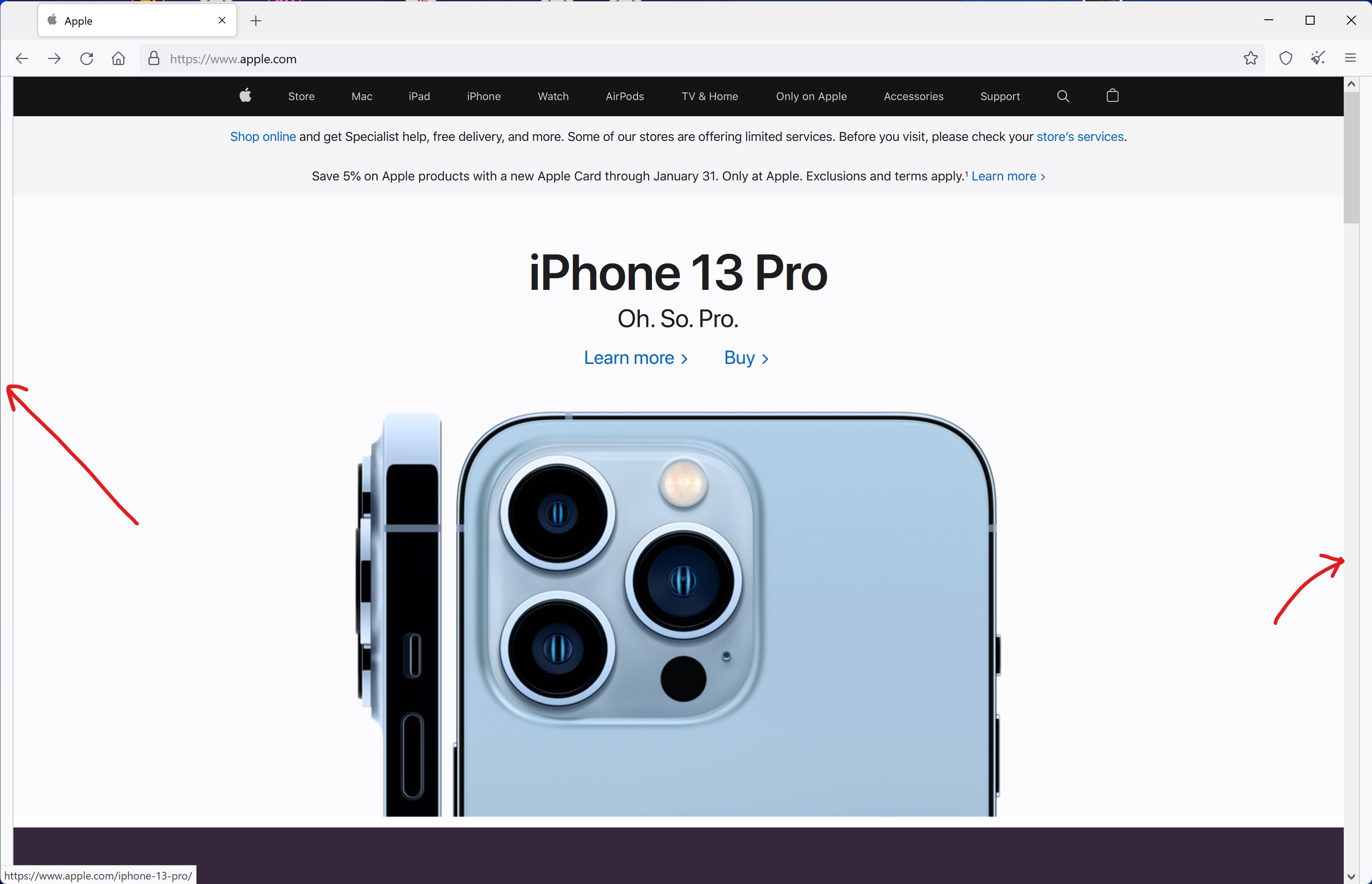
Hi, why i am seeing this border on left and right of the browser and how to remove this?
---
### Author:  [@championquizzer](https://forum.torproject.org/u/championquizzer)
#### Post date: [January 18, 2022, 6:39pm UTC](https://forum.torproject.org/t/border-around-websites/1812/2 "2022-01-18T18:39:53Z")
ref. [What are grey bars on resized Tor Browser window?](https://support.torproject.org/tbb/maximized-torbrowser-window/)
> Tor Browser in its default mode is starting with a content window rounded to a multiple of 200px x 100px to prevent fingerprinting the screen dimensions. The strategy here is to put all users in a couple of buckets to make it harder to single them out. That works so far until users start to resize their windows (e.g. by maximizing them or going into fullscreen mode). Tor Browser ships with a fingerprinting defense for those scenarios as well, which is called [Letterboxing](https://en.wikipedia.org/wiki/Letterboxing_%28filming%29), a technique developed by Mozilla and [presented in 2019](https://www.zdnet.com/article/firefox-to-add-tor-browser-anti-fingerprinting-technique-called-letterboxing/). It works by adding white margins to a browser window so that the window is as close as possible to the desired size while users are still in a couple of screen size buckets that prevent singling them out with the help of screen dimensions.
> In simple words, this technique makes groups of users of certain screen sizes and this makes it harder to single out users on basis of screen size, as many users will have same screen size.
> [@umar](#):
>
> how to remove this?
I would highly recommend to **not** do this but letterboxing can be disabled with the `about:config` option `privacy.resistFingerprinting.letterboxing`.
---
### Author:  [@ukmr](https://forum.torproject.org/u/ukmr)
#### Post date: [January 18, 2022, 6:45pm UTC](https://forum.torproject.org/t/border-around-websites/1812/3 "2022-01-18T18:45:21Z")
Hi @umar
Thanks for your question & welcome to the Tor Project Forum 🙂
Advertising networks often sniff certain browser features, such as the window size to create user profiles and track users as they resize their browser and move across new URLs and browser tabs.
Called “letterboxing,” this technique adds “gray spaces” to the sides of a web page when the user resizes the browser window.
The general idea is that “letterboxing” will mask the window’s real dimensions by keeping the window width and height at multiples of 200px and 100px during the window resize operation --generating the same window dimensions for all users-- and then adding a “gray space” at the top, bottom, left, or right of the current page.
This link provides some further information:
> **[What are grey bars on resized Tor Browser window? | Tor Project | Support](https://support.torproject.org/tbb/maximized-torbrowser-window/)**
>
> Defend yourself against tracking and surveillance. Circumvent censorship. | What are grey bars on resized Tor Browser window?
---
### Author:  [@umar](https://forum.torproject.org/u/umar)
#### Post date: [January 18, 2022, 7:24pm UTC](https://forum.torproject.org/t/border-around-websites/1812/4 "2022-01-18T19:24:54Z")
Thanks for the explanation, i got the point 🙂
---
### Author:  [@umar](https://forum.torproject.org/u/umar)
#### Post date: [January 18, 2022, 7:35pm UTC](https://forum.torproject.org/t/border-around-websites/1812/5 "2022-01-18T19:35:36Z")
Yes i got the point as @championquizzer explained, thank you too 🙂
---
### Author:  [@gus](https://forum.torproject.org/u/gus)
#### Post date: [January 18, 2022, 9:18pm UTC](https://forum.torproject.org/t/border-around-websites/1812/6 "2022-01-18T21:18:20Z")
---
### Author:  [@nineproof](https://forum.torproject.org/u/nineproof)
#### Post date: [February 3, 2022, 9:39pm UTC](https://forum.torproject.org/t/border-around-websites/1812/7 "2022-02-03T21:39:06Z")
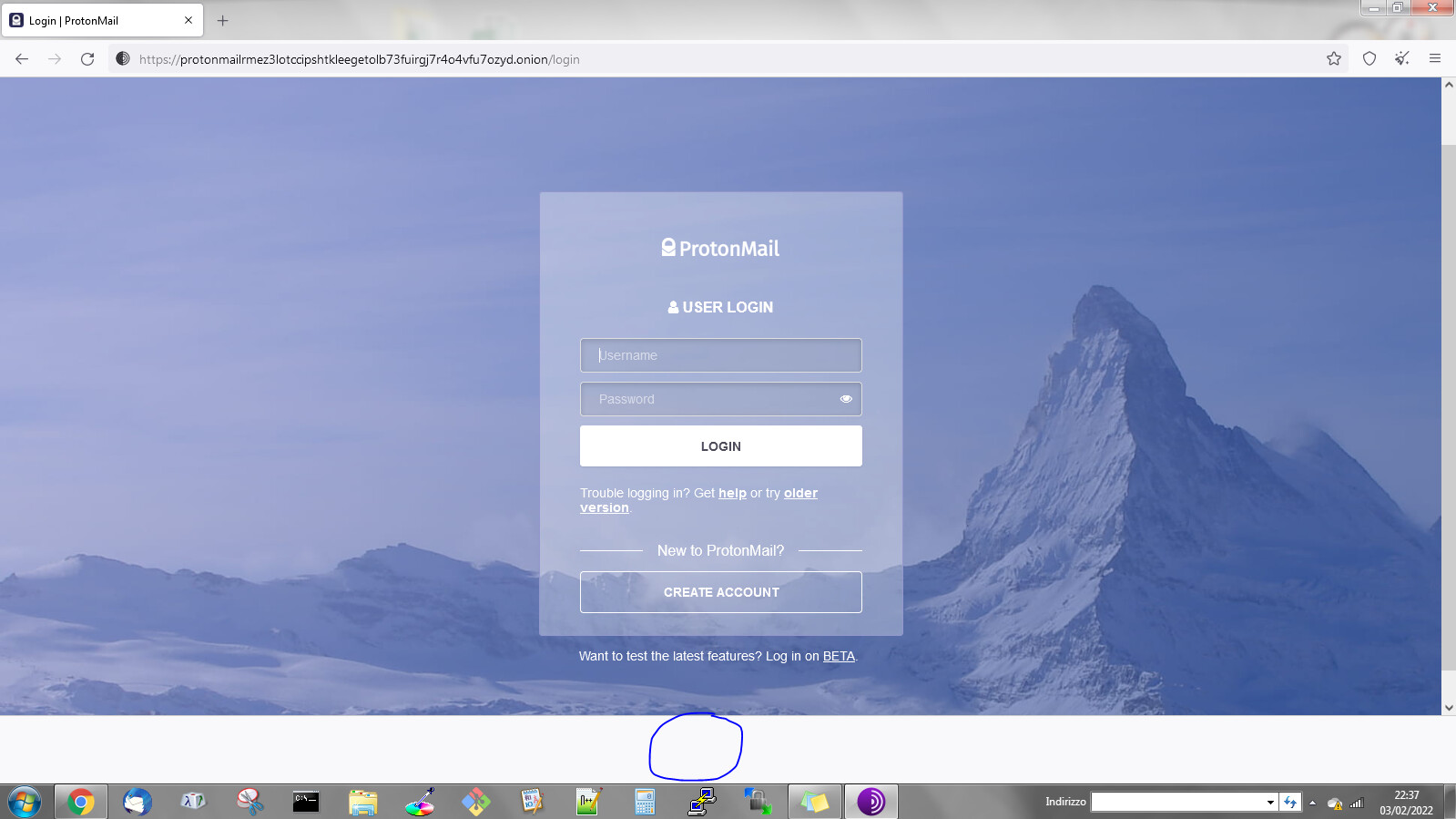
Tor Browser 11.0.4 when maximized on Windows 7 displays a white footer on every page, what is it?
---
### Author:  [@championquizzer](https://forum.torproject.org/u/championquizzer)
#### Post date: [February 3, 2022, 9:41pm UTC](https://forum.torproject.org/t/border-around-websites/1812/8 "2022-02-03T21:41:25Z")
ref. [What are grey bars on resized Tor Browser window?](https://support.torproject.org/tbb/maximized-torbrowser-window/)
> Tor Browser in its default mode is starting with a content window rounded to a multiple of 200px x 100px to prevent fingerprinting the screen dimensions. The strategy here is to put all users in a couple of buckets to make it harder to single them out. That works so far until users start to resize their windows (e.g. by maximizing them or going into fullscreen mode). Tor Browser ships with a fingerprinting defense for those scenarios as well, which is called [Letterboxing](https://en.wikipedia.org/wiki/Letterboxing_%28filming%29), a technique developed by Mozilla and [presented in 2019](https://www.zdnet.com/article/firefox-to-add-tor-browser-anti-fingerprinting-technique-called-letterboxing/). It works by adding white margins to a browser window so that the window is as close as possible to the desired size while users are still in a couple of screen size buckets that prevent singling them out with the help of screen dimensions.
> In simple words, this technique makes groups of users of certain screen sizes and this makes it harder to single out users on basis of screen size, as many users will have same screen size.